Claude Code for Orgs
Become your company's AI leader
The follow-along page for the workshop on building a Team OS — so the whole company moves faster, not just you.
Your instructor

Hey, I'm Carl Vellotti. I spent 8 years as a PM at startups, GoodRx, and Redfin. Now I run The Full Stack PM to help PMs learn to build with AI.
I also built Claude Code for PMs — a free, hands-on course that teaches you Claude Code inside Claude Code. Over 25,000 PMs have completed it.
Join 44,000+ PMs reading every week.
Before we start
Here's what to have open for the next hour. None of it is required, but the page hits different if you can follow along.
Claude Code installed
Doesn't have to be running. Just helpful to have if you want to try anything during or after.
A scratch doc
Notes app, Notion, paper, whatever. There are a few moments where you'll want to write something down.
Your team in your head
The whole thing makes more sense if you can map it back to people you actually work with. Keep your team in mind throughout.
The scenario

Imagine you're a PM at Faculty Products — a fictional company we'll use throughout this page to make all of this concrete.
Quick FP overview
- •Mid-sized SaaS, ~50 people, sells workflow tools to universities
- •Flagship product: GradeFlow (faculty grading), used by 200+ schools
- •Also building GradeBook and GradeAssist
- •Standard product/eng/design/data org structure — probably looks like your company
You came in nine months ago as a PM. Things have changed. You've got Claude Code humming. So does Sarah on GradeBook. So does Marcus in eng. The new ops partner is somehow already faster than half the team.
Individually, Faculty Products is moving 3-4x faster than a year ago.
But collectively, things aren't moving much faster at all.
So: if individuals are 4x faster, why isn't the team?
That's what we're going to figure out together.
Three things happening at Faculty Products this week
Lily
(new PM, started a few weeks ago)Half the time you can't point her anywhere canonical. Whatever you happen to send her becomes the standard, by default.
Marcus
(eng, doing competitive scans manually for six months)Marcus could probably use it too — but he doesn't know it exists, and there's no obvious place to put it.
The whole team
(re: how you actually operate)New people learn them by osmosis. Slowly.
Your team needs a shared layer above all this
A Team OS is a shared place where the specialized knowledge and workflows of your specific company are codified. A live system Claude Code reads from when anyone on the team works.
| Unlock | What it looks like at FP |
|---|---|
| Specialized workflows codified | The workflow your data team uses for cohort analysis lives in the repo. Anyone can pull it on demand and run it the same way the data team would. |
| Whole team works from same context | Same metric definitions. Same customer notes. Same playbooks. No more “wait, which version of activation rate?” in strategy review. |
| Updates propagate instantly | Your manager updates /exec-preso-prep with a new thing they always check — every PM on the team has it the next time they prep. No comms needed, no Slack thread, no training. |
Building a compounding system at the team level is the next huge unlock for AI.
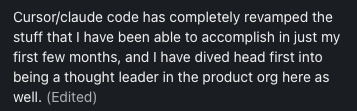
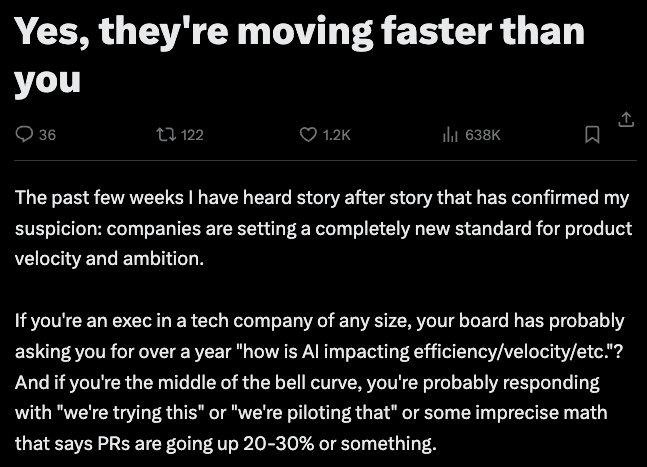
And this is happening
This isn't theoretical. Teams are doing this right now and the gap is widening fast.
Why bother?
You get faster
The compounding effect kicks in for you first. Every skill the team adds = one more thing you didn't have to build yourself.
Your team gets faster
Not just the people who are already AI-curious. The ops partner who doesn't use Claude Code "yet" is two months from needing nothing else.
You become the AI leader at your company
The PM who builds the AI layer at their company in 2026 is the person leadership turns to in 2027 about how to use AI. It's THE future-proofing skill to learn this year.
Here's where this goes
- 01→The mechanicsHow the repo works (it's just GitHub, mostly)
- 02→What's actually in a Team OSThe four kinds of things that live in the repo
- 03→How to get people to use itTwo angles, including the move nobody else is teaching
- 04→What makes things shareableFive rules so what you write actually works for someone else
- 05→How to keep it aliveGovernance without bureaucracy
Section 1
The mechanics (it's mostly just GitHub)
It's a folder, a README, and a pull request flow. That's it.
The team OS lives on GitHub.
- •Folder + README — the README is the front door. It tells humans what's in here, tells Claude what's in here, tells new people how to install it.
- •Pull request flow — adding/changing things uses the same flow eng has been using forever. Branch → edit → push → PR → review → merge.
- •The PR is the contribution flow is the governance — No separate process. The paper trail comes for free.
The contribution flow
Pro tip
Non-technical teammates can do all of this.The whole “GitHub CLI is intimidating” thing is gone. Open Claude Code, paste this:
Install the GitHub CLI on this machine if it's not already installed,
walk me through authentication, and show me the basics of branching, committing,
pushing, and opening a PR. I'm new to this. Use my team's actual repo at
[paste your repo URL] for examples.
Three minutes later they're shipping PRs.
Build your company's shared GitHub layer.
Spin up a private repo named {company}-org-os. Add a one-page README that says what it's for. Give your team access.
That's the foundation. Everything else gets layered on top.
Section 2
What's actually in a Team OS
We'll walk through the Faculty Products Team OS repo — a worked example you can clone at the bottom of this page. The folder structure mirrors any team OS, just filled in with FP-specific stuff.
Four kinds of things live in the repo
Context
Data Claude reads
- ·User research
- ·Metric definitions
- ·Playbooks & templates
- ·CLAUDE.md tree (the index)
Actions
Things Claude does
- ·Skills (slash commands)
- ·Agents (autonomous)
- ·Workflows (multi-step)
Behavior
How Claude should act
- ·Rules (file naming, prioritization)
- ·Hooks (enforced, advanced)
Connections
What it plugs into
- ·Tool connections (Slack, GitHub, your data)
- ·Scheduled jobs (weekly digests, alerts)
Context
The data Claude reads when it does work
The actual stuff you want Claude to be able to pull in when doing work. Things like:
- •User research — interview notes, survey data, customer profiles
- •Metric definitions — how we calculate activation. How we count weekly actives. The exact SQL.
- •Playbooks — how we run strategy review. How we write launch emails.
- •Templates — empty PRDs waiting to be filled, status update formats, RFC structures
- •CLAUDE.md files — sit in this bucket too, but play a different role: they're the index, not the content. Lean root file + nested files acting as navigation maps so Claude knows where things are without loading everything at once.
The new-hire-asks-six-people-for-six-different-formats problem
When a new PM (Lily, in our scenario) asks “what format do we use for customer notes?” — the answer is “clone the repo, look in /templates/customer-interview.md.” Not whatever you happened to send her last week.
The folder structure
faculty-products-org-os/
├── CLAUDE.md                      # the index — under one page
├── customers/
│   ├── CLAUDE.md                  # what's in this folder + when to read what
│   ├── interview-notes/
│   │   └── CLAUDE.md              # how we structure interviews + the template
│   ├── account-summaries/
│   │   └── CLAUDE.md              # one file per account, format + cadence
│   └── playbooks/
│       └── CLAUDE.md              # discovery, win/loss, churn — how we run them
├── analytics/
│   ├── CLAUDE.md                  # how to find a metric, who owns what
│   ├── metrics/
│   │   ├── CLAUDE.md              # one .md per metric, naming + ownership
│   │   └── activation-rate.md     # owned by Marcus
│   ├── queries/
│   │   └── CLAUDE.md              # named SQL, where to add new ones
│   └── playbooks/
│       └── CLAUDE.md              # monthly metric review, alert triage
├── templates/
│   ├── CLAUDE.md                  # which template to use when
│   ├── customer-interview.md
│   ├── prd-template.md
│   └── status-update.md
└── .claude/
    ├── CLAUDE.md                  # what's a skill vs rule vs workflow
    ├── skills/
    │   ├── CLAUDE.md              # skill index + how to add a new one
    │   └── exec-preso-prep/
    └── rules/
        ├── CLAUDE.md              # what rules apply globally
        ├── file-naming.md
        └── prioritization.md
What a good root CLAUDE.md looks like
# Faculty Products — Team OS

This repo is the team's shared workflow layer. If you're new, start here.

## Where stuff lives
- /customers/      — calls, summaries, account profiles
- /analytics/      — metrics, queries, schemas, playbooks
- /templates/      — PRDs, status updates, RFCs
- /.claude/skills/ — shared workflows (slash commands)
- /.claude/rules/  — team standards (file naming, prioritization)

## Team
| Name   | Role             | Slack    | GitHub      |
|--------|------------------|----------|-------------|
| Carl   | PM, GradeFlow    | @carlv   | @cvellotti  |
| Sarah  | PM, GradeBook    | @sarah   | @sarahb     |
| Marcus | Eng              | @marcus  | @marcusk    |
| Priya  | Data             | @priya   | @priyad     |

## Slack channels
- #product           — async product discussion, decisions
- #eng               — engineering coordination
- #customer-feedback — auto-posted customer call summaries

## How we ship features
A feature doesn't merge until the repo is updated:
- Metrics defined in /analytics/metrics/
- Customer impact captured in /customers/
- Launch checklist run from /templates/launch-checklist.md
Notice what's NOT in here: no manifesto, no full product descriptions, no metric formulas. Those live in nested files. Root stays under one page.
What a good nested CLAUDE.md looks like
# /customers/

Where customer evidence lives. Read this folder when you need to ground a
decision in what users actually said or did.

## What's in here
- /interview-notes/      — raw notes from discovery & validation calls
- /account-summaries/    — one file per top account, updated monthly
- /playbooks/            — how we run discovery, win/loss, churn calls

## When to read what
- Drafting a PRD?              → /interview-notes/ for the last 90 days
- Prepping a renewal?          → /account-summaries/{account}.md
- Running a new discovery?     → /playbooks/discovery.md (then drop notes
                                  into /interview-notes/)

## Conventions
- File names: kebab-case, dated — e.g. 2026-04-15-acme-discovery.md
- Every interview note ends with a "What we learned" section (3 bullets max)
- Account summaries: one per account, lifetime — append, don't replace

## Owners
Carl owns this folder. Ping @carlv before adding new subfolders or
changing the template.
Each folder gets one. Tells Claude (and humans) what's in here, when to read what, and the conventions for adding new files. Root points to folders; folder CLAUDE.mds point to specific files.
📖 The whole game is minimize what Claude loads at any given time.A 5,000-token root CLAUDE.md kills your thinking room before you've even asked a question. Lean root, nested files for everything else.
Actions
The things Claude does
Workflows you invoke when you actually need work done. The stuff that executes:
| Type | What it is | Examples |
|---|---|---|
| Skills | Slash commands you invoke. Each one is a recipe. | /exec-preso-prep, /devils-advocate, /competitive-scan |
| Agents | More autonomous than skills. Have their own tools, can run loops, can call other skills. | Bug-investigation agent, deep-research agent, onboarding agent |
| Workflows | Multi-step orchestrations that chain skills/agents together. | /launch chains /competitive-scan → /draft-launch-email → /post-to-slack |
The teammate-doing-the-same-work-manually problem
Your competitive scan skill has an obvious home now (Marcus on eng, in our scenario, has been doing them by hand for six months — not anymore). It's in the repo, with a name on it. Anyone who needs it can find it.
What a skill file looks like
# /exec-preso-prep

**Owner:** @carlv
**Updated:** 2026-04-15

## When to use
Before any meeting where you're presenting up — QBRs, monthly product
reviews, board updates. (Not for peer reviews or weekly syncs.)

## Inputs
- Audience (VP, CEO, full E-team)
- Timeframe (last sprint / month / quarter)
- Meeting goal (status, decision, alignment)

## What it does
1. Pulls customer summaries from /customers/account-summaries/
   covering the timeframe
2. Pulls metric alerts and dashboard changes from /analytics/
3. Loads the leader's review checklist from
   /.claude/skills/{leader}-review-checklist.md
4. Drafts a 5-section outline:
   - Headline (lead with the metric)
   - What shipped
   - What we learned (customer evidence)
   - Decisions / asks
   - Next sprint focus
5. Saves to /scratchpad/exec-presos/{date}-{audience}.md

## Notes
Outline only — slides are on you. If the leader's checklist doesn't
exist yet, runs without it and flags you to build one
(run /leader-review-prompt).
📖 A skill isn't magic, it's a recipe. The reason yours works for you and not for Marcus is because it lives on your laptop. Move it to the repo, give it a README, name an owner — done.
Behavior
How Claude should act
Standards. Defaults. The “we always do it this way” stuff that doesn't fit cleanly as a skill but should apply across the board.
- •Rules — file-naming.md says kebab-case for everything. prioritization.md says we use RICE. review-standards.md says PRDs need a metric in the first 100 words.
Rules don't forceClaude — they advise. Claude reads them and makes the call. (For the rare case where you need it to be enforced, that's hooks territory, but most teams don't need that.)
The unwritten-patterns-living-in-people's-heads problem
Things like the senior PM's “we always check X before Y” — written down. Once. Read every time. New people learn how the team actually operates without needing two months of osmosis.
Connections
What it plugs into
Claude can read from and write to your team's tools — Slack, GitHub, your data warehouse, your CRM — but it has to be told which ones. That setup lives in the repo as a small list.
What lives here
- •The connections list — a short file at the root that names what the OS plugs into — your Slack workspace, your Linear project, your database. When anyone on the team clones the repo and opens Claude Code, the same connections are live for them. No “wait, what do I need to install first?”
- •Scheduled jobs — things that run automatically on a timer or trigger. Weekly synthesis of customer calls posted to #product-feedback. Metric playbook auto-checked when a PR merges.
The tools themselves (Slack, your warehouse) live where they always have. The repo just declares what's wired up — which is what makes the OS portable.
In practice — what this actually feels like
The four buckets aren't separate features. They compose into a single flow when you sit down to do work. Two ways this shows up.
First — five skill patterns worth building
This is where most teams get stuck: “okay we have a Team OS… what do we put in it?” These five categories cover ~90% of useful skills. Pick one to start, ship it, come back for the next.
| Pattern | What it does | Example |
|---|---|---|
| Capture | Turns ad-hoc activity into structured context | /post-meeting-notes/customer-call-summary/daily-journal |
| Synthesis | Pulls cross-functional context to answer a question or draft a doc | /exec-preso-prep/whats-up-with-customer-X/weekly-focus |
| Self-review | Captures a leader's mental model as a self-check skill | /vp-strategy-review/eng-rfc-review/design-crit-review |
| Drafting | One-shot doc generators using your team's standards | /prd-draft/launch-email-draft/rfc-scaffold |
| Routine automation | Scheduled or event-triggered, no human kickoff | /customer-voice-digest/stale-doc-alerts/metric-freshness-check |
Second — what a typical Monday morning looks like
The proof point. This is the moment that makes the OS click for people:
You have a Wednesday product review with the VP.
You type /exec-preso-prep. Claude pulls last sprint's customer calls (/customers/), the open metric alerts (/analytics/), and the VP's actual review checklist (/.claude/skills/vp-review-checklist.md) — then drafts a 5-section outline that's already self-checked against how the VP reviews.
30 seconds later you have a draft. You spend 25 minutes refining instead of 3 hours assembling.
📖 The four buckets are just parts. The flow is what makes them feel like an OS instead of a folder of files.
Populate it with your starting context.
Move whatever templates your team is already using into /templates/ — PRDs, status updates, customer interview formats, anything passed around in DMs.
Add a metrics table in /analytics/metrics.md: one row per metric, with the name, definition, owner, and SQL or source. Then add a /metrics-check skill that reads the table to answer “how do we measure X?”— no more guessing or DM'ing the data team.
Section 3
How to actually get people using it
The technical pieces (Sections 1-2) take a weekend. Adoption is the whole game — and the real leadership challenge.
Goal
Get someone to an “aha moment” as fast as possible. Help people feel the time savings on their own work.
For senior people whose thinking matters but who don't use Claude Code yet
Your VP of Product, your head of design, the principal PM who reviews everyone's strategy docs — they probably aren't ready to learn a new IDE this quarter. They're also the people whose mental model needs to be in the OS.
Move: hand them a prompt they can paste into claude.ai (chat — no IDE, no terminal, nothing to install). The prompt asks them to articulate the questions they always think through when reviewing things. They run it, get a draft of their own thinking back. You turn that draft into a skill. Now everyone on the team has the leader's review process embedded in their workflow.
The actual prompt to send them
I'm a [your role — e.g., VP of Product, Director of Design, principal PM].

A teammate is building a shared playbook so our team can self-review
their work the way I would, before bringing it to me. They've asked me
to articulate how I actually review things — and I'd like your help
capturing it as a structured document I can send back to them.

Ask me ONE QUESTION AT A TIME. Wait for my answer before moving on.
Don't summarize my answers back to me — just ask the next question.

1. When you read a [PRD / strategy doc / launch plan / exec preso —
   pick the doc type you review most often], what are the 3-5 things
   you ALWAYS check first?
2. What red flags make you immediately skeptical when you start reading?
3. What context do you wish people gave you upfront but rarely do?
4. Recent example where someone surprised you positively — what did
   they do?
5. Recent example where someone missed the mark — what was missing?

After all 5 answers, output a markdown file I can copy-paste and send
to my teammate. Use this exact structure:

---
# How [my name] reviews [doc type]

## What I always check first
- [bullet]
- [bullet]

## Red flags
- [bullet]
- [bullet]

## Context I wish I had upfront
- [bullet]
- [bullet]

## What good looks like
- [generalized from the positive example]

## Common misses
- [generalized from the missed-mark example]

## Self-review checklist (7-10 items)
- [ ] [specific, testable thing]
- [ ] [specific, testable thing]
---

Make the self-review items SPECIFIC. No "be clear" or "be thoughtful" —
those are useless. Things like "open with the metric, not the context"
or "name the 2 alternatives you ruled out and why" — things a teammate
can actually check before sending me a draft.
Then what
Take the checklist they get back. Drop it into a skill file in your repo:
- →
/review-strategy-doc— pulls VP's actual review checklist - →
/prep-exec-preso— embeds the senior PM's “what surprises leadership” lens
Now every PM on the team is self-reviewing the way leadership would, before leadership ever sees the draft. The team gets sharper and execs immediately see people are coming to meetings much more prepared.
For one specific peer whose work overlaps yours
Pick one actual individual.
Pick one task they do repeatedly and complain about. (Status updates. Customer call summaries. Competitive scans. Weekly metric reviews. Pick the one with the most groans.)
Sit down with them. Run the skill on their actual data. Let them see.
Sarah preps for monthly product reviews manually — pulls metrics, scans customer call summaries, drafts an outline. ~3 hours, every month.
/exec-preso-prepsynthesizes against the VP's actual review checklist. ~25 min, plus another 30 to refine.
2+ hours back.AND she's pre-checked against the VP's lens, so the readout lands without surprises. She tells the next person within a day.
The objections are predictable. The response is the same to all of them:
| What they say | What you say |
|---|---|
| "I don't have time to learn a new tool" | "3 minutes to set up. Let me show you." |
| "I'm not technical enough" | "Plain English. You tell Claude what to do. Let me show you." |
| "AI output isn't good enough" | "Shared skills with team standards built in. Let me show you." |
| "I already use ChatGPT" | "Connected to your files and team standards. Let me show you." |
📖 You don't argue with people about Claude Code. You sit down with their real data and let the time savings argue for you. “Let me show you” is the entire playbook.
Get one person above you and one peer using it.
One leader.Pick a VP, director, or principal who reviews everyone's work. Run the manager prompt with them. Drop their checklist into the repo as a skill. Their thinking is now embedded in the team's workflow.
One peer.Pick a name — Sarah, Marcus, Joel. Find the task they do every week and groan about. Sit down with their actual data. Run a skill on it. Don't pitch — just show.
Two committed users beats ten lukewarm ones. Adoption spreads from the proof, not the announcement.
Quick quiz: what's wrong with this skill?
The skill
# /think-it-through
**Use when:** stuck on a hard product decision

## Process
1. Read the situation
2. I tend to over-scope, so push back if I do
3. Use the Tavily web search to find prior art
4. Check pricing in our company's pricing doc (TAVILY_API_KEY=tvly-abc123def456)
5. Output: a 2-page memo

## Notes
Ping Sarah on the data team if you need numbers.
What's wrong here?Click each option to reveal whether it's a problem.
Click each option to reveal whether it’s a problem.
📖 Five things wrong out of six lines. (This is more common than you'd think.) The fix isn't writing perfect skills — it's reviewing for these patterns before you ship.
Section 5
Keep it alive
The hard part is keeping it from rotting. Three rules.
Everything has a named owner
A person. Sarah owns /customer-call-summary. Marcus owns /analytics/metrics/. You own the root and governance. If someone leaves, transfer ownership the same week — before knowledge transfer.
Coach, don't gatekeep
When someone submits a skill with an API key in it, don't reject the PR. Comment with how to fix it. Help them clean it up. Merge.
The job isn't quality control — it's making contribution as low-friction as possible. Friction kills shared resources faster than typos do. This is real leadership work, treat it that way.
Quarterly prune
30 minutes, every quarter. For each item in the repo: still used? Still has an owner? Still works? Anything no = delete or deprecate.
Systems die from accumulation, not neglect. A repo with 12 things that all work is much more useful than one with 30 where 18 are stale.
📖 If you forget every other rule, remember this one: named owners. It's the single thing that predicts whether a Team OS survives a year.
One more thing under “keep it alive”: visibility. The repo can be perfect and still die quietly if people forget it exists. Make the changes loud — every week, in the channels people already check.
Make it visible.
Create a #org-oschannel in Slack or Teams. This is the home for everything related to the repo — new skills, ownership changes, deprecations, “hey can someone check this skill” threads.
Add a /org-os-updates skill that posts a weekly summary to the channel: what merged, what changed owners, what got pruned. People see the OS moving — they remember to use it, and they want to add to it.
Where this leaves you
The PM who builds the AI layer at their company in 2026 is the person leadership turns to in 2027 when they ask “how do we use AI here?”
It's a compounding system. The earlier you start, the more it returns.
Your 5-step rollout plan
Recap of the steps from each section. Check them off as you go.
Take these home
The FP Team OS
A complete worked example. Faculty Products' Team OS, fully populated. Clone it, browse it, copy the patterns.
Clone the repo →Blank starter repo
An empty Team OS scaffold ready for your team. Folder structure, root CLAUDE.md template, contribution guide, README — set up. Drop your team in and start populating.
Open starter →Bookmark it
Send it to whoever you're going to convince next. The full talk lives here, with the manager prompt and the shareability quiz ready to use.
Copy link →If you want to go further
Maven workshop with me and Hannah
Going much deeper than this hour: a 3-hour paid workshop with me and Hannah Stulberg, Sunday May 10. We'll actually scaffold your team's OS live. $200.
Sign up →Claude Code for PMs
The 100% free site that teaches you Claude Code in Claude Code. Over 25,000 PMs have completed it to rave reviews.
ccforpms.com →Full Stack AI Mastery
If you want to take it all the way: Full Stack AI Mastery, the membership for PMs who build with AI. Applications are open right now.
Apply →Quick reference
The four buckets
| Bucket | What goes here | Examples |
|---|---|---|
| Context | Data Claude reads | User research, metric defs, playbooks, templates, CLAUDE.md tree |
| Actions | Things Claude does | Skills, agents, workflows |
| Behavior | How Claude should act | Rules, hooks |
| Connections | Outside world | MCPs, GitHub Actions, Routines |
The 5 shareability rules
| # | Rule | Test |
|---|---|---|
| 1 | Described | Could a teammate use it without asking you? |
| 2 | No hardcoded personal context | Does it assume it's you running it? |
| 3 | Dependencies documented | Are external tools/APIs listed in the README? |
| 4 | No secrets in files | API keys in .env, not in skill files? |
| 5 | Testable | Can someone clone, install, run successfully? |
The 2 rollout angles
| Angle | When | First move |
|---|---|---|
| Manager prompt | You have a senior person whose thinking matters | Hand them the claude.ai prompt above |
| Peer champion | You have one teammate whose work overlaps yours | Pick them, pick their most-hated task, run before/after |