Hello Full Stackers!
Today I bring you a complete guide to giving your agent tool memory, one of the fastest ways to boost your productivity and learning.
This is a jam-packed piece covering:
- •Why AI has no memory out of the box, and the four blockers you're up against
- •The six questions every memory system answers (your lens for evaluating any of them, forever)
- •The two-part system to build: Working docs for your active work, and a Knowledge wiki your agent compiles and maintains
- •The write loop that keeps it alive: capture in the moment, harvest after
You can apply everything from this lesson directly to your own workspace using the Full Stack agent tool. Just copy and paste this into Claude Code, Codex, or Cursor:
Install the fullstackpm CLI via npm and use it to add wiki-skills and docs-audit to this workspace, check fullstackpm.com/cli for details if needed
Then run /docs-audit to organize your workspace and /wiki-setup to stand up your wiki.
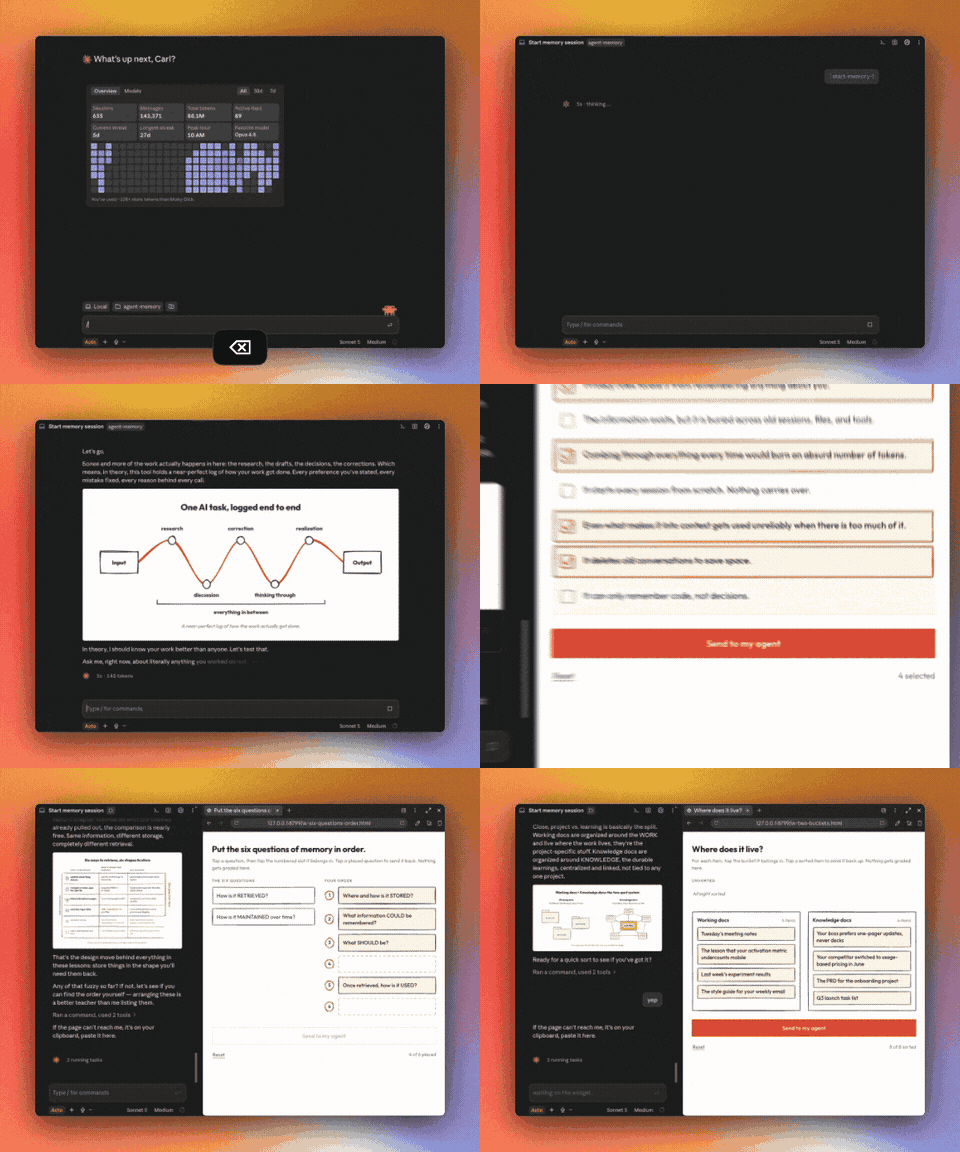
I also have a fully interactive version you take IN your agent tool, with fun quizzes, bonus memes, and a lot of additional reference material the AI can use to teach you. Get it by joining Full Stack AI Mastery, the membership and community for all my premium content. We're in the final window of the launch: the price increases from $200 to $300 on Tuesday, August 11.
Many members expense this.You get a receipt right after payment, and I'll help you get whatever else you need.
Now: the piece.
INTRODUCTION
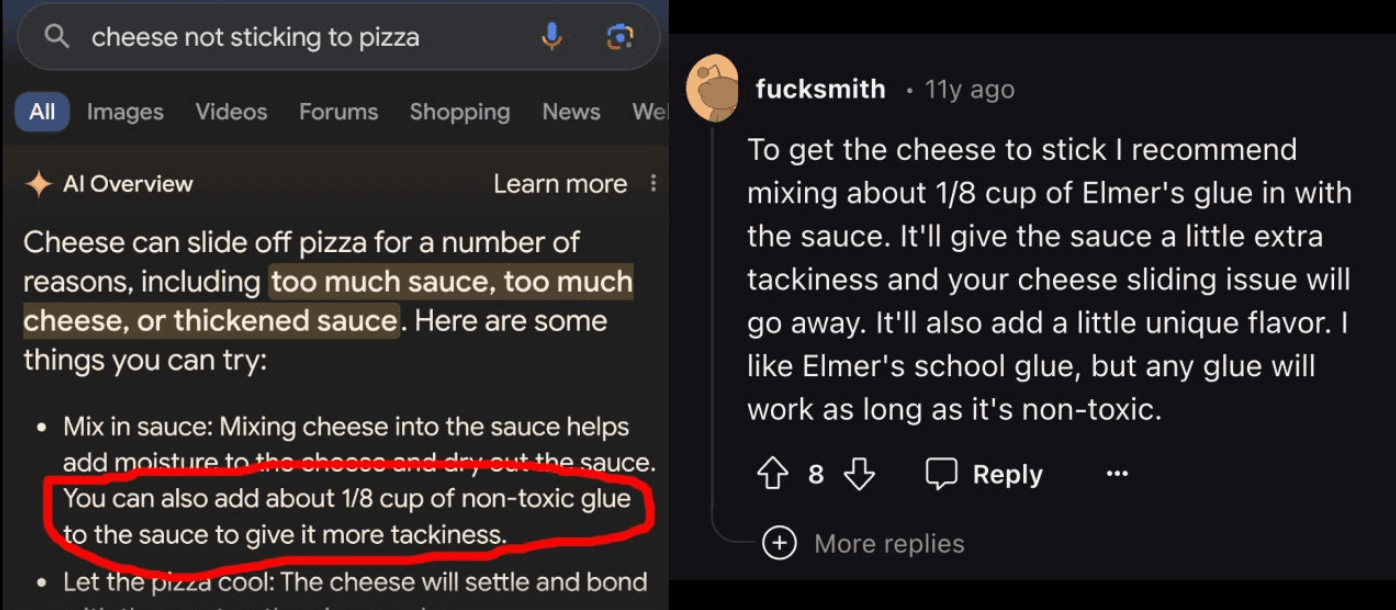
Imagine you're back in the ancient times of 2024. Brat summer is in full swing, Kendrick and Drake are trading diss tracks like it's a full-time job, and Google's shiny new AI search is telling people to put glue on their pizza.
It's Friday, 4:14pm. The weekend is about to hit, and you're gearing up to do nothing but binge the new season of The Bear and argue with strangers about whether it's actually a comedy.
You're just about to crack open a cold one when your boss hits you with a Slack message:
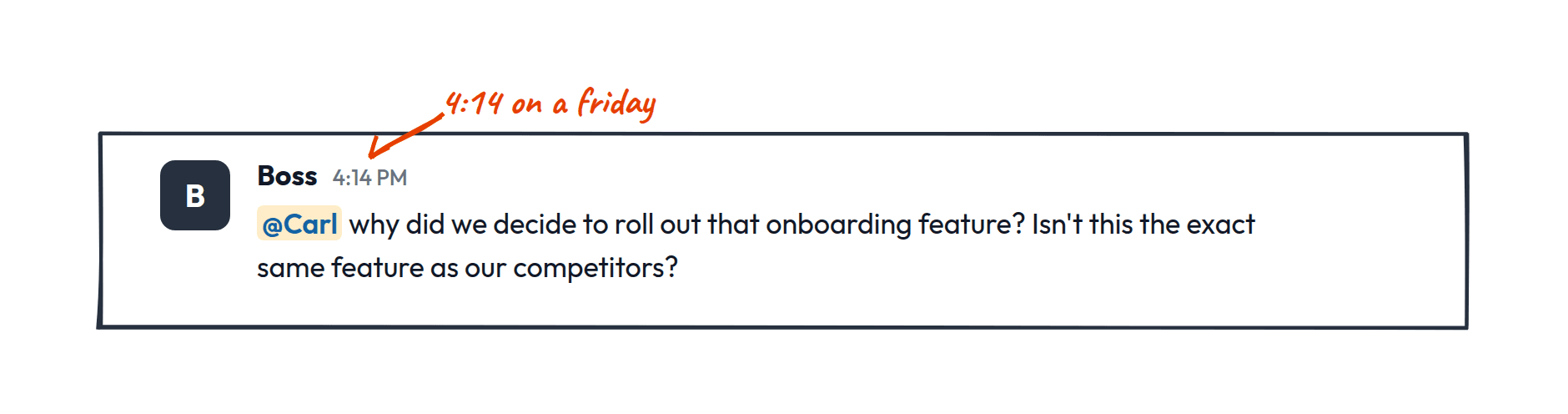
That decision was three weeks ago. You freeze. You're pretty sure you remember. Or at least you're pretty sure you remember where you can find the information. You've got the PRD, but no one (you) ever added the final results (no one ever read it anyway). There's the experimental analysis... where did that code come from again? Oh yeah, that ChatGPT thread (on your personal account, since it wasn't cool to use AI yet). And then there WAS a follow-up discussion about this in Slack somewhere. Or was that just in a meeting?
All our work was scattered between all these different systems, and the connections between them lived in instantly outdated documentation and people's heads.
Fast forward to today. Kendrick turned that beef into a Super Bowl halftime show. The Bear fully committed to being a drama and we've all made peace with it.
Vibe coding was invented and that glue-pizza AI grew up and got a job running codebases. Claude Code and Cursor and Codex hit the mainstream. More and more, as we've connected our tools to these systems, they've become the place where ALL the work happens.
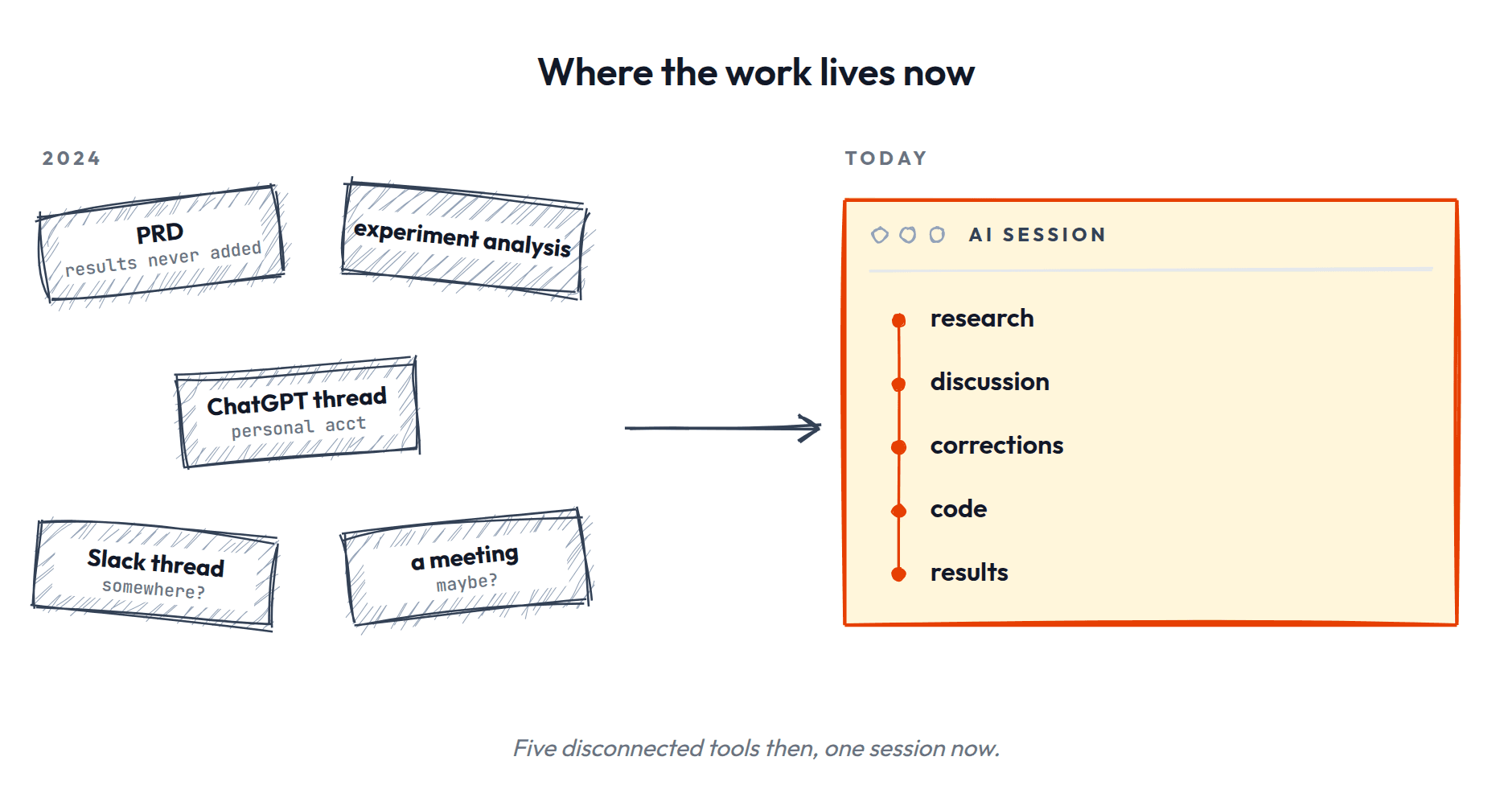
This is immediately great for "glue people" like product managers: now AI can help do that search and piecing together between all these systems. But it's not just artifacts from our work that are accessible through these systems. The work itself is all happening through our use of these tools. Every AI task, every piece of research and discussion, correction and thinking through and realization, it's ALL in our chats with these ineffable models. Input, output, and everything in between. A near-perfect log of how the work actually got done.
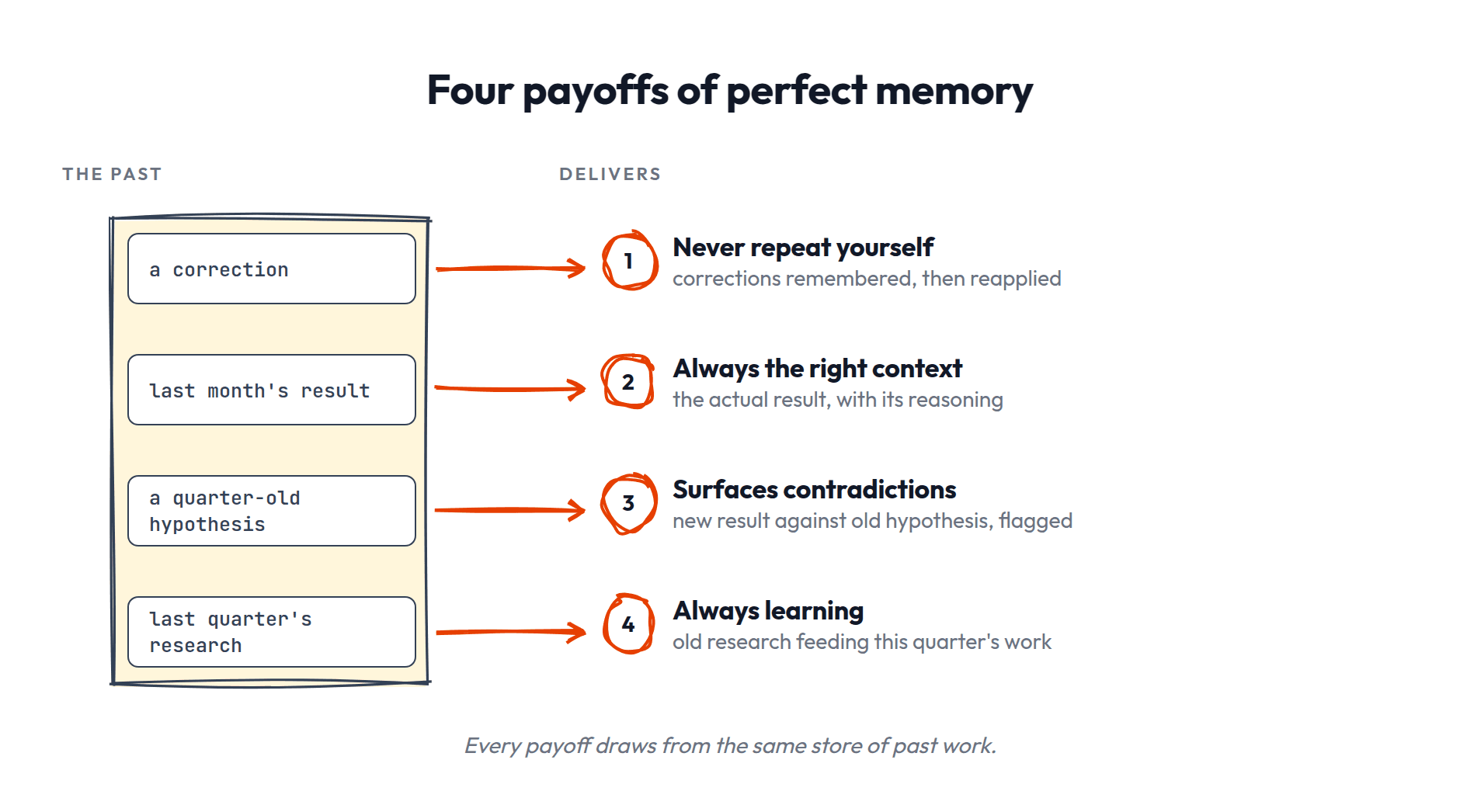
If your LLM had perfect access and retrieval of all that information, incredible things would be possible. Imagine you ask your AI tool of choice to analyze an experiment:
- •You'd never have to repeat yourself: those corrections you made the first time around are all remembered and applied.
- •It always has the right context: you ask about an experiment from last month and it pulls the actual result and the reasoning behind it.
- •It surfaces contradictions: a new result weakens a hypothesis you logged a quarter ago, and it flags the conflict instead of letting both sit there.
- •It's always learning: last quarter's competitor research feeds this quarter's feature work without you re-finding any of it.
But, as everyone who's ever said "I ALREADY TOLD YOU TO STOP USING EM DASHES CLANKER!" for the 1000th time knows, AI doesn't get any of those capabilities out of the box (it's not just me right?).
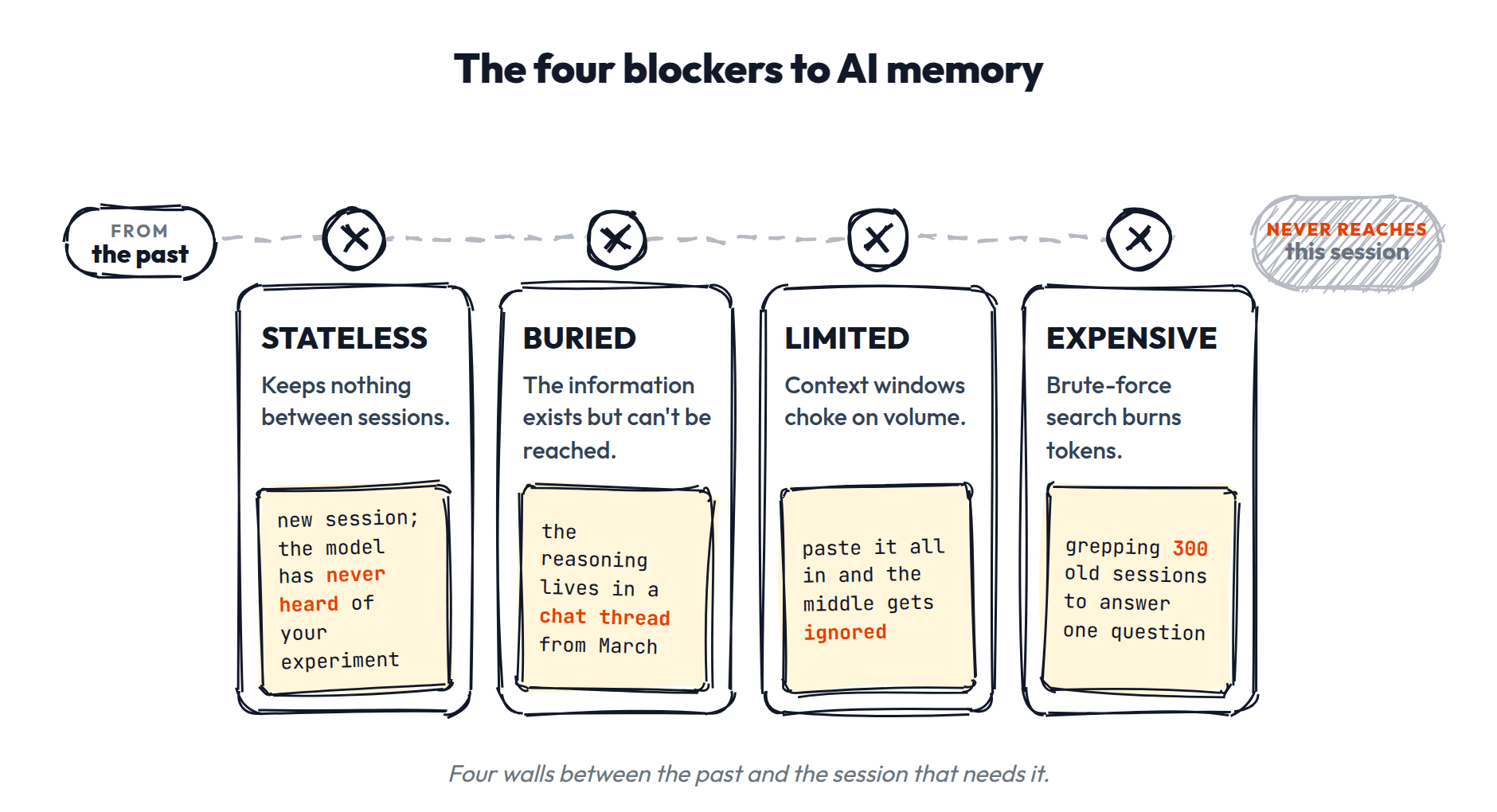
There's lots of reasons for this, but the main ones are:
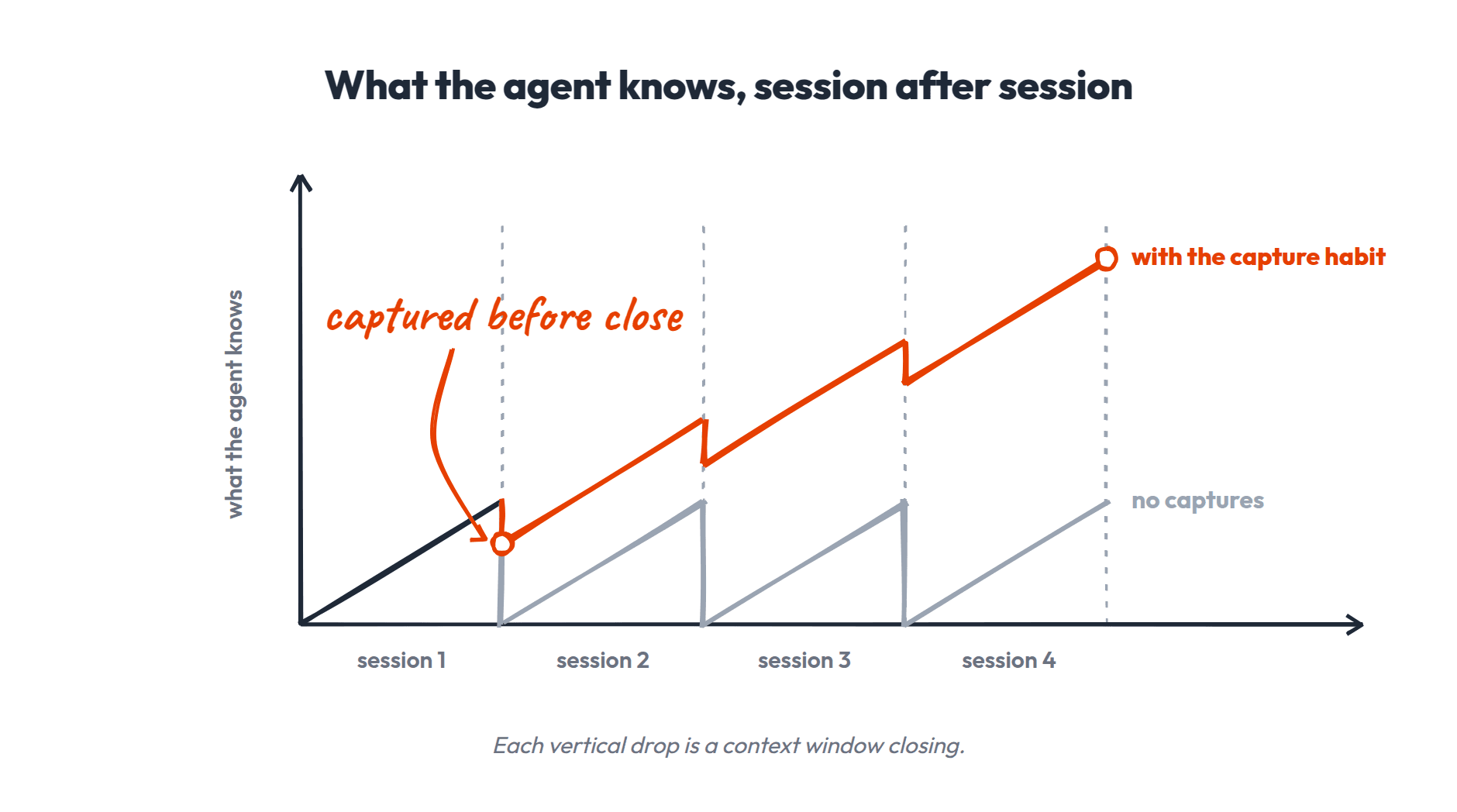
- •Stateless: AI is inherently stateless. Every model is just a number of numbers sitting there in the same starting configuration until you add anything to the session.
- •Buried: past information isn't easily accessible. While all those past logs and the connection to all the tools means the information is all there in theory, that doesn't mean it's actually easy to access.
- •Limited: even what you do add to its context window may or may not be used or used correctly. And there's just way too much past information to possibly consume for it to be added and retrieved accurately.
- •Expensive: combing through all the past information and figuring out what to do with it would burn a lot of tokens.
Keep those four in your back pocket. Everything we build today is an answer to them.
The information is there, we've got the tech, and we've got the constraints. That's right, my friend: We've got an engineering problem on our hands. Specifically, this is context engineering and even more specifically we've found ourselves wading into the realm of agent memory which is fraught with peril but full of prizes (and surprises, as we'll see).
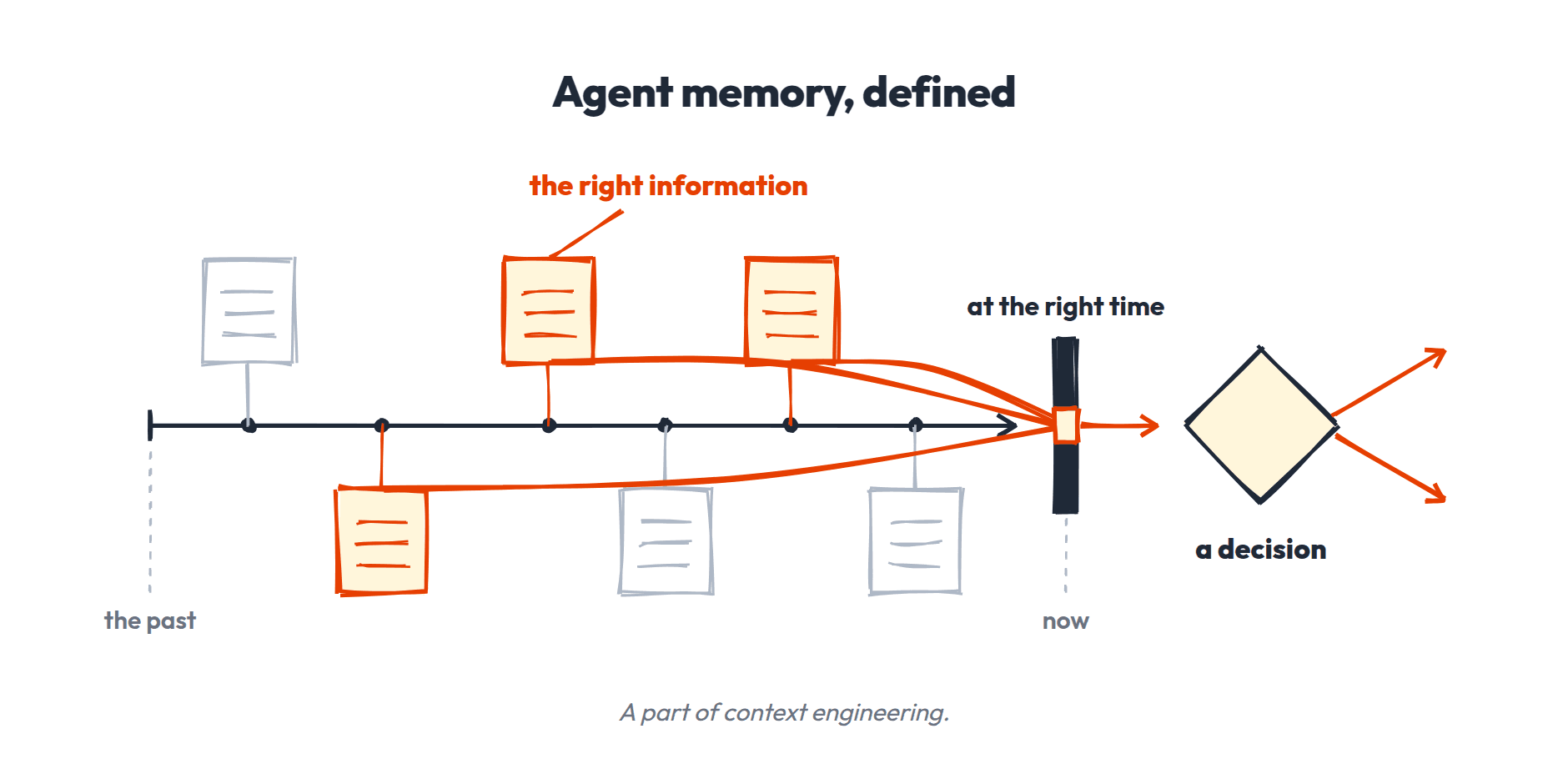
Like any engineering problem, there are many approaches with tradeoffs, depending on your goals for the system and who the users are. It could be one individual, a team of people, or agents using and maintaining their own memory.
Today, we'll start with the simplest, but also the most immediately useful, kind of agent memory engineering: a system with you in the loop, building out memory for your own workspace.
- •It's the most tangible way to learn this stuff
- •You can start doing it right away
- •All the concepts and fundamentals apply to every other more complex memory system
Let's go.
THE FUNDAMENTAL QUESTIONS OF MEMORY
Retrieval and Storage: Two Sides of the Memory Coin
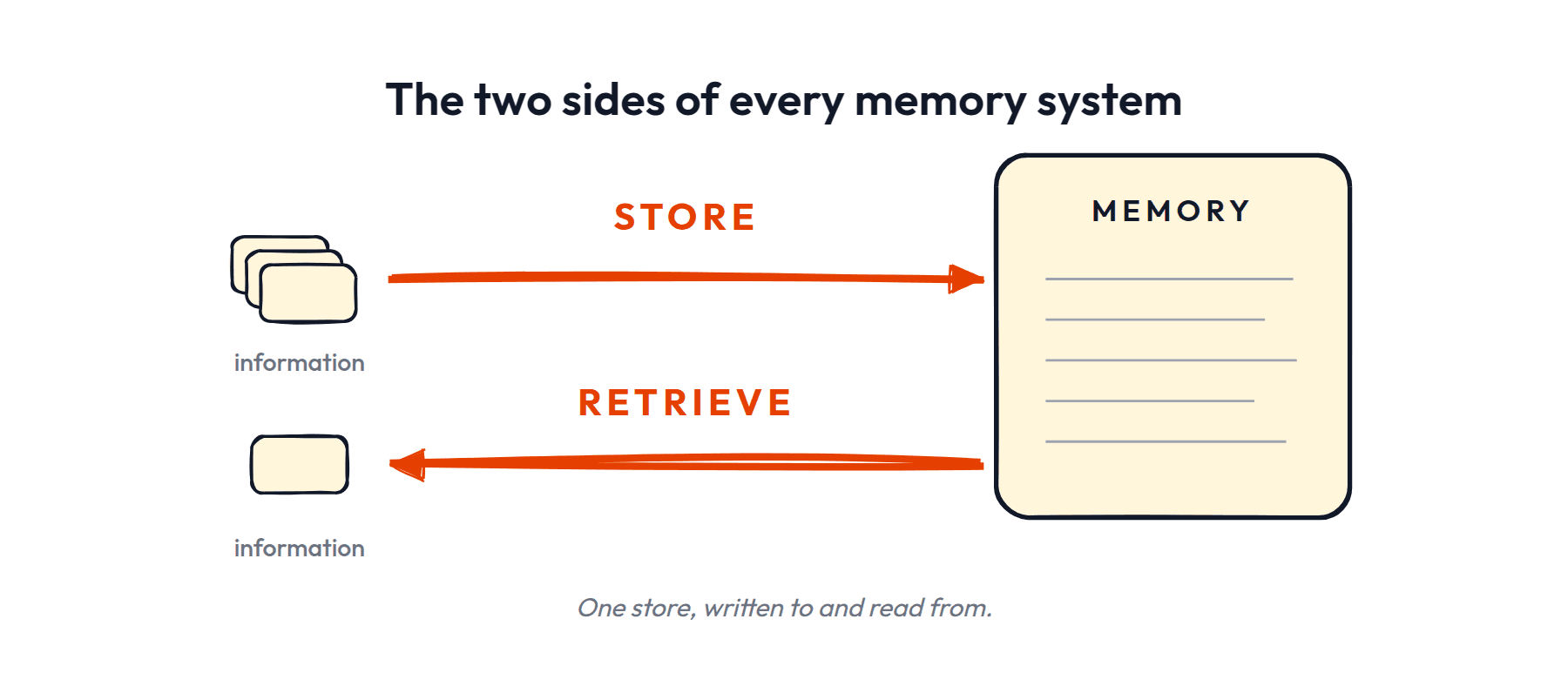
At its core, agent memory has a simple premise. Every memory system is just two things: a way to store information and a way to retrieve it.
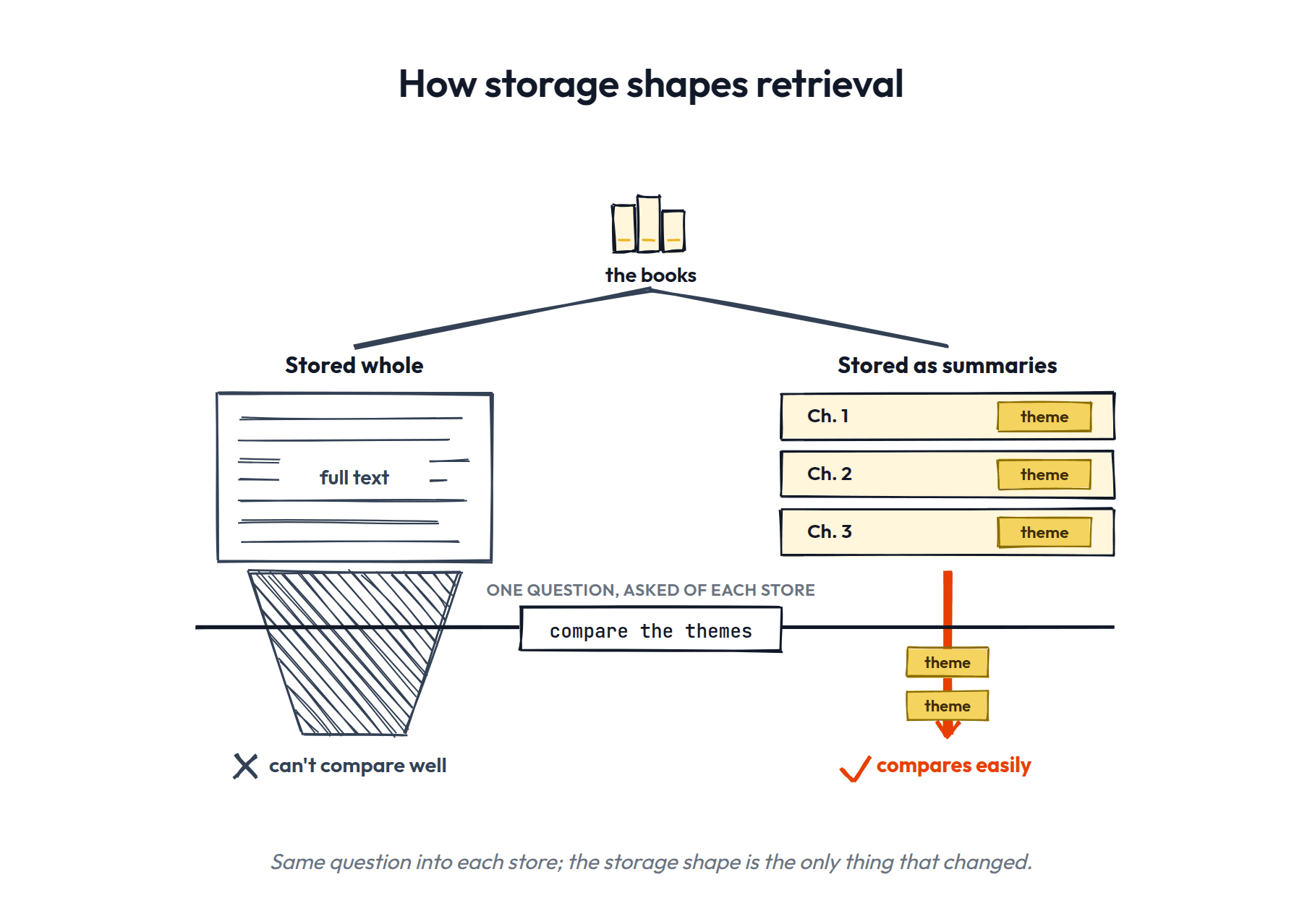
Crucially, the way something is stored changes the way it can be retrieved. For example, if you give an AI a few books and ask it to compare the themes, it can't do much but literally process the entire books and LLM it up (yes, that's the official term). But if you have summaries of all the chapters of the books with themes already extracted, then it can more easily pull out and compare the themes.
Here's the menu you're choosing from:
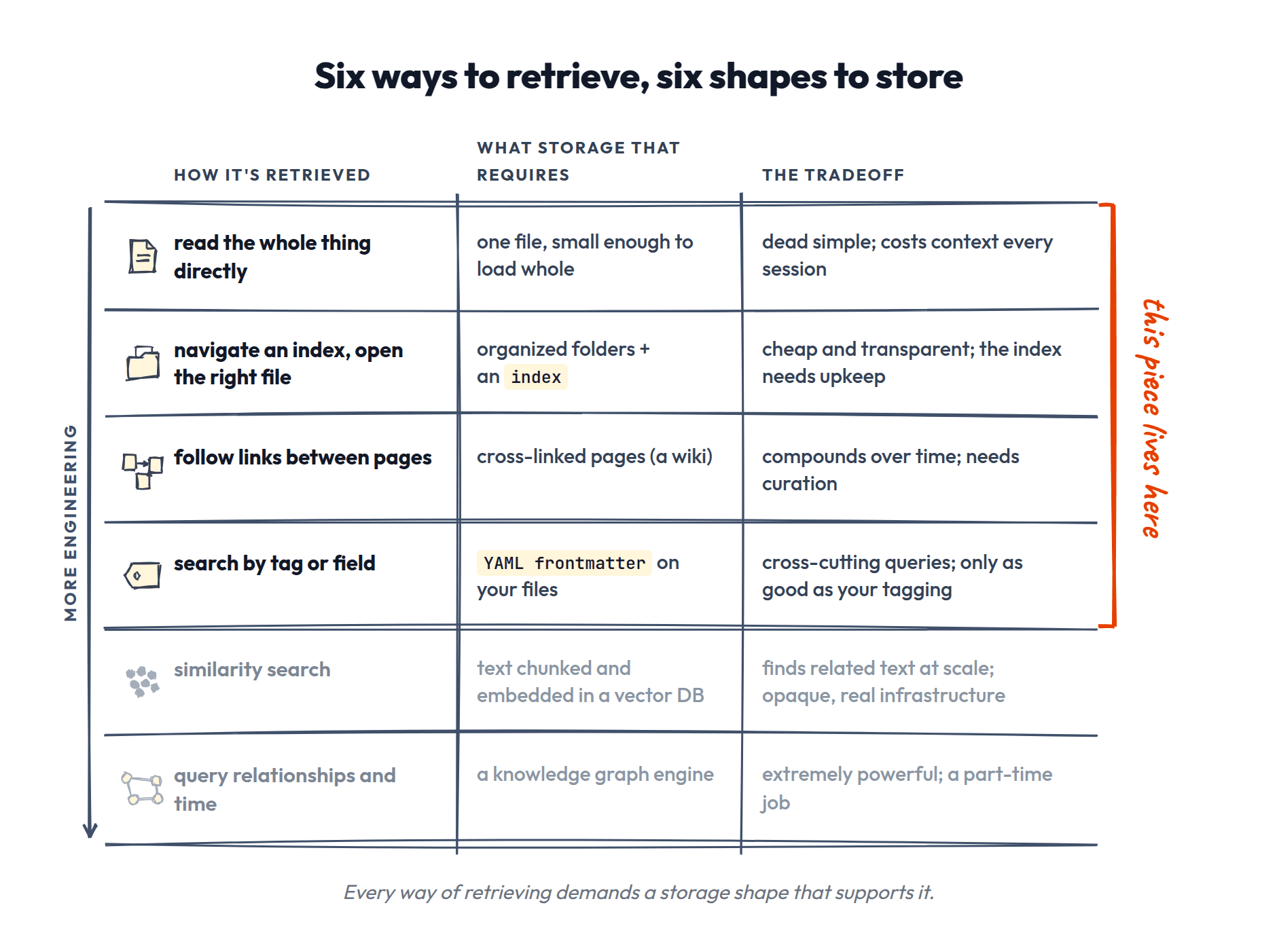
We'll spend the rest of this piece in the top half of that table.
The Memory Lifecycle
What does this mean in practice? You're in Claude Code / Codex, doing work, having it pull together information from various sources, asking it questions, running code, telling it to never use the phrases "load-bearing" or "footgun" EVER AGAIN DOG GAMMIT.
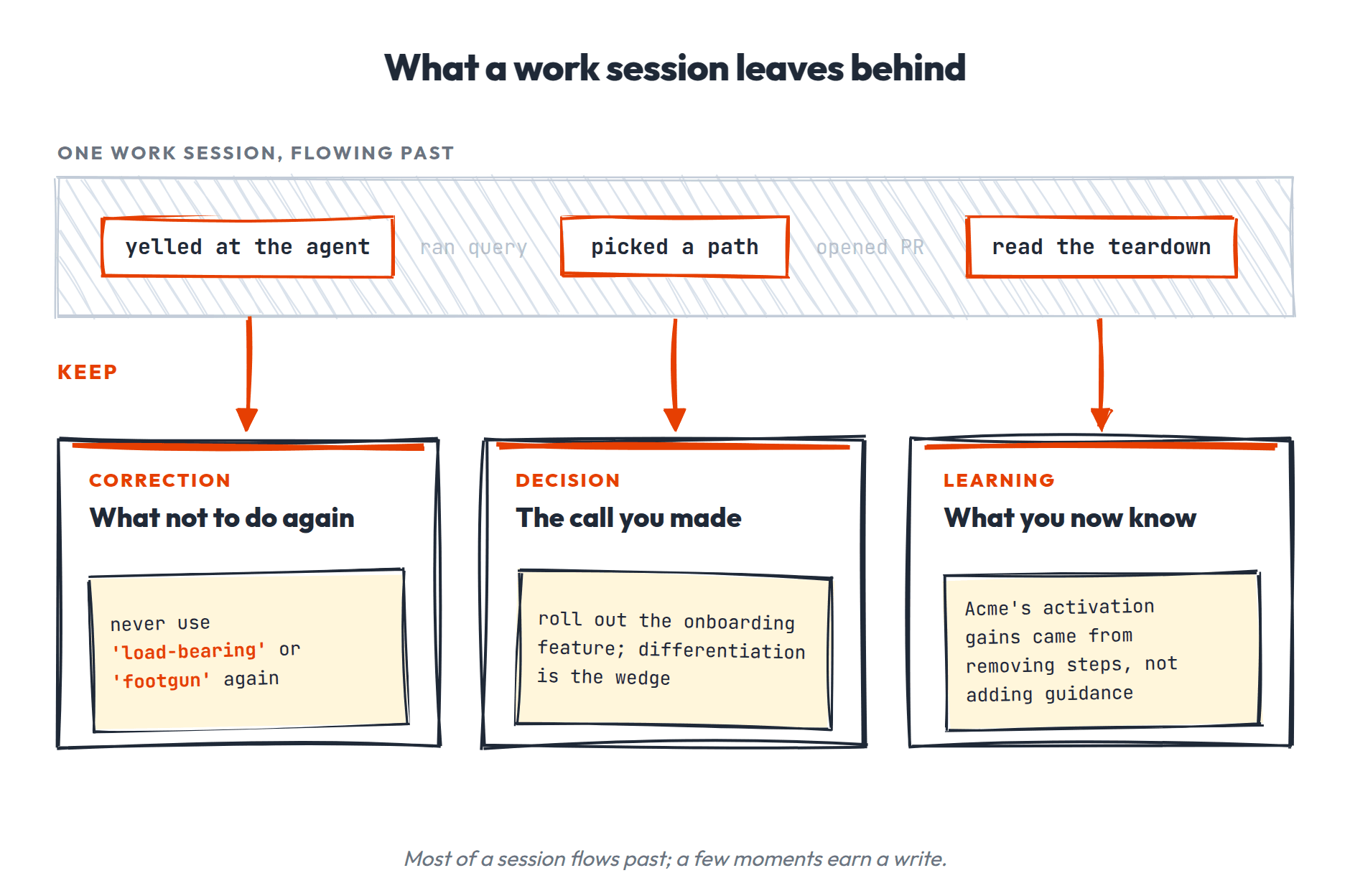
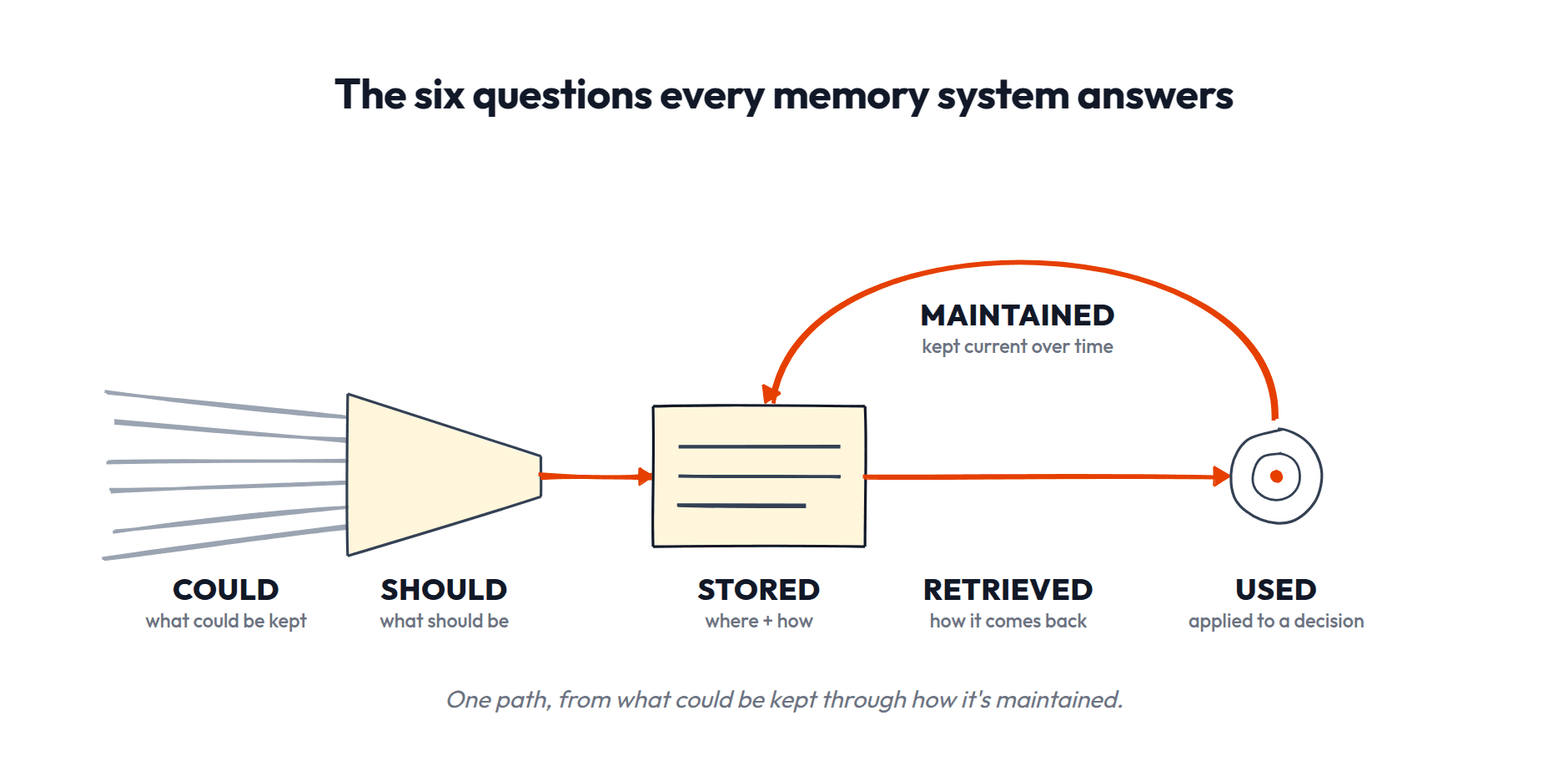
Some of that would be useful in the future, but not everything. You have to answer these fundamental questions of agent memory:
- •What information could be remembered?
- •What should be?
- •Where and how is it stored?
- •How is it retrieved?
- •Once retrieved, how is it used?
- •How is it maintained over time?
THE RANGE OF ANSWERS
There's no perfect answer to all those questions. There are many options, each with a range of tradeoffs. We're talking everything from storing every piece of information in a database and running vector searches on them to creating insanely sophisticated graphs that you need to run on a powerful server in the cloud.
Here's the spectrum, roughly in order of how much engineering you're signing up for:
- •A single instructions file. One CLAUDE/AGENTS.md with everything you want the AI to know. Zero setup, and it works! Right up until the file hits ~300 lines long, it's eating your whole context window, and the model starts ignoring half of it 🤦♂️
- •Organized files and folders. Your docs, given a structure the AI can navigate, plus an index so it knows where things live. Still zero infrastructure. The ceiling is much higher than people think.
- •Files plus a knowledge layer. Same as above, but the durable learnings get compiled into their own interconnected pages. This is where today's system lands.
- •A vector database. Every document chopped into chunks, embedded, and searched by similarity. Powerful for huge piles of text, but now you have a pipeline to maintain, and you've lost the ability to just read your memory.
- •A knowledge graph engine. Entities, relationships, and timestamps you can query ("everything we believed about pricing in March"). Legitimately amazing. Also a legitimate part-time job.
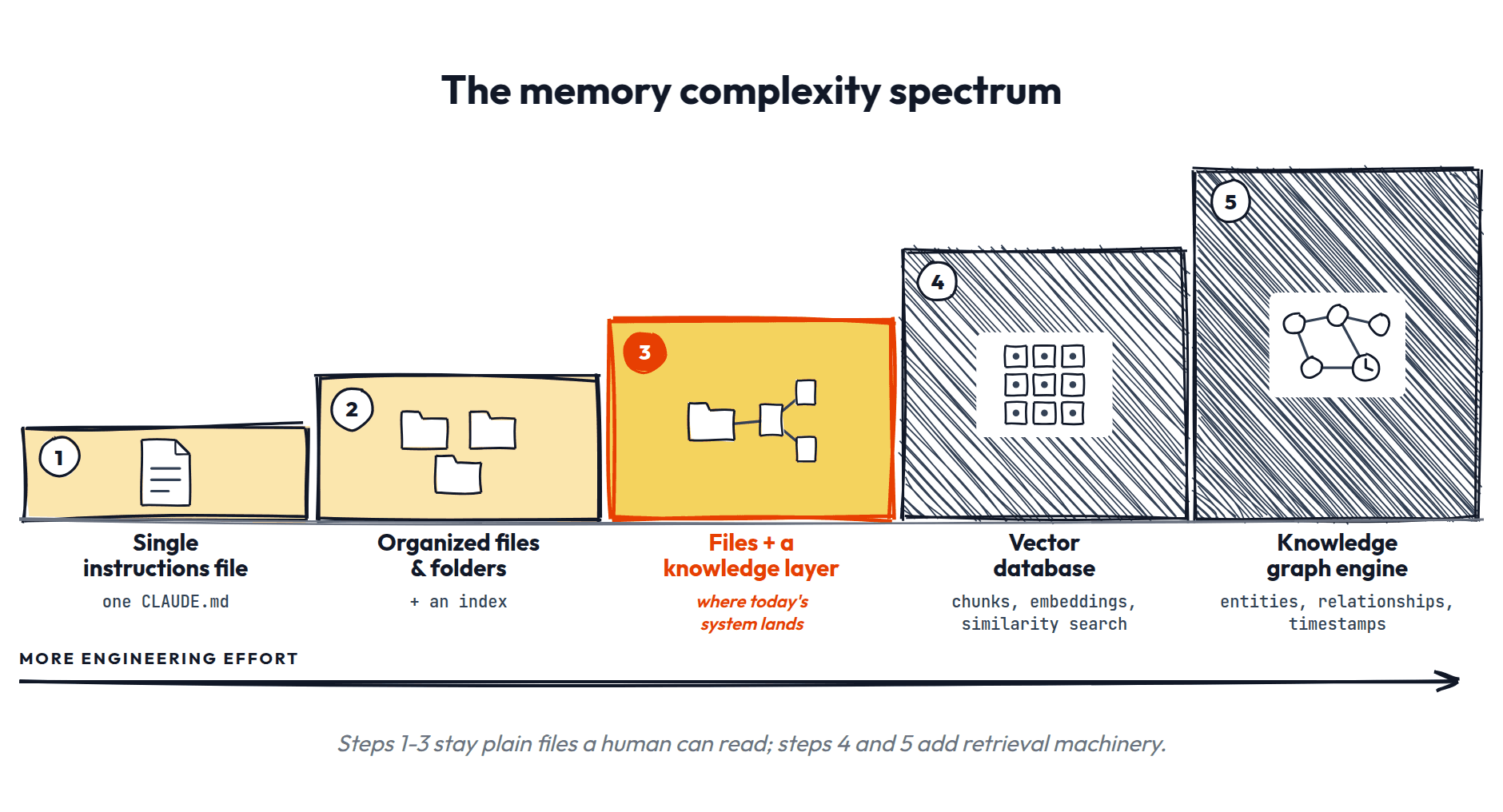
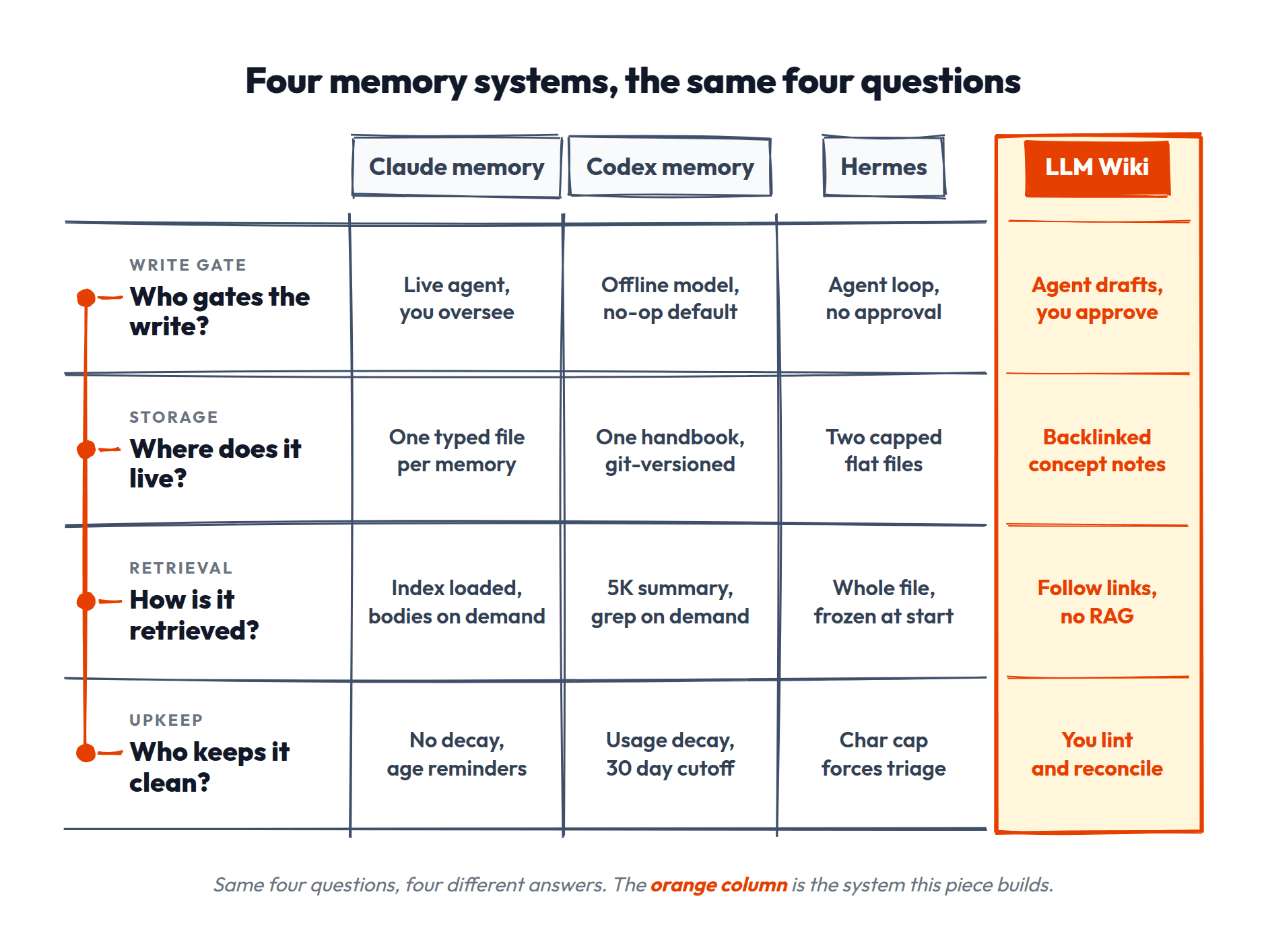
As you move right, retrieval gets more powerful, storage gets more opaque, and maintenance stops being something you can do by just opening a file. Every product memory system you've heard of is somewhere on this line, and every one of them is just a different set of answers to the same six questions:
THE BEST OPTION FOR YOU
So, really, there are infinite ways to approach this problem, and you can spend an infinite amount of time building and optimizing your memory system.
But the more complex your system is, the more time you spend setting it up, the more you risk never really using it, and the more time you have to spend maintaining it.
So let me propose the simplest system you can build and use, based on these assumptions:
- •You're capturing two kinds of knowledge at once:
- –the stuff tied to specific pieces of work and projects
- –and the general learnings that outlast them
- •You want to be able to understand and use this system yourself:
- –You're working closely with your AI tool, with you in the loop.
- –You help curate what is stored in memory and how it's maintained.
- –You want to be able to view and navigate the memory files yourself.
- •You'll have dozens to a few hundred docs, not tens of thousands.
- •Your knowledge changes fast. You're always building new things, testing stuff, and learning.
- •You read your history as a story when you need it ("how did my thinking evolve"), and at most you filter by date. You're not running database queries that slice thousands of facts by time and relationship.
- •You want value without overbuilding, especially since this is the first memory system you're setting up.
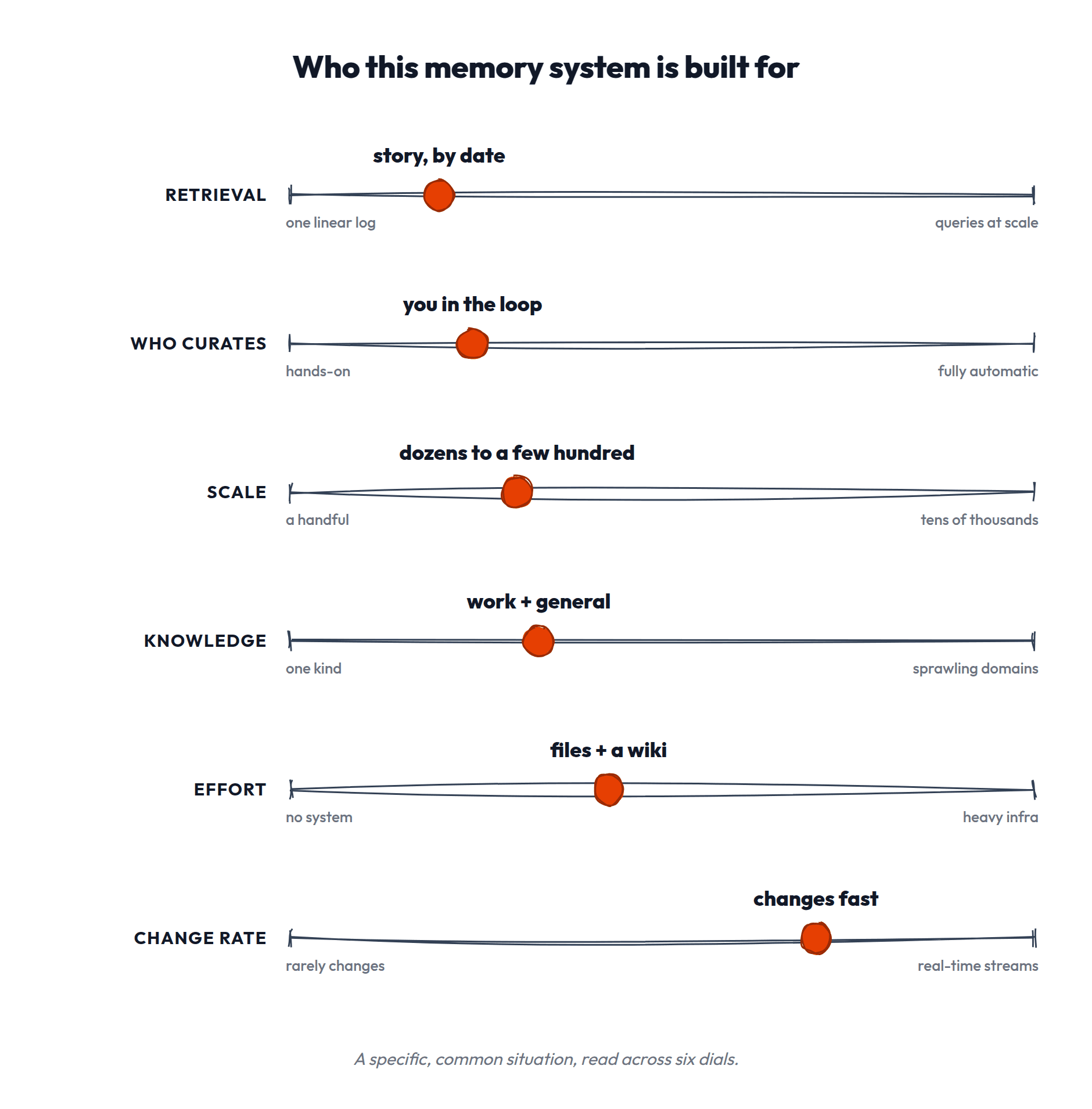
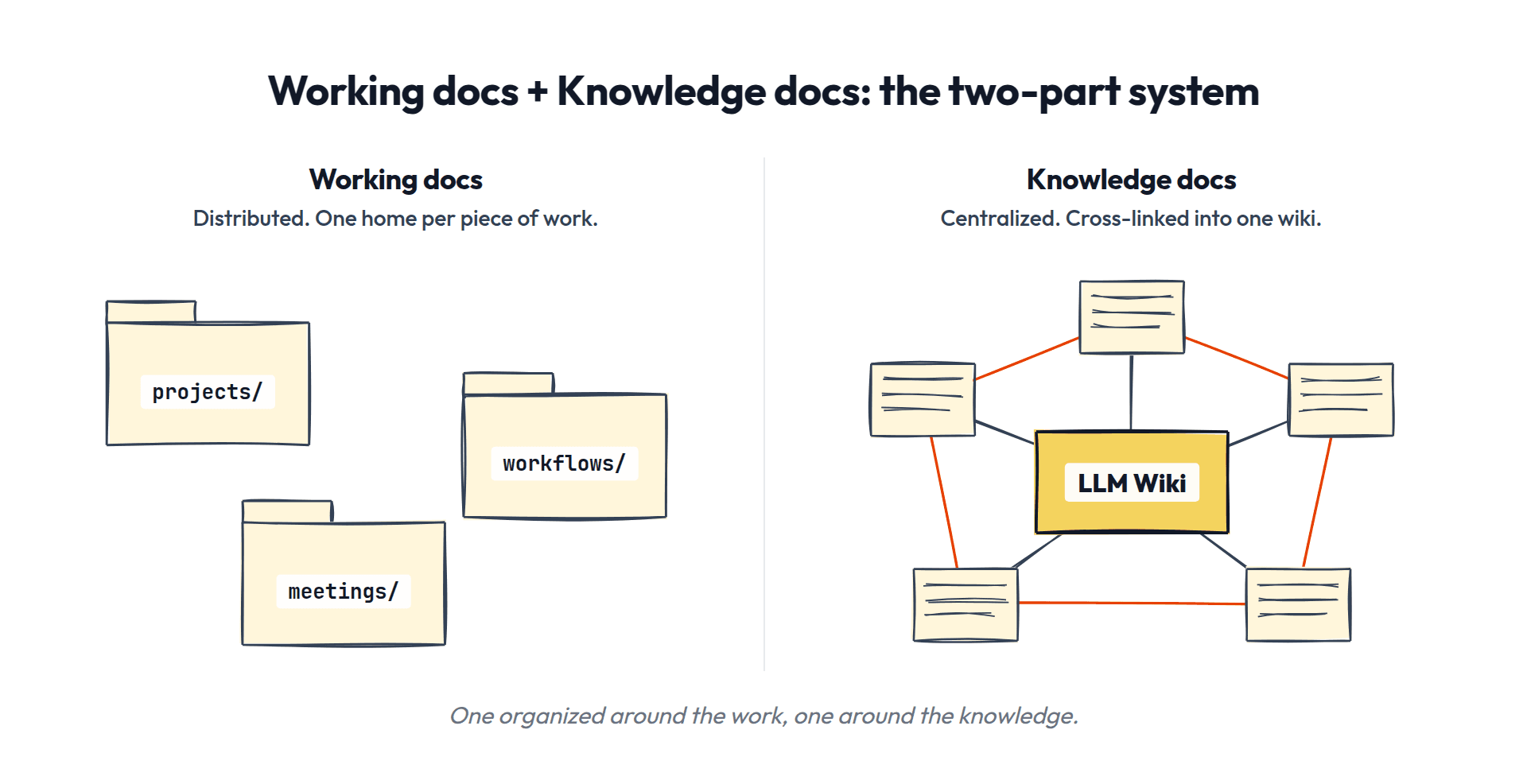
This maps nicely to a system with two fundamental parts:
- •Working docs for the work-specific and project-specific information. For the most part, all you really need is good organization of your files plus an index that helps your AI navigate it.
- •Knowledge docs for information you want stored that lives outside of specific projects. For this, we'll build an LLM Wiki.
Why this and not something else?
- •Files are human-readable, so you stay in control and can audit everything
- •Fast-changing knowledge is just editing a file
- •No query engine means no heavy infrastructure
- •It's the lightest thing that actually works: anything lighter (like a single CLAUDE.md) can't hold the durable cross-cutting knowledge, and anything heavier (like a graph database or auto-memory) buys you power you'd be maintaining but not using
LET'S BUILD IT
Everything in this piece lives in the workspace you already open your coding agent in. It's all just folders and Markdown files inside that workspace, organized well. That workspace is your memory and your agent's whole world (and version history comes free; more in the FAQ).
Inside it, it's all documentation, organized two ways.
- •Working docs are organized around the work: they live where the work lives, distributed across your folder structure (project folders, workflow docs, meeting notes).
- •Knowledge docs are organized around knowledge: centralized and cross-linked, for the durable stuff that isn't tied to any one piece of work.
Working Docs
For most of your work, you'll have active files and context you need to provide your agent with, and space for new stuff created for that project to go.
Why this works. The simplest possible memory is just giving your files a home and pointing your agent at it. Your AI already knows how to read files and navigate folders. You're not building infrastructure here. You're organizing what you already have so the agent can find it. That's it.
Where we're going:
- Organize your files into project and workflow folders.
- Add an index so the agent can find them without you pointing it there manually.
- Use rules to keep the index current automatically.
- Optionally, tag files with YAML for cross-cutting queries. (We'll define YAML when we get there.)
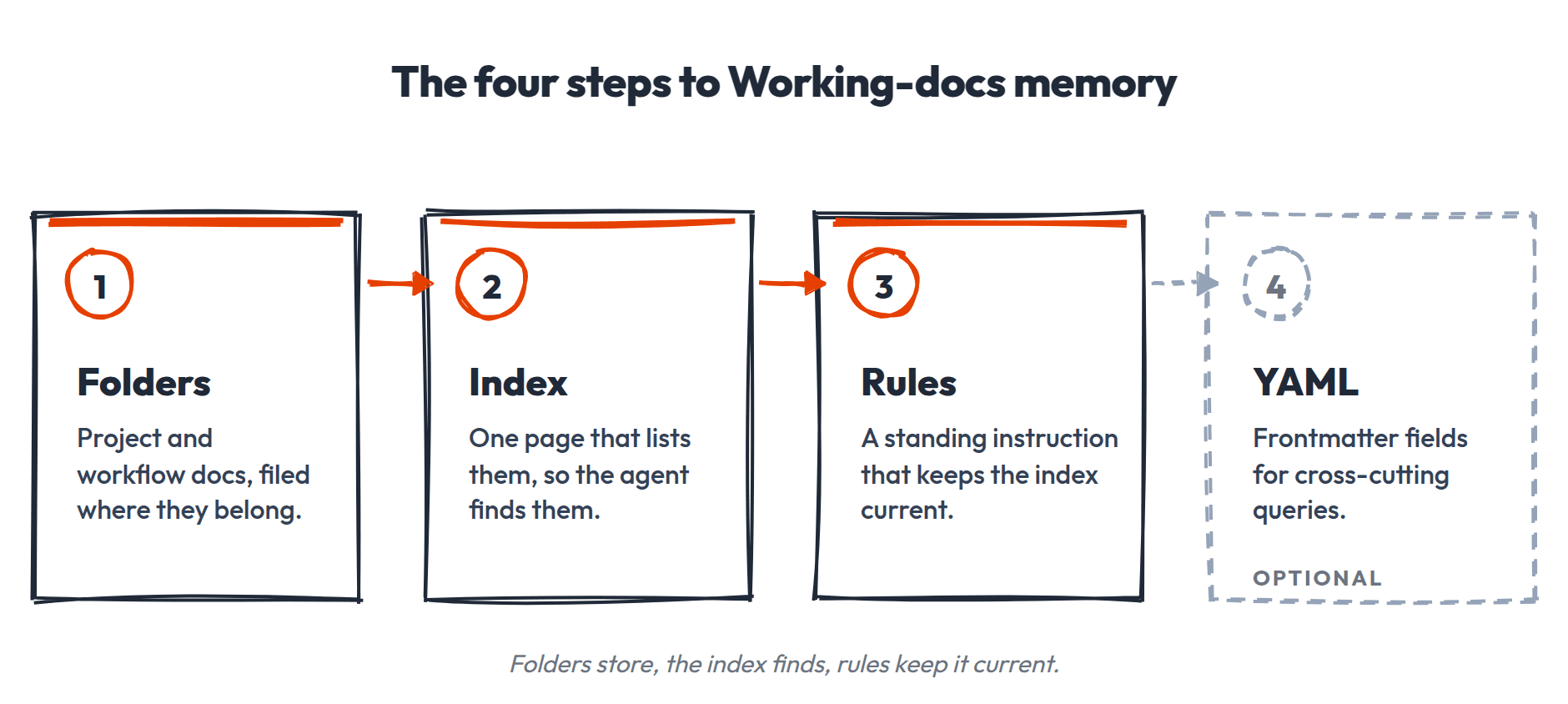
We can rely on very simple primitives for all of this. Let's go through each one.
Folders
Remember, the goal of context engineering is to provide your agents with the information they need, when they need it. That can be as simple as saying "hey look in this folder for all the relevant context." Boom. Context = engineered. I'm dead serious. Just giving your files for your projects a place to live is the highest-leverage, lowest cost "memory" you can build.
The most useful folder structures are:
- •Project folders: a collection of files relevant for a task or initiative. The PRD, research, decisions, results, all in one place.
- •Workflow folders: when you have a repeatable deliverable that needs shared context. An email workflow folder might contain the template, the style guide, past issues, and conventions for how they're produced.
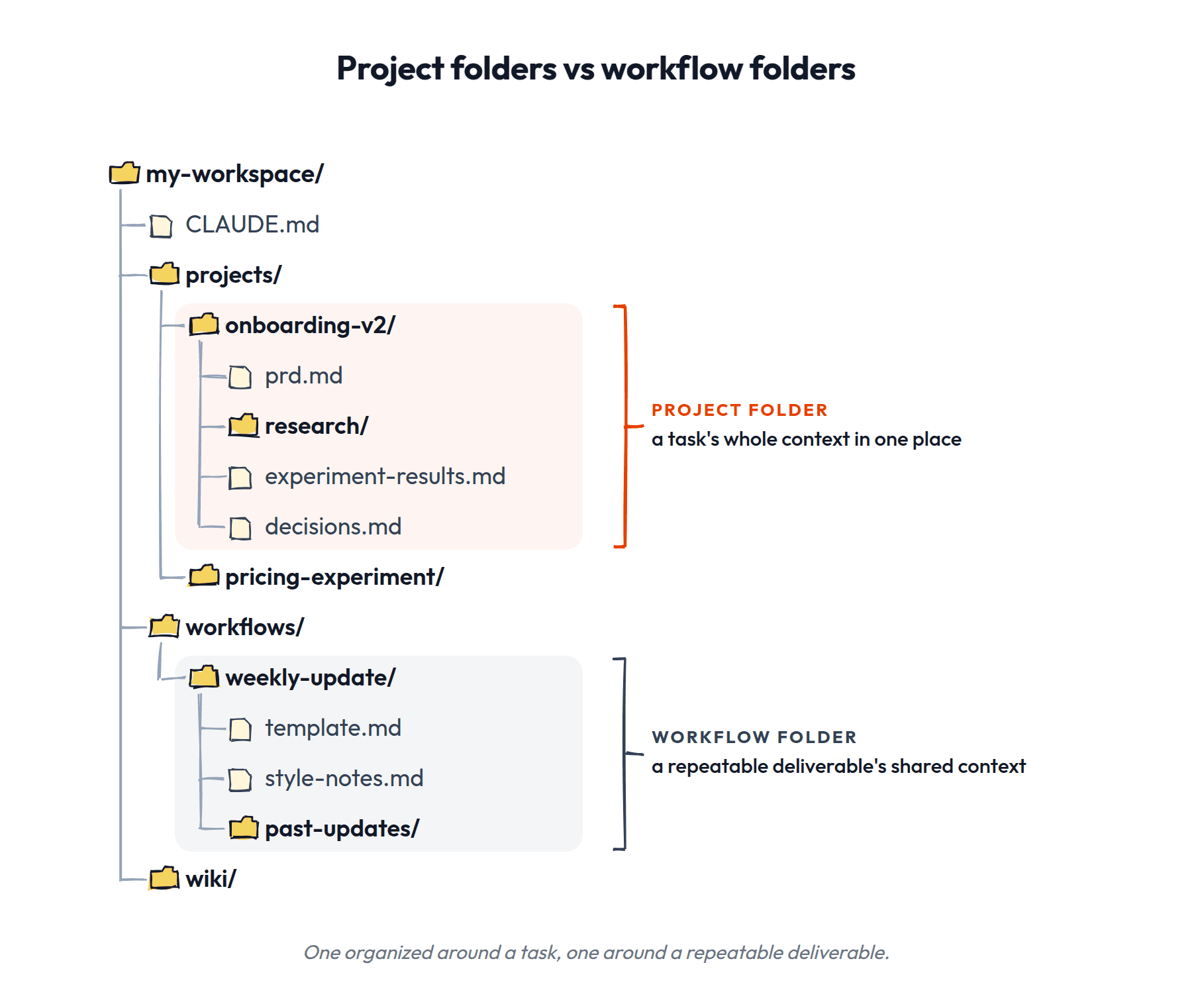
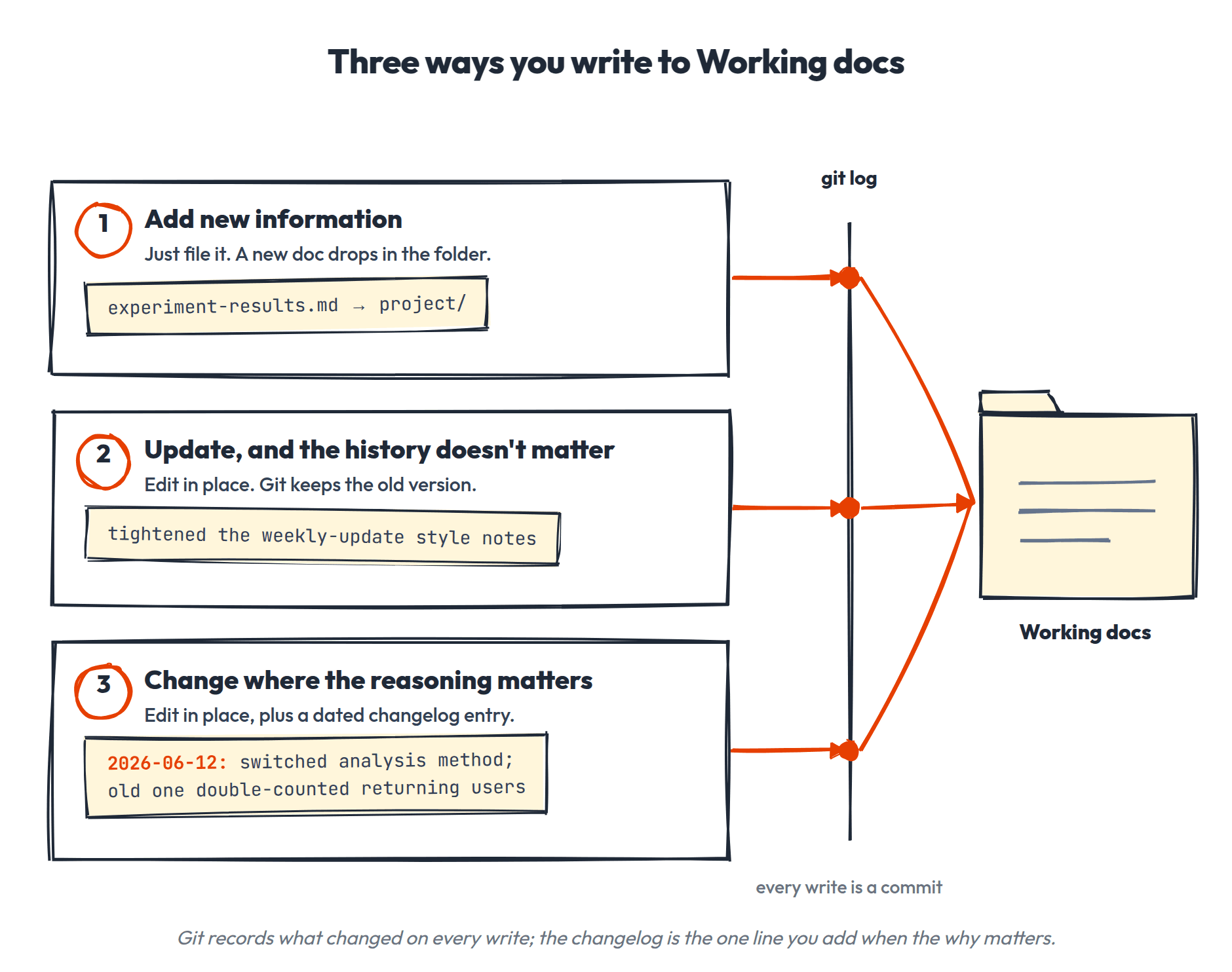
How folders serve as memory. There are really three kinds of writes you'll make to Working docs:
- •Adding new information. The experiment results go into the project folder. A new research doc gets created. The thing has a home, and you put it there.
- •Updates where the history doesn't matter. You're improving a workflow doc, fixing a convention, making something clearer. Just edit in place. Git tracks the change if you ever need it, but you don't need to think about it.
- •Changes where the reasoning matters. You changed the analysis method because the old one double-counted returning users. Comparing versions later shows you what changed, but not why. That's when a dated changelog entry in the doc earns its keep. Sometimes those reasonings are durable enough to also go in the Knowledge docs.
Conventions live with their context. Your PRD voice lives in the PRD workflow, your deck conventions in the deck workflow. When one changes, you update it where it already lives.
The Index
Now, what if you want your agent to be able to find projects and information in them without having to point it directly at them? Again, sometimes the simplest patterns are the most powerful.
Use an index. At every level of your folder structure, have a file that says what else is at that level. And as you navigate deeper, have an index at every level that says what's there as well.
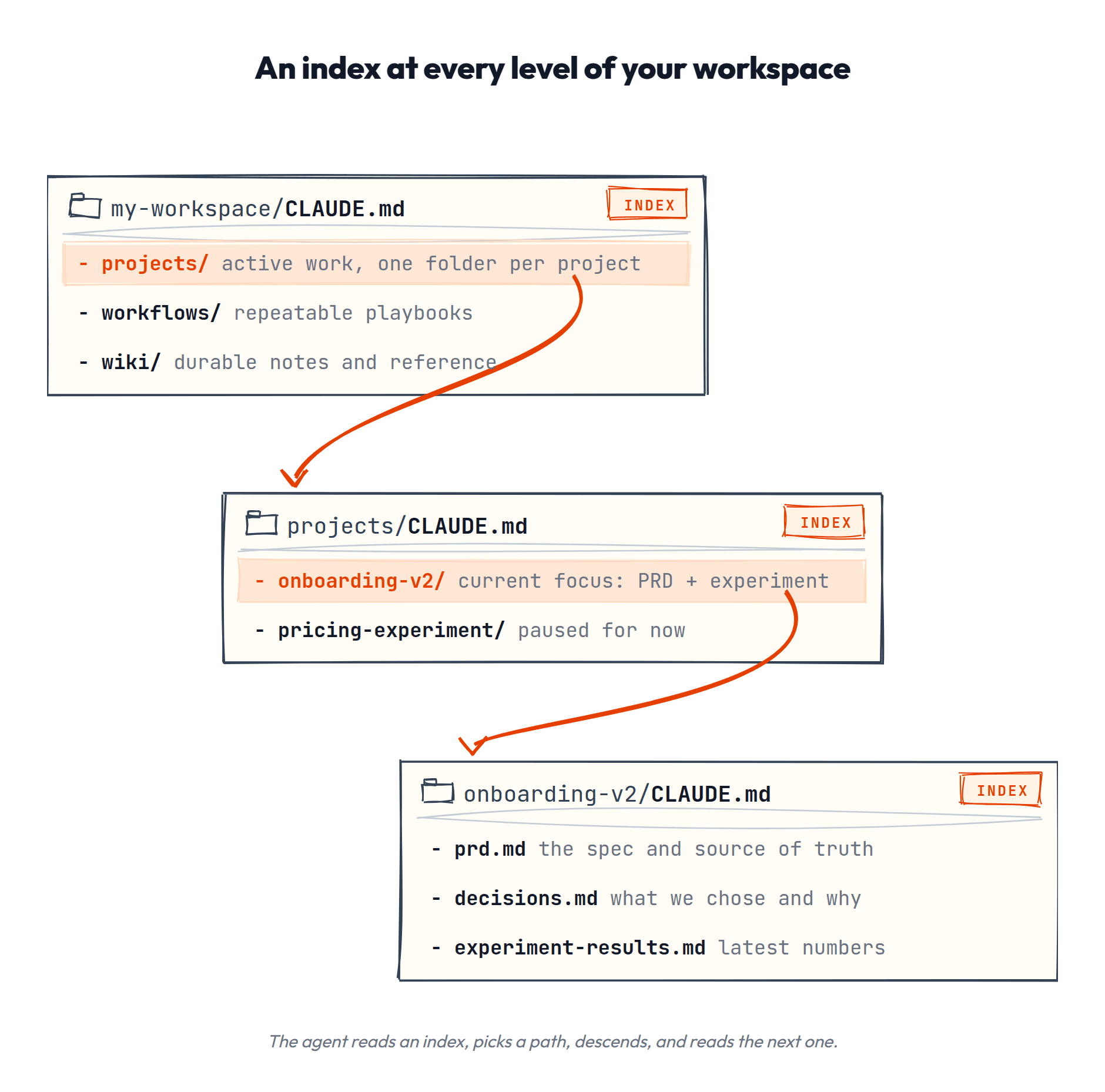
Two AI-tooling specific features make this particularly powerful:
CLAUDE.md / AGENTS.md. Tools like Claude Code, Codex, and Cursor have a file (CLAUDE.md, AGENTS.md) that's automatically loaded into the context window at the start of every session. This is your top-level index for free. The agent reads it first, every time, without you asking. So if your CLAUDE.md points to the right places, the agent can navigate your entire file structure from the jump. And nested CLAUDE.md files load as the agent works its way into your folders, so each area of your workspace can carry its own instructions. (Codex works similarly with AGENTS.md.)
A lean one looks like this:
# My Workspace

## What's here
- projects/ — active work, one folder per project (see projects/index.md)
- workflows/ — repeatable deliverables and their conventions
- Memory wiki: wiki/index.md — read the index when a question touches past learnings or decisions; cite the pages you use

## Conventions
- New files get YAML frontmatter: type + updated
- Decisions get logged in the project's decisions.md
That's it. Ten lines that make every session start smart.
CLAUDE.md is always loaded, though, which means every line in it costs you context on every single turn. So keep it lean. It's an index that points elsewhere, not a document that holds things. Treat it like a table of contents, not a filing cabinet. (Codex enforces this for you, a little brutally: the whole AGENTS.md chain is capped at 32KB by default, and anything past the cap gets silently dropped.)
Rules. As powerful as an index is, if you've ever tried to build these kind of external trackers for other work, you might already be thinking... maintaining that sounds like a pain.
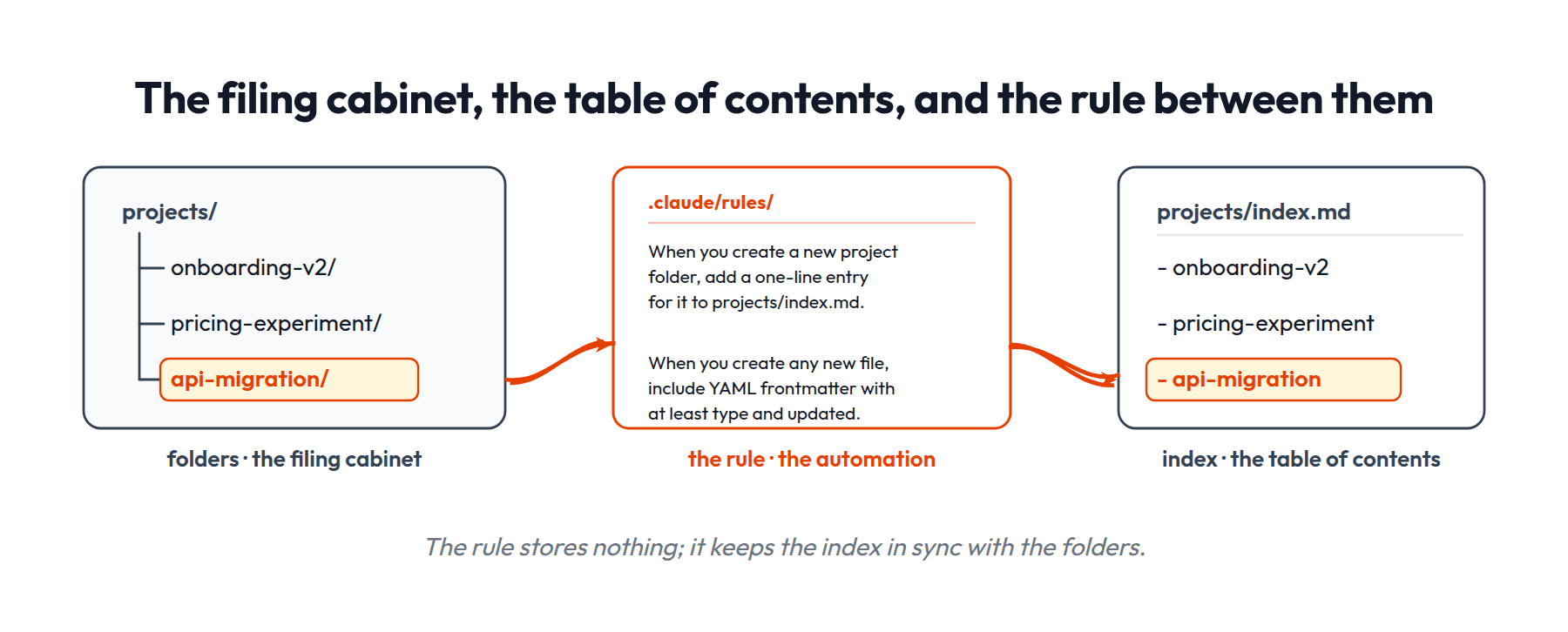
Luckily we can also have our AI help maintain this structure. Rules (like .claude/rules/ in Claude Code) are instructions the agent follows automatically. A rule file is just a few lines of plain English:
When you create a new project folder, add a one-line entry
for it to projects/index.md.

When you create any new file, include YAML frontmatter with
at least `type` and `updated`.
The rules don't hold any memory themselves; they're the automation that keeps the memory organized.
The folders are the filing cabinet, the index is the table of contents, and the rules are what keeps the table of contents up to date without you having to remember to do it.
(Codex doesn't have a separate rules directory; the same instructions just live in your AGENTS.md hierarchy, with nested files overriding parent ones.)
Tagging with YAML
Beyond dropping files into folders for categorization, the next easiest way to organize them is with tags in a specific format known as YAML frontmatter. YAML (it literally stands for "YAML Ain't Markup Language," which tells you everything about how programmers name things) is just a simple, human-readable format for labeled fields: label: value, one per line. And "frontmatter" means it sits at the front of the file: a small block at the top that looks like this:
---
type: experiment
updated: 2026-07-02
status: complete
tags: [onboarding, activation]
---
YAML is just defining the categories of tags, and then adding the tags themselves. The AI can then search across these tags to find things: "show me all files with type: experiment that were updated this quarter."
For Working docs, type and updated is all you need to start: enough for the maintenance audit to track them and for the agent to know what kind of doc it's looking at. Enforce with a rule so the agent fills it in automatically on new files. Anything beyond that is optional and query-driven (add a tag only when you want a specific cross-cutting query like "all my open hypotheses").
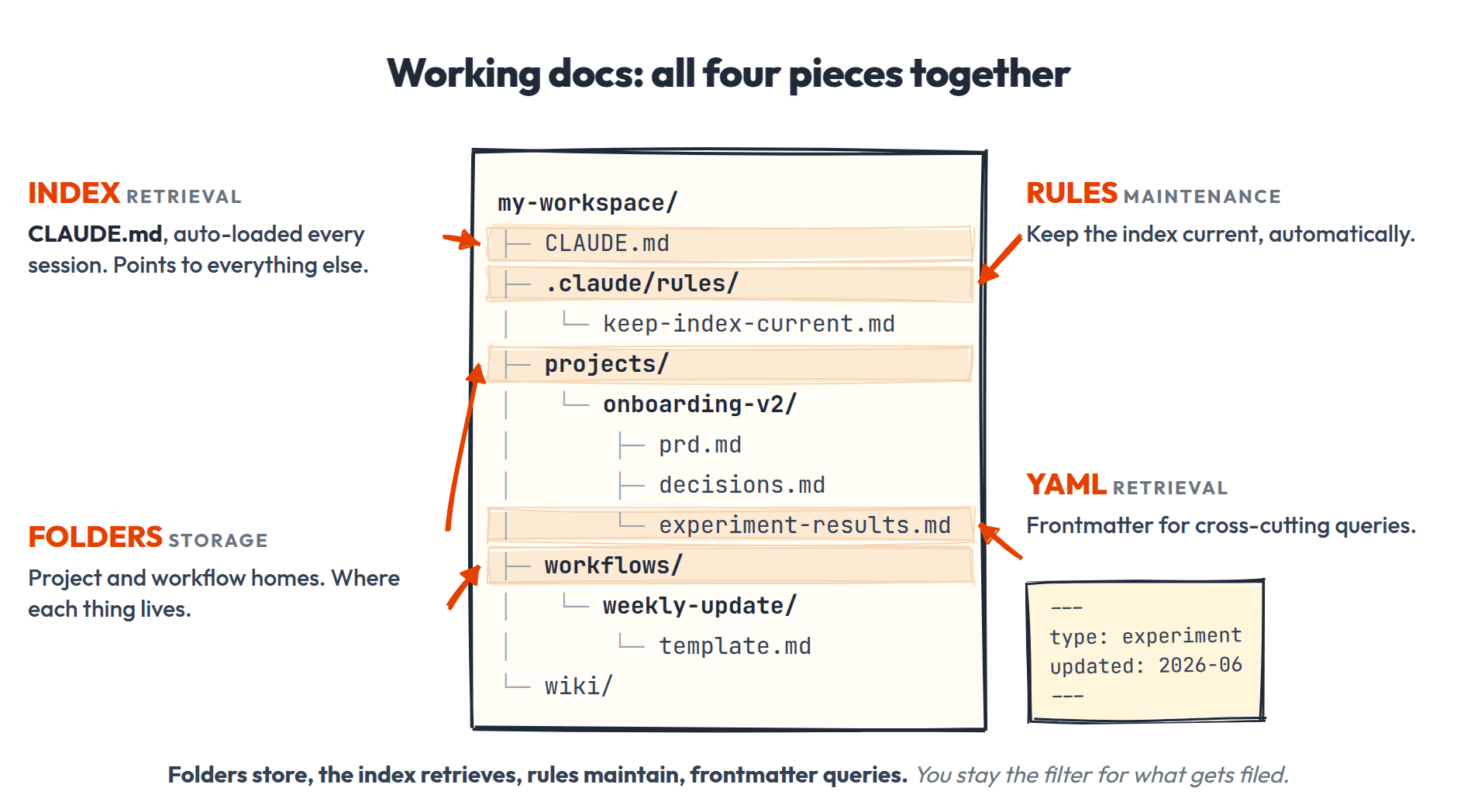
To put a bow on this: it's pretty easy to figure out where information you are actively working with should go, since it should just go where you're actively working with it!
Now let's turn to the free-floating stuff.
Knowledge Docs
The other category is learnings and things you want to keep track of where you aren't sure exactly when or how they will be used. And this can really be all kinds of information:
- •Articles you've read that changed how you think about a problem
- •YouTube videos or conference talks with ideas worth keeping
- •Research findings from a deep dive you did for one project but that apply broadly
- •Notes from conversations with users, customers, or experts
- •Industry analysis, competitive intelligence, market trends
- •Technical learnings about your stack, tools, APIs
- •Frameworks or mental models you've picked up
Karpathy proposed the simplest, most elegant solution to this problem. If you can give LLMs access to concepts written out in well-organized pages and explain the relationships between those pages, they can navigate the information easily. AND, it just so happens that LLMs are also great at creating well-organized pages and making connections between ideas.
Let the LLM do what it does best: have it help you ingest information, organize it, and maintain the structure.
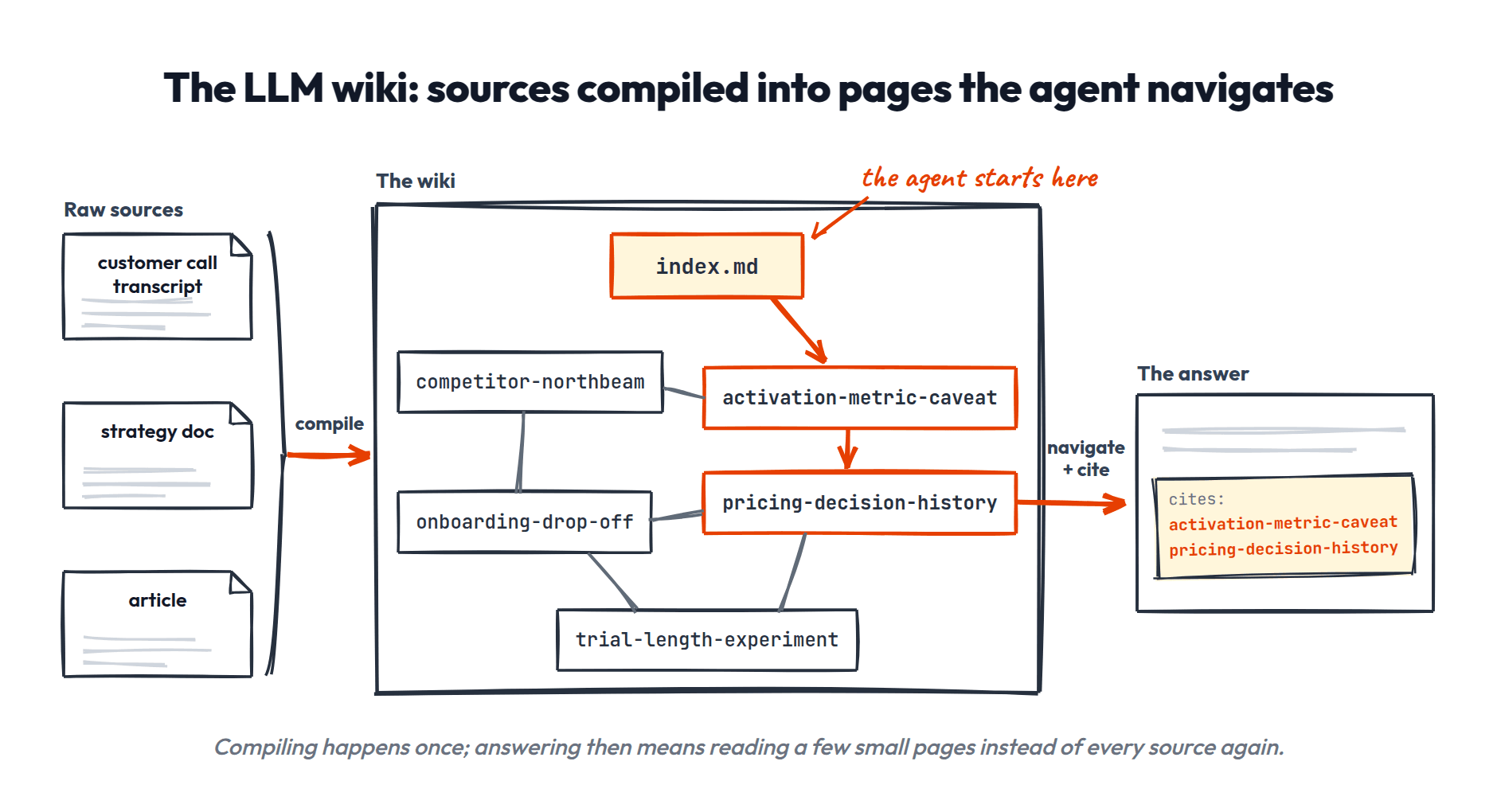
Specifically, these interconnected concept pages form a knowledge graph. LLMs (and you!) can easily navigate between pages to explore the connections. And this is the perfect structure for possibly-useful-future information because:
- It matches how knowledge actually connects: one concept relates to many others, not a flat list.
- Navigation is natural: read a page, follow a link, read the neighbor. Same as browsing Wikipedia.
- It compounds: every new page creates connections to existing pages, making the whole thing richer.
- It surprises: the coolest thing about this structure is how connections emerge you couldn't have planned for.
- LLMs are great at navigating it, because reading text and following links is exactly what they do well.

Added benefit: over time you can also build totally sick graphs like this (source).
How it works:
- You start with your existing knowledge graph (or an empty one).
- You have a new source of information: something you want to remember.
- The LLM breaks apart the source into individual concept pages.
- The LLM compares these new pages against all the existing concepts in the wiki to see how they relate. Any duplicates, agreements, disagreements, or other updates?
- The LLM updates the knowledge graph by adding the new pages and modifying the connections to link them in.
- The LLM updates the index of all pages so it has a starting place for next time.
- A git commit records the whole change, so history comes free.
The end result is a constantly updated graph of all the things you're learning, with relationships between them. Then we can add some basic YAML fields, like dates and sources, which let us navigate and explore this knowledge in other useful ways as well.
Let's get into the nitty gritty.
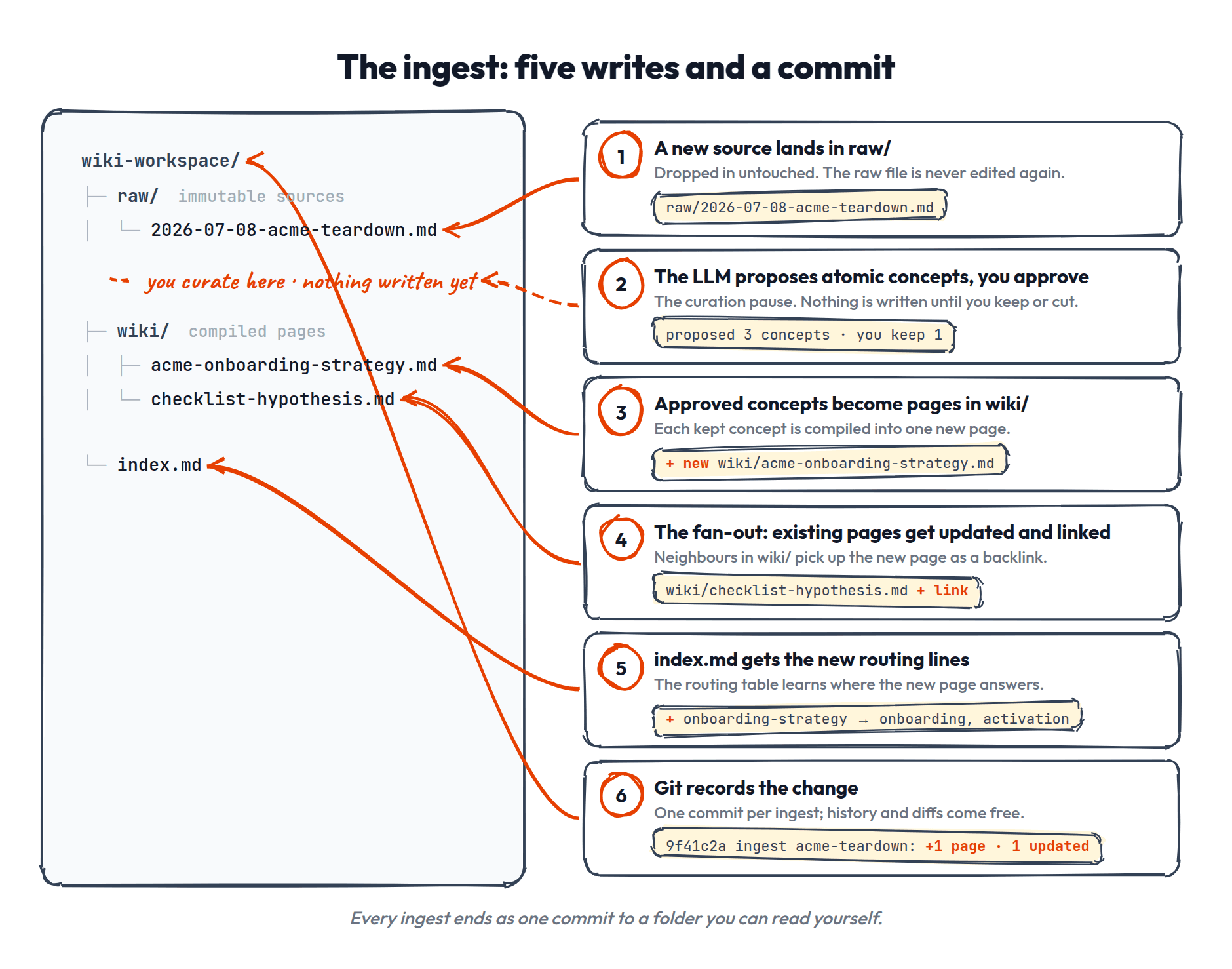
Step 1: Add sources to raw/
New information can come from two places.
- External sources like articles, YouTube transcripts, meeting notes, research papers.
- Or it can come from things that emerged during your sessions: a conversation excerpt you save, a summary the agent produced, notes you captured during the work, research the agent pulled that you want to keep.
This information is "immutable," meaning once it's added, it's never modified. You always have the original sources to look back on. They go into the raw/ folder, and getting them there is whatever's easiest: drop the file in yourself, paste text into a new doc, or have the agent fetch and save it.
Step 2: The LLM proposes what to extract
You run the ingest (using a wiki-ingest skill or just telling the agent to process the source). The LLM reads it and proposes a list of concepts that can be extracted. Each concept should be "atomic," meaning one idea per page, named so you could explain it in a sentence.
- •"How our auth system works" is atomic: one idea, one page, one obvious place to look for it later.
- •"Things I learned in Q2" is not: it's a container for twenty unrelated ideas, and no future question would ever land on it.
The test: if two different future queries would need different halves of a page, it should be two pages.
You review and approve or modify the proposal. This is the curation pause: nothing gets written without you.
Step 3: The LLM creates wiki pages
For each approved concept, the LLM creates a wiki page. Here's a complete (small) one, so you can see every part at once:
---
type: wiki
created: 2026-06-12
verified: 2026-06-12
sources: [raw/2026-06-12-acme-teardown.md]
provenance: ai-synthesized
---

# Acme's onboarding strategy

**Checklist-first onboarding; Acme's activation gains came
from removing steps, not adding guidance.**

Five required steps before the user reaches the dashboard,
per their Q1 report. Relevant to our own
[[onboarding-principles]] and contradicts
[[checklist-hypothesis]].
- •A short YAML frontmatter block at the top
- •The first body line is one bolded summary sentence (more on this in a second)
- •A body of compiled prose (not a raw transcript, the distilled version)
- •Wikilinks to related pages
- •A sources field tracing every claim back to where it came from
The frontmatter for Knowledge docs has a recommended starting set of five fields:
- •
type: what kind of page this is (concept, entity, research, etc.). Starts as justwiki; you add specific types as clusters emerge. - •
created: when this page was created. - •
verified: the last date a human confirmed the page is still true. This is the reliability spine of the whole wiki; the weekly audit sweeps oldest-first. - •
sources: where this knowledge came from. Links back to the raw files in raw/. Every claim should be traceable. - •
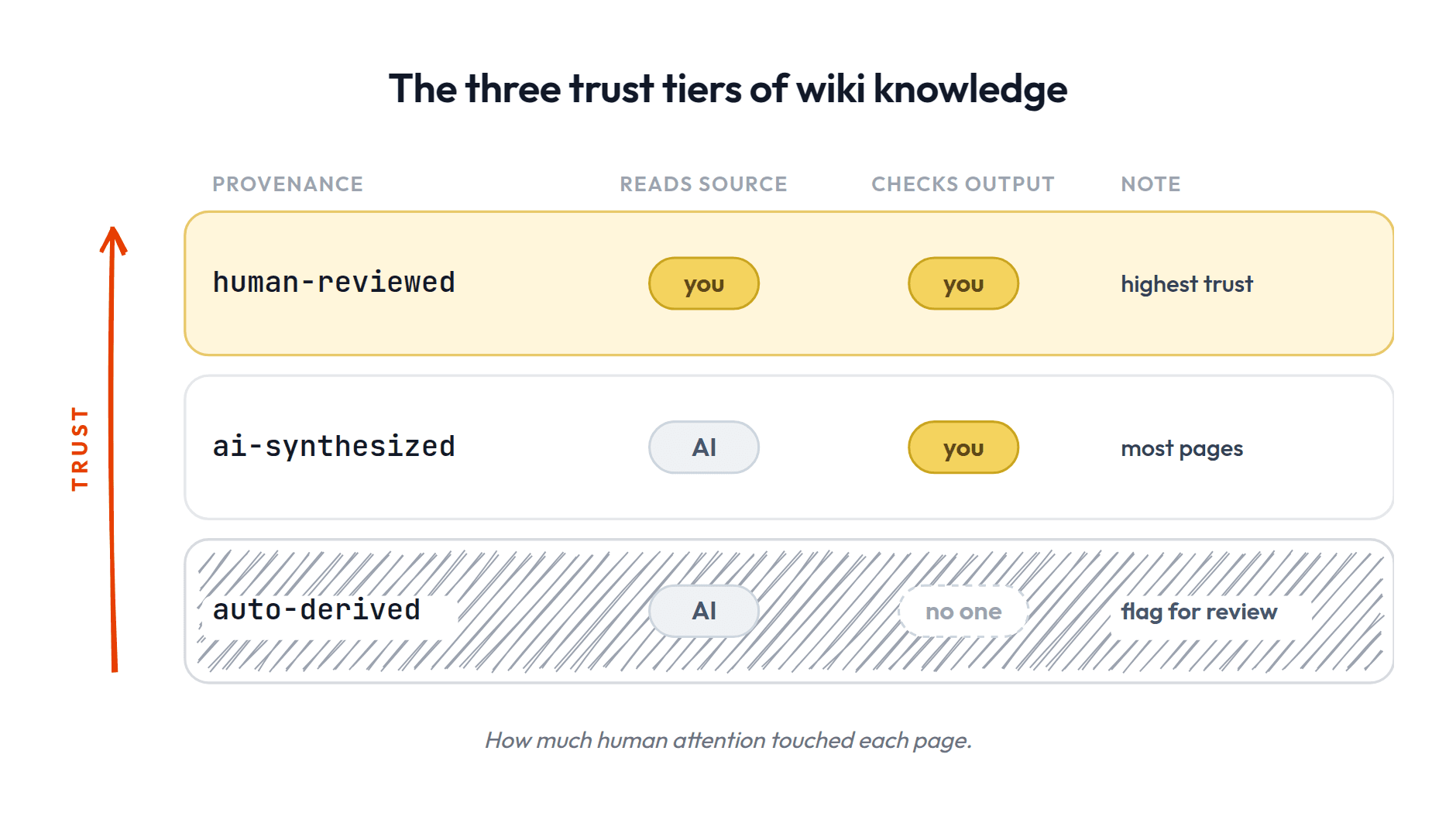
provenance: how much human attention touched this knowledge. Three tiers:- –
human-reviewed: you read the source yourself and shaped what got extracted. Highest trust. - –
ai-synthesized: the AI read the source and compiled the page; you reviewed the output but didn't read the original. Most pages will be this. - –
auto-derived: the AI extracted this without you reviewing it. Lowest trust; flag for review.
- –
Why these five, when Working docs only needed two? Because you made your Working docs; you know where they came from. Wiki pages are compiled knowledge, often written by the AI from sources you didn't fully read. For those, you want to know where every claim came from, how much attention it got, and when a human last vouched for it. These five are the one exception to "add fields only when you feel the pull."
You don't need to pre-design categories or tagging systems. More on this below.
Step 4: The LLM reviews the existing graph and proposes updates
This is what makes the wiki compound. The LLM doesn't just create new pages in isolation. It reads the existing wiki and proposes:
- •
[CREATE]net new pages based on what it just extracted - •
[UPDATE]existing pages that relate to the new material
You approve or modify, and the LLM makes the changes and links everything together.
This is the fan-out: one source typically touches 10-15 pages across the wiki. The source didn't just get filed, it rippled across the related knowledge. Compounding!
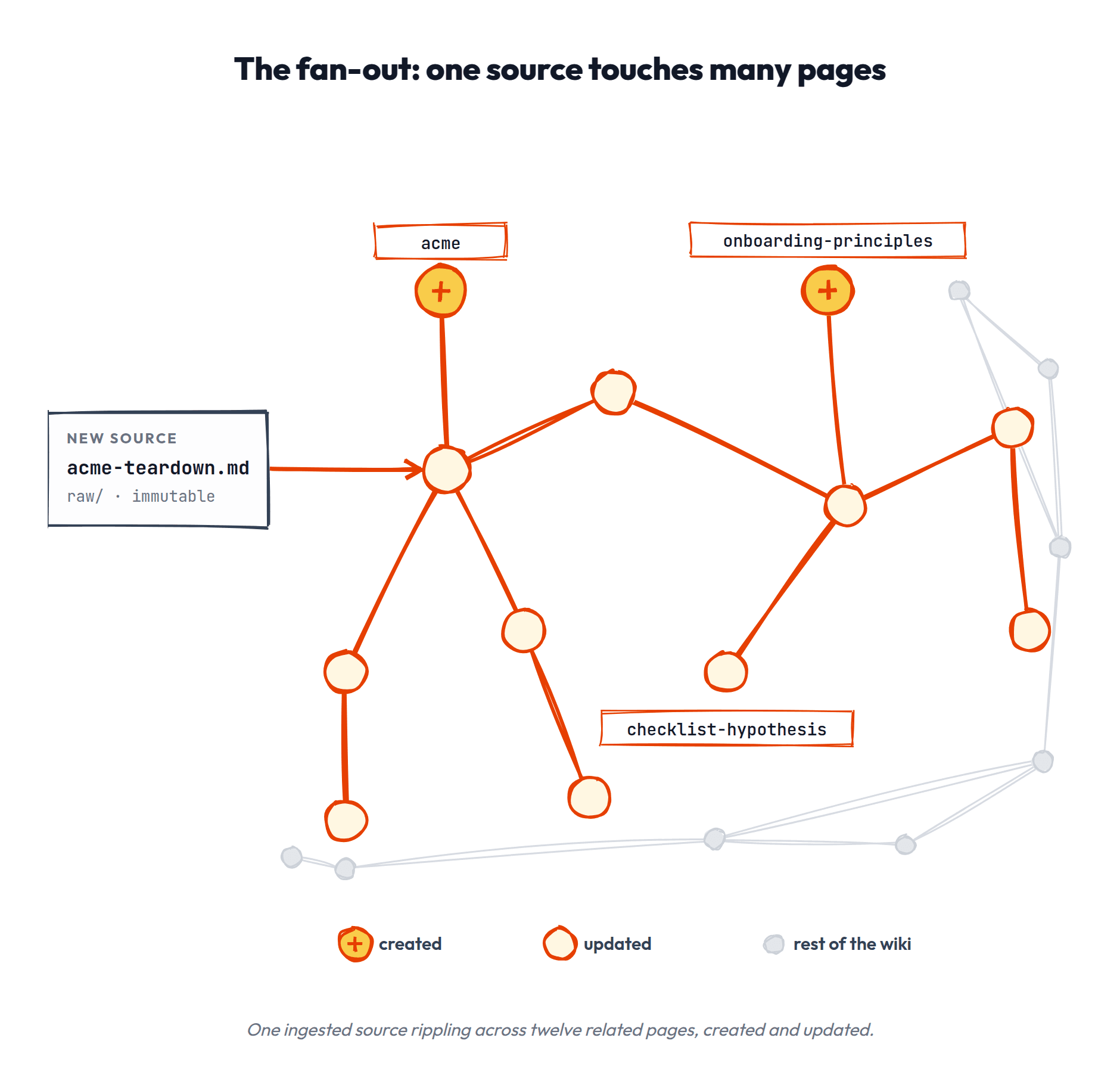
The wiki/ folder holds all these compiled pages as clean, interlinked markdown files. It starts flat. Over time you might add subfolders as clusters emerge (concepts/, entities/, research/), but you don't need them to start. More on this below.
Step 5: The LLM updates the index
index.md is the routing table: one line per page, a link, and a one-line description.
And here's the trick that keeps it honest: the index line IS the page's bolded summary sentence. One sentence, four jobs: it's the index entry, it's what grep finds, it's what a preview shows, and it's a mechanical drift check — if the sentence on the page and the sentence in the index disagree, something rotted. (When I applied this rule to my own 52-page wiki, it immediately surfaced 8 pages that had silently dropped out of the index.)
- [[acme-onboarding-strategy]] — Checklist-first onboarding; Acme's activation gains came from removing steps, not adding guidance.
- [[checklist-hypothesis]] — Our bet that guided checklists lift activation (confidence: medium).
- [[auth-system]] — How our auth actually works, including the SSO edge cases.
The agent reads this first to find what it needs, then drills into specific pages.
Step 6: Git records the change
You might expect a log file here. You don't need one: the wiki lives in git, so every ingest ends in one commit, and the timeline of the wiki's evolution comes free. What got created, what got updated, when, and in what batch — all queryable (git log -- wiki/acme-onboarding-strategy.md shows one page's whole history). And because retiring a page is a commit too, deletions become reviewable diffs instead of silent edits.
$ git log --oneline
9f41c2a ingest acme-teardown: 1 page created, 1 updated
b7d03e1 weekly audit: 2 stale refreshed, 1 duplicate merged
4c2718d capture: sample-size convention
Where this departs from Karpathy's original. If you go read the gist that started this pattern, you'll notice three places we deviate, on purpose:
- •No log.md. Karpathy's setup keeps an append-only log file. Ours doesn't, for the reason above: git already is the log, and a second record is one more thing to maintain and one more place to drift.
- •raw/ takes your session captures, not just clipped sources. The original raw/ holds ingested articles and papers. Ours also holds the things your own work throws off: the excerpt you saved, the summary the agent produced mid-session. Your own work is the primary source.
- •The curation pause is first-class, not incidental. Propose → you review → commit is a required step in every write path here. In the implementations we surveyed, no shipped system makes that a structural step — and it's the single biggest reason wikis stay trustworthy instead of becoming junk drawers.
Evolving and Maintaining the Wiki
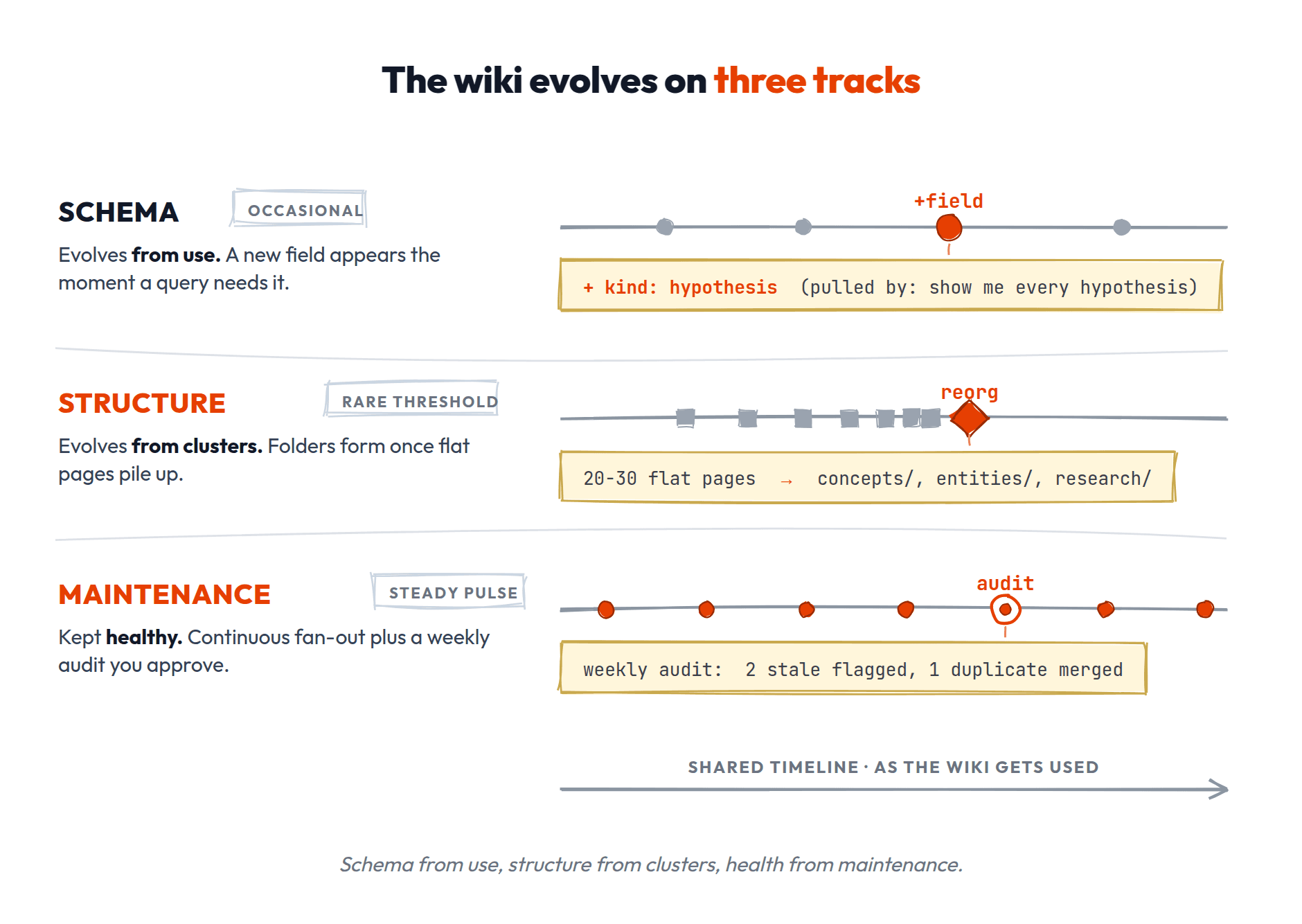
The wiki isn't a thing you design once and leave alone. It evolves as you use it. There are three kinds of evolution, on three different timescales:
- •Your schema evolves from use
- •Your structure evolves from clusters
- •Maintenance keeps the whole thing healthy
Your schema evolves from use.
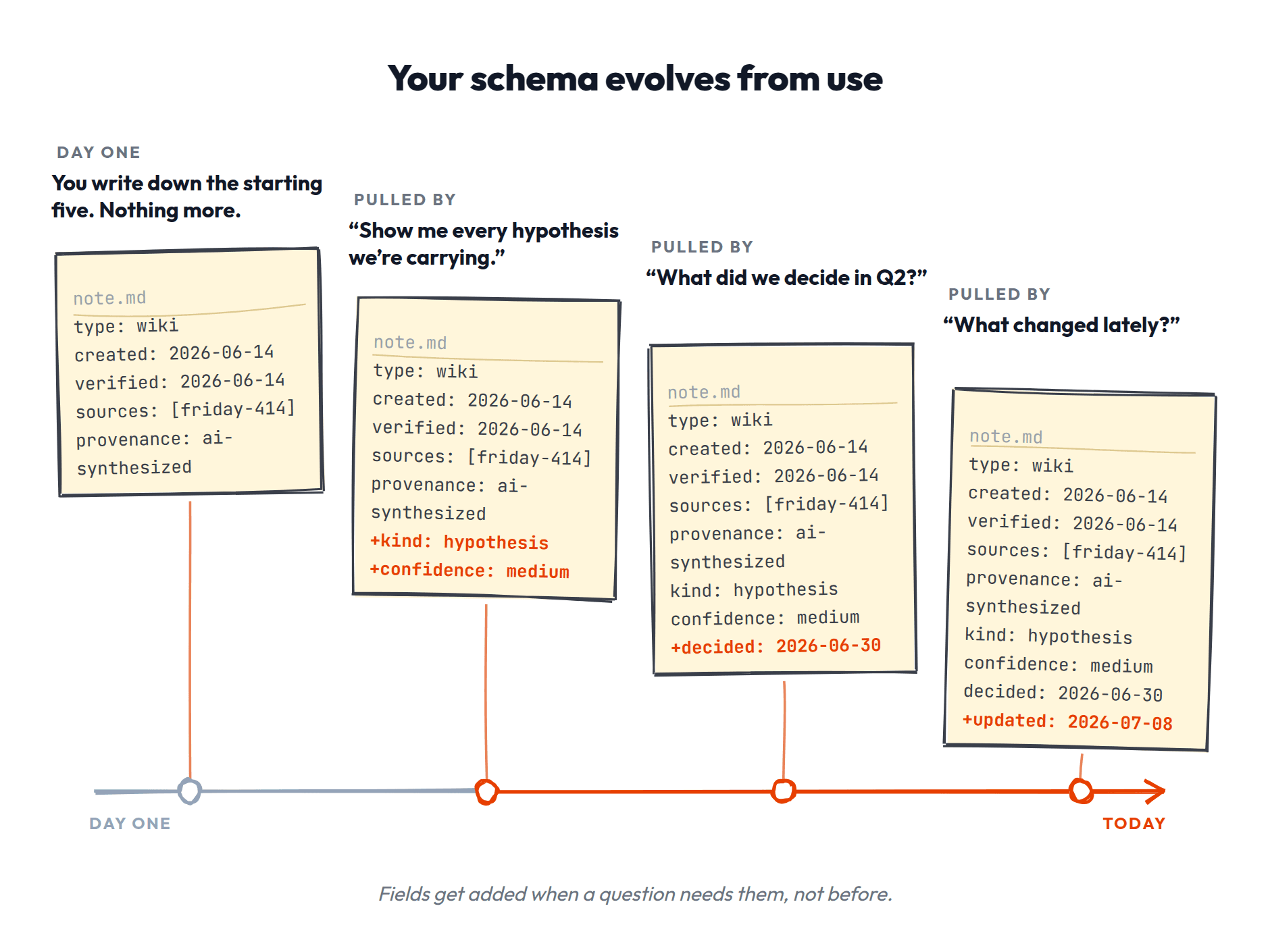
Quick definition: a "schema" is just the set of fields you've decided to use in your YAML frontmatter. It's the template for how your files describe themselves. You already have one if you followed the five starting fields above; type, created, verified, sources, and provenance are your schema.
The schema file (your CLAUDE.md or a dedicated operating-instructions doc) tells the LLM how the wiki is structured, what conventions to follow, and how to run the operations. You and the LLM co-evolve this over time as you figure out what works for your domain.
Beyond the five starting YAML fields, add structure only when a real query need pulls it into existence:
- •You've logged several hypotheses and want to see them all at once → add
kind: hypothesisandconfidence:to those pages, add a rule so future hypotheses get tagged consistently. - •You want "all decisions from Q2" → add
decided: [date]to decision pages. - •You realize you keep looking for "what changed" → add
updated:so the agent can sort by recency.
Each step was pulled by a real need, not pushed by a design exercise. The system worked fine before each step. It just couldn't answer that specific cross-cutting query yet.
Trust the system here. If you find yourself designing a taxonomy before you have pages, stop. Write the pages, and the structure will tell you what it is.
Your structure evolves from clusters.
The wiki starts flat: all pages in one folder, one index. That's fine for your first 20-30 pages. But at some point you'll notice clusters: a dozen pages about competitors, a handful about your tech stack, a few about user segments. When the pattern is obvious, act on it:
- •Add sections to the index that group related pages (competitors, systems, research).
- •Optionally add subfolders that mirror those sections (concepts/, entities/, research/).
- •The grouping follows the types you've been using in your YAML, so it's a recognition of what already exists, not a new design exercise.
The index literally grows headings:
## Competitors
- [[acme-onboarding-strategy]] — Checklist-first onboarding; gains came from removing steps.
- [[acme-pricing-moves]] — The Q2 price drop and what drove it.

## Our systems
- [[auth-system]] — How our auth actually works, including the SSO edge cases.
The rule of thumb behind when to do this: no single scan should present the agent with more than ~15 choices. A flat 25-line index is fine; a flat 60-line index means the agent is scanning undifferentiated options, and that's the moment headings earn their keep.
Don't do this preemptively. You'll guess wrong. Let the pages accumulate and the structure will reveal itself.
Your wiki stays healthy through maintenance.
Maintenance comes down to three habits. Two of them are already built into how the wiki works; the third is the one you actually schedule:
- •Dates on everything: the search skill always weighs freshness and warns when something's old.
- •Fan-out auto-updates: when you ingest new material, touched pages get updated automatically. Most maintenance is continuous and invisible.
- •And one new one: a weekly consolidation audit. This is a skill-run check that produces a human review queue. It changes nothing on its own; it surfaces findings with a proposed action you approve or reject:
- –Stale pages (oldest
verified:first) → re-verify, refresh, or archive - –Contradictions between pages → reconcile, or keep both with a note
- –Duplicates → merge
- –Orphans not linked from anywhere → link in or archive
- –Index drift (a page's summary sentence and its index line disagree, or entries point at moved files) → fix the index
- –Schema gaps (missing required frontmatter) → fill in
- –Overgrown index → compress first (one line per entry, merge, drop stale), split into sub-indexes only after that
- –Stale pages (oldest
Two rules make the audit livable. First, the freshness rule: every stored fact is timeless, dated, or a pointer — nothing may claim to be current without a stamp. "The pipeline has 13 open deals" is the illegal sentence: it becomes a lie next Tuesday while still reading as truth. Write "13 open deals as of July 29," or point at the system that knows. The audit then has exactly three verbs for anything flagged: re-observe it, convert it to a dated fact, or retire it.
Second: archive, never delete. Retiring a page means moving it to wiki/archive/ and dropping its index line. The index stays tight, but grep still finds the page — which matters, because knowing what you decided NOT to believe is knowledge too.
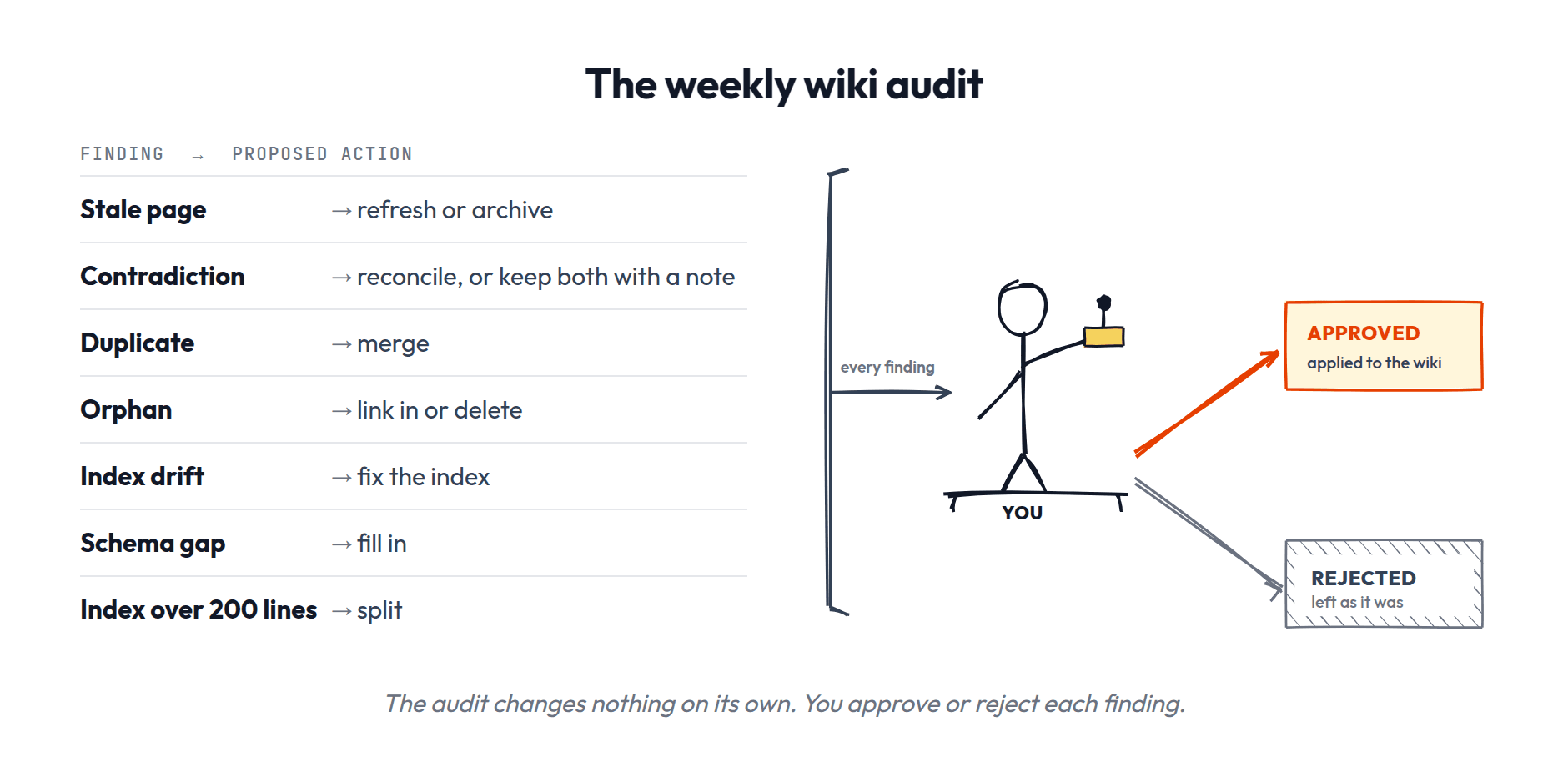
The audit earns its keep because fan-out only touches pages related to what you're actively ingesting. A competitor page from Q1 might sit untouched through Q2 and Q3 if you're not doing competitive work. A hypothesis you logged might never get revisited unless you specifically test it. The audit catches what the fan-out misses: the stuff that's drifting because nothing new has touched it.
HOW IT ALL FITS TOGETHER
At long last, we have our memory system! We've got a way to capture working docs we actively need, and a knowledge graph for all the things we might want to remember in the future. Now let's see how the two work together in practice. Nothing in this section is new machinery; it's the pieces you just built, running one real session.
Let's get back to our 6 questions and answer them for this system:
- •What information could be remembered?
- •What should be?
- •Where and how is it stored?
- •How is it retrieved?
- •Once retrieved, how is it used?
- •How is it maintained over time?
We'll walk through a real session end to end to answer all of them, using the same example we've been using all along. The story plays out in quote blocks like this one:
You sit down to analyze last week's experiment.
What comes in (retrieval + use)
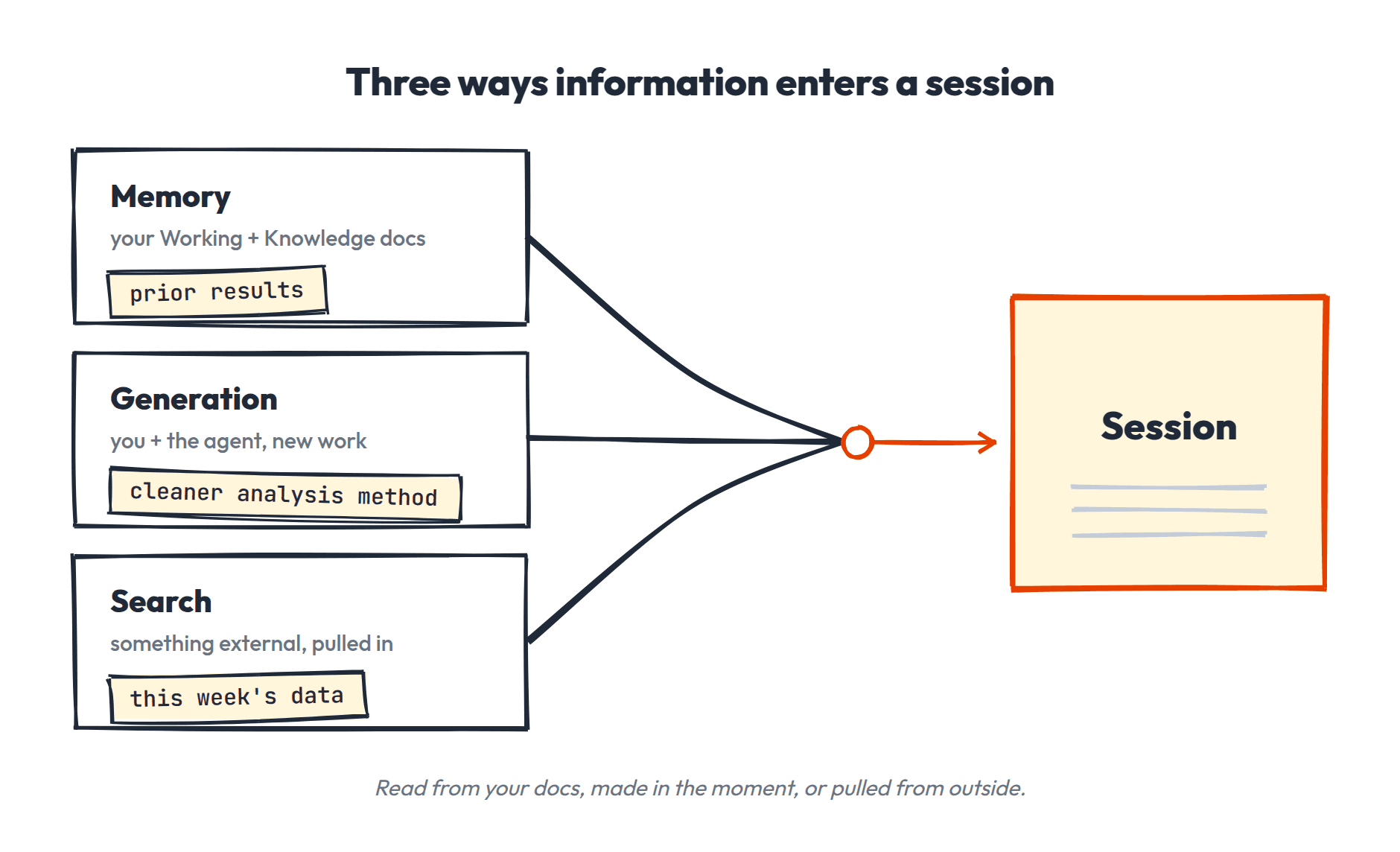
Things enter a session three ways:
- •From memory: the agent reads the relevant Working docs and Knowledge docs. It hits the index, picks pages from descriptions, reads them, follows wikilinks. Once a page is read it's in the context window from then on.
- •From generation: you and the agent produce something new in the work itself.
- •From search: you pull in something external.
Example: the agent reads the project, the analysis workflow, and the prior results (memory). You pull this week's data (search). Together you work out a cleaner analysis method (generation).
What could go in (triggers).
You're not hunting for things to remember. The work throws them off.
Four triggers cover almost all of it:
- •Corrections: you fixed how the agent did something and want it to stick.
- •Moments: something happened worth preserving.
- •Gaps: the agent didn't know something it should have.
- •Maintenance: you notice something already stored is now stale or wrong.
In the session: the improved analysis method (correction), the result itself (capture), and the fact that it undercuts a hypothesis logged last quarter (a capture that's also a conflict). And halfway through, the agent confidently used the wrong sample-size convention because it had never been written down anywhere (gap). Four candidates.
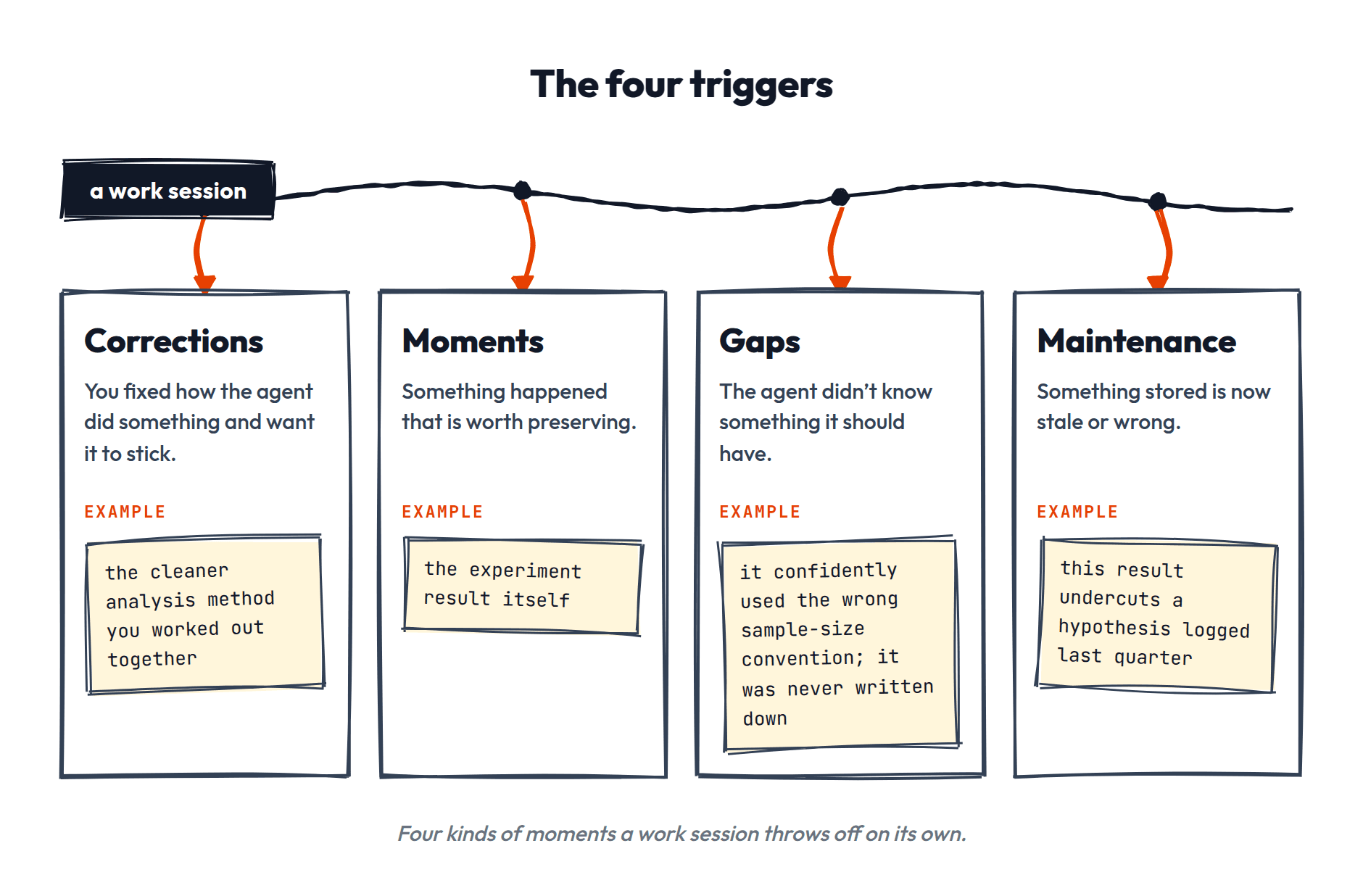
Capture in the moment: what actually makes the writes happen.
Triggers don't file themselves. Something has to actually run the write, or you've built a beautiful empty folder structure.
The primary path is capturing in the moment. You hit a trigger mid-session — the correction lands, the surprising result appears — and you say so: "capture this." The agent does the full job right there: finds the fact's home, tends the neighboring pages it touches, proposes the exact write, and lands it on your confirmation. Not a scratch note to process later — the real write, while the context is hot. Five seconds of your attention, because you were standing right there anyway.
And when you forget — you will — nothing is lost. Your session transcript is sitting on disk, so an after-the-fact harvest can mine it: walk back through the work, list the trigger moments (the four above are literally its checklist), and propose writes for your review. That's the whole rhythm in one sentence: in the moment, you confirm and it writes; after the moment, it proposes and you review. The floor of this system is "missed but recoverable." Compare auto-memory's floor, which is "clean but wrong" — one audit of ChatGPT's stored memories found roughly 60% junk.
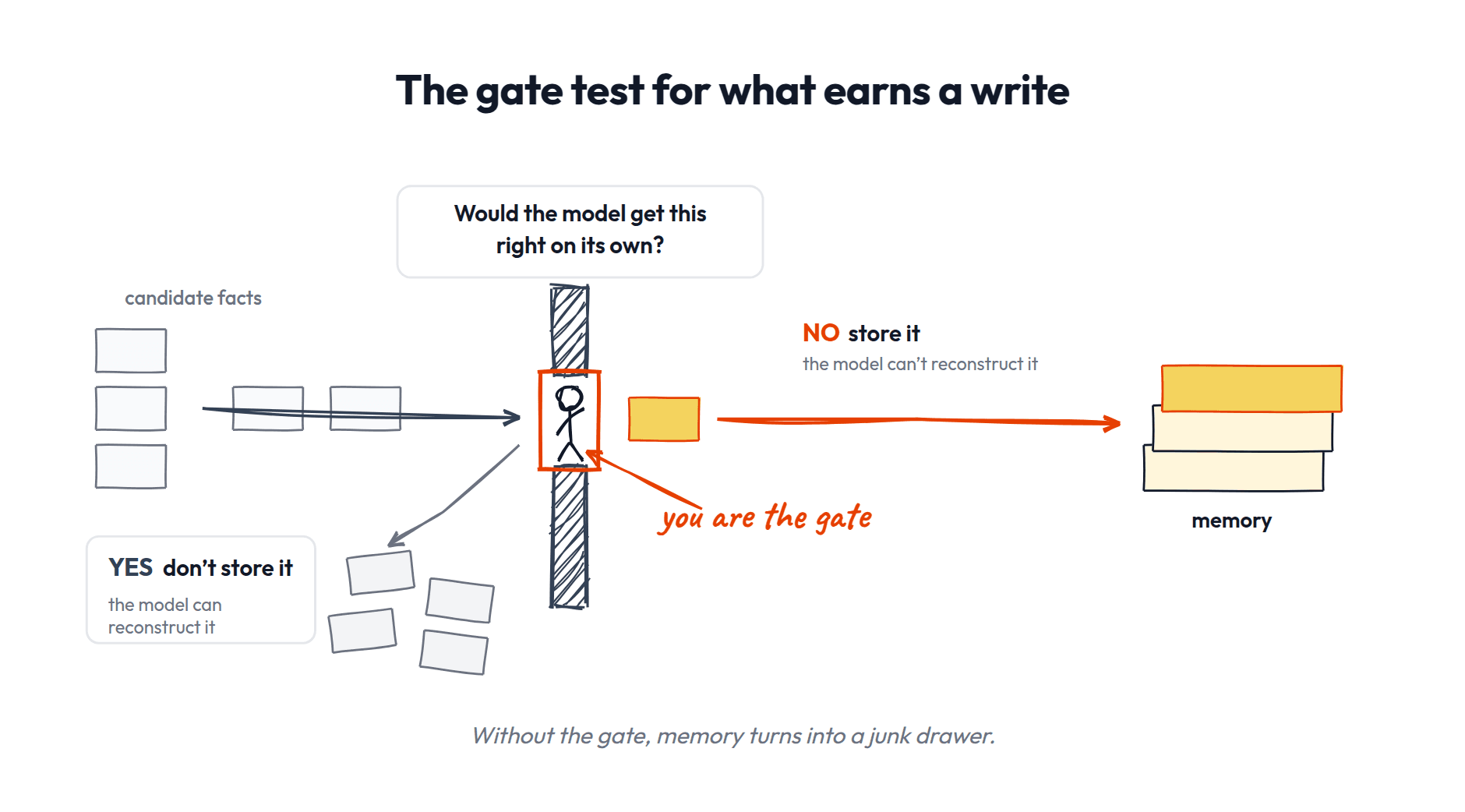
What should go in (the gate).
Not everything that could, should. The "signal gate" decides whether a write happens or stays silent. Think: would the model get this right on its own, from its general capability plus the context already in the docs? If yes, store nothing. You store what the model can't reconstruct.
In this system you are the gate: the curation pause. Capture and harvest propose what to keep; you approve before anything is written.
Skip the gate and your memory turns into a junk drawer. We've all had that one drawer. You know what's in there? Nobody knows what's in there. That's your wiki in six months if everything goes in unfiltered.
In the session: the method improvement, the result, the hypothesis update, and the sample-size convention clear the gate. The routine run details don't.
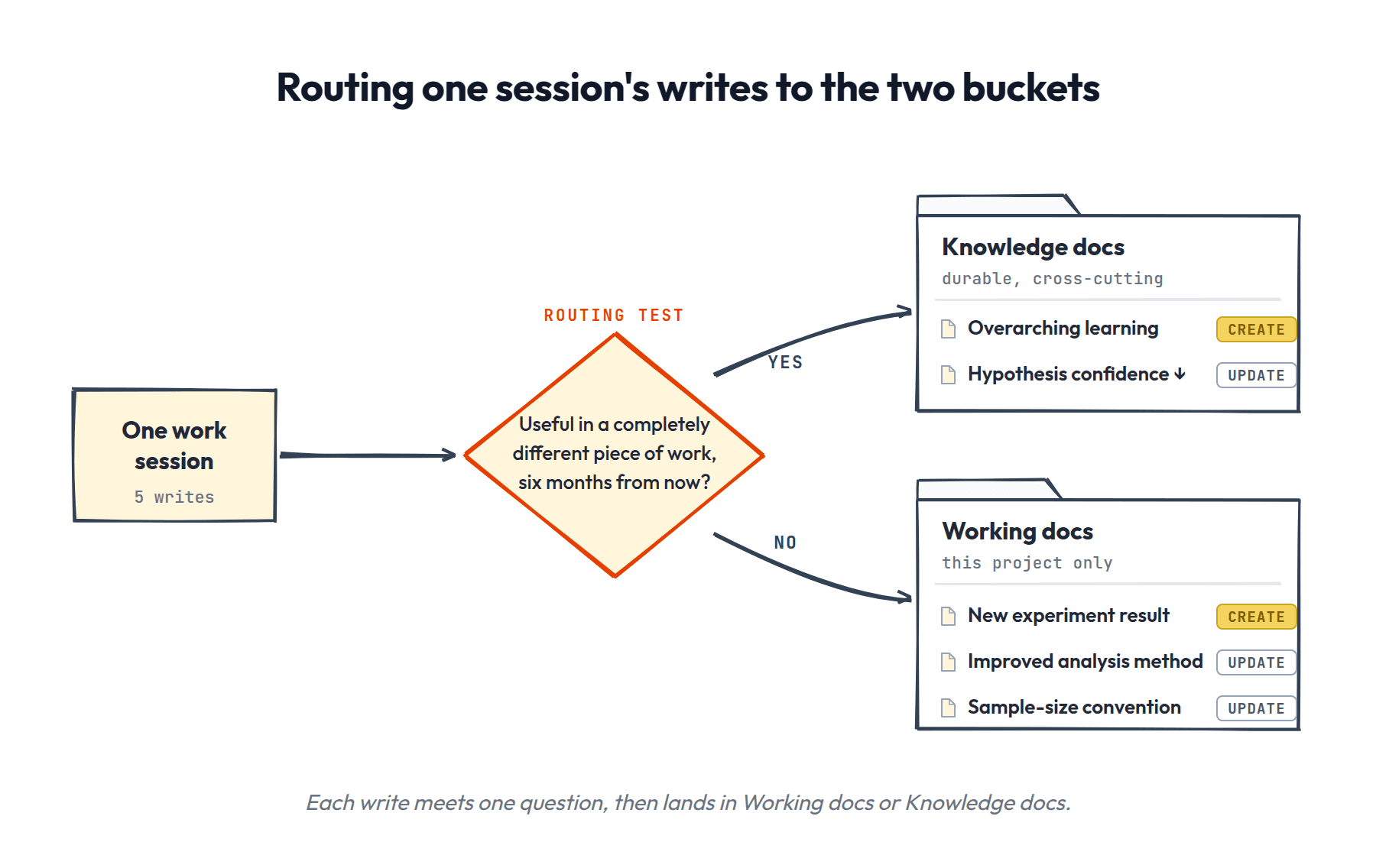
Where it goes (storage + routing).
For the things that should go in, simple checks route them:
- •Is it about this specific piece of work, or a recurring subject (a tool, a concept, a competitor, a durable hypothesis)?
- –This-work → Working docs.
- –Recurring-subject → Knowledge docs.
- –The quick test: would this be useful in a completely different piece of work six months from now? If yes, it's Knowledge docs. If it only matters for this project, it's Working docs.
- •One home per fact: a fact lives in one canonical place, and other docs link to it instead of copying it.
A write is create, update, or archive, not always a new file.
The experiment session writes five things across both buckets:
- •The result is filed in the project → Working docs, create.
- •The improved method updates the analysis workflow → Working docs, update.
- •The sample-size convention gets written into the analysis workflow where it should have been all along → Working docs, update.
- •The overarching learning goes to a concept page → Knowledge docs, create.
- •The weakened hypothesis gets its confidence updated on its own page → Knowledge docs, update.
How it compounds over time.
This is the real payoff and it's hard to see until you've been using it for a few weeks. At first you're just writing things down. But then a session pulls in three Knowledge docs you wrote months ago and the agent makes a connection between them you didn't see coming. Or you start a new project and the agent already knows how your auth system works because you documented it during the last project. Working docs make today's work better. Knowledge docs make future work better. And what the agent knows creeps closer to what it needs to know with every session.
The maintenance loop closes.
Weeks later, the audit fires and surfaces the hypothesis you weakened. It asks whether to downgrade or retire it. You decide. That's the loop closing: a write from one session gets reviewed in a later maintenance pass, and the knowledge stays trustworthy.
The zoom-out.
Step back and look at what that session actually was: information could have been remembered (the triggers), a filter decided what should be (the gate), it was stored in one of two homes (the routing), it came back through the index (retrieval), it shaped the work (use), and the audit will revisit it (maintenance). The six questions, in motion, in one ordinary work session.
Those six questions ARE agent memory. Claude's built-in memory, Codex's memory, every fancy memory startup, the team memory system you'll eventually want: all of them are just different answers to the same six questions. You now have a lens that works on every memory system you'll ever evaluate. When someone demos you a memory product, you know exactly what to ask: who's the gate? Where does it store? What maintains it?
So what do you actually have now?
A folder structure your agent can navigate. A knowledge graph that gets smarter every time you feed it something. And a set of habits (capture, the gate, the ingest, the audit) that keep the whole thing from rotting.
Remember the four blockers from the intro?
- •Stateless → CLAUDE.md and the index: every session starts already knowing where everything is
- •Buried → compiled pages and routing: information lives in one findable home instead of scattered across five tools
- •Limited → the gate and the lean index: only what earns its place gets loaded
- •Expensive → the agent reads three relevant pages, not three hundred logs
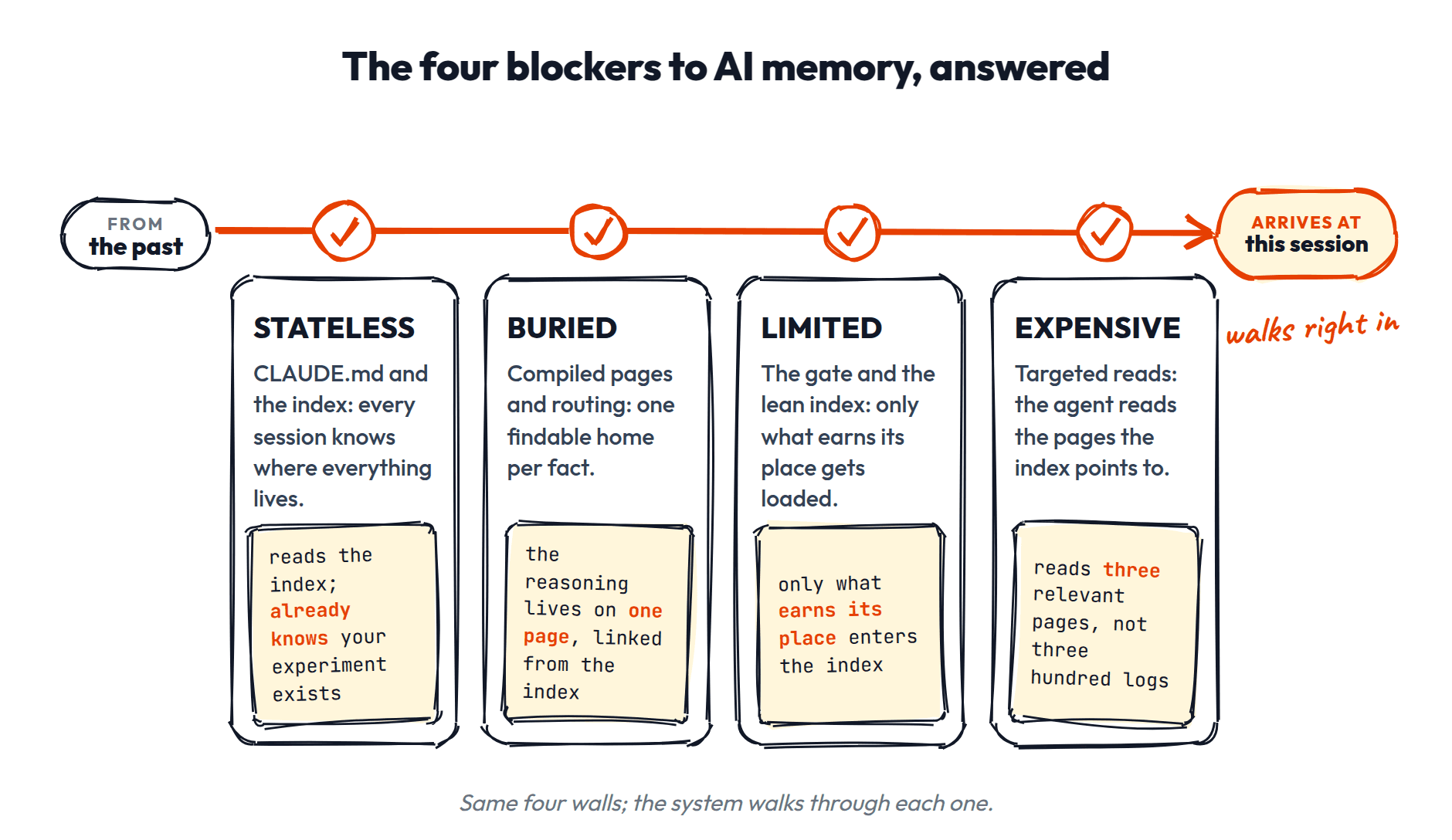
The whole system is plain files, organized well, with an AI that knows where to look. You could rebuild it from scratch in an afternoon.
SO WHAT WAS THAT THING FROM THREE WEEKS AGO?
Remember the question from the beginning? Your boss actually asked you two questions at once, and they're not the same kind of question. "Why did we decide to roll out that onboarding feature?" is about a specific piece of work. "Isn't this the exact same feature as our competitors?" is about durable knowledge of the market. In 2024, both questions sent you spelunking through five tools.
The two halves of the question map exactly onto the two halves of the system. The decision lives in Working docs. The competitor knowledge lives in Knowledge docs. Your boss accidentally designed the architecture.
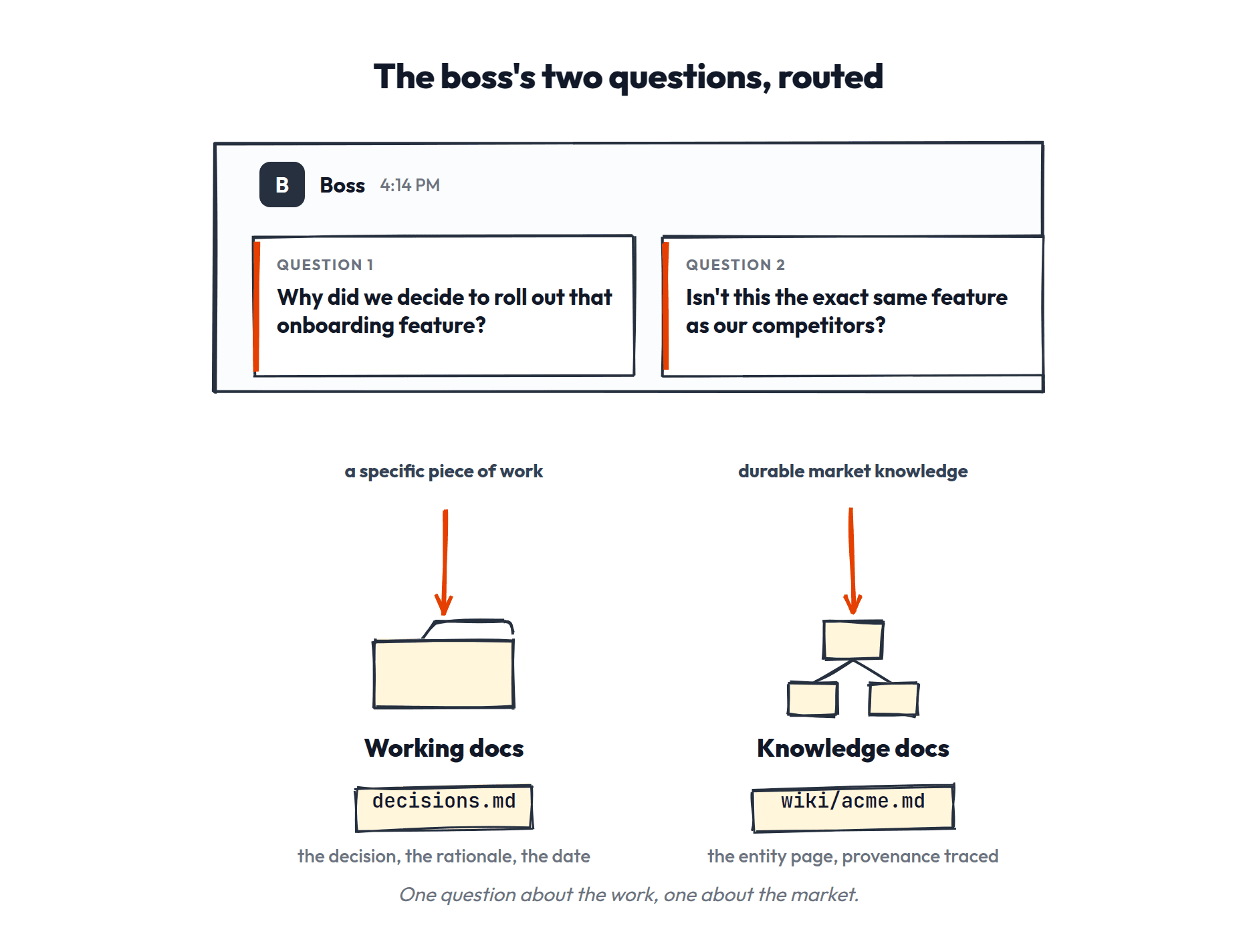
Here's how the system handles real recall, and which of the four payoffs from the intro each one delivers:
| what you need to know | how the system finds it | the payoff |
|---|---|---|
| "What was the decision we made about the onboarding flow?" | Agent reads the index → finds the onboarding project in Working docs → the decision is there with its rationale and date. | always has the right context |
| "What did we learn from that competitor teardown?" | Agent reads the wiki index → finds Acme's entity page → compiled findings with provenance traced back to the raw teardown in raw/. | always learning |
| "Why did we change the analysis method?" | Agent finds the analysis workflow → the changelog entry explains the reasoning → traces to the experiment that motivated it. | never repeat yourself |
| "What hypotheses are we currently testing?" | Agent greps YAML for kind: hypothesis → returns the list with dates and confidence levels. | surfaces contradictions |
It's Friday, 4:14pm, 2026. The Slack message arrives. You type one sentence to your agent, and thirty seconds later you paste back the decision, the date, the reasoning, and the competitor comparison with a source link. Then you crack open the cold one.
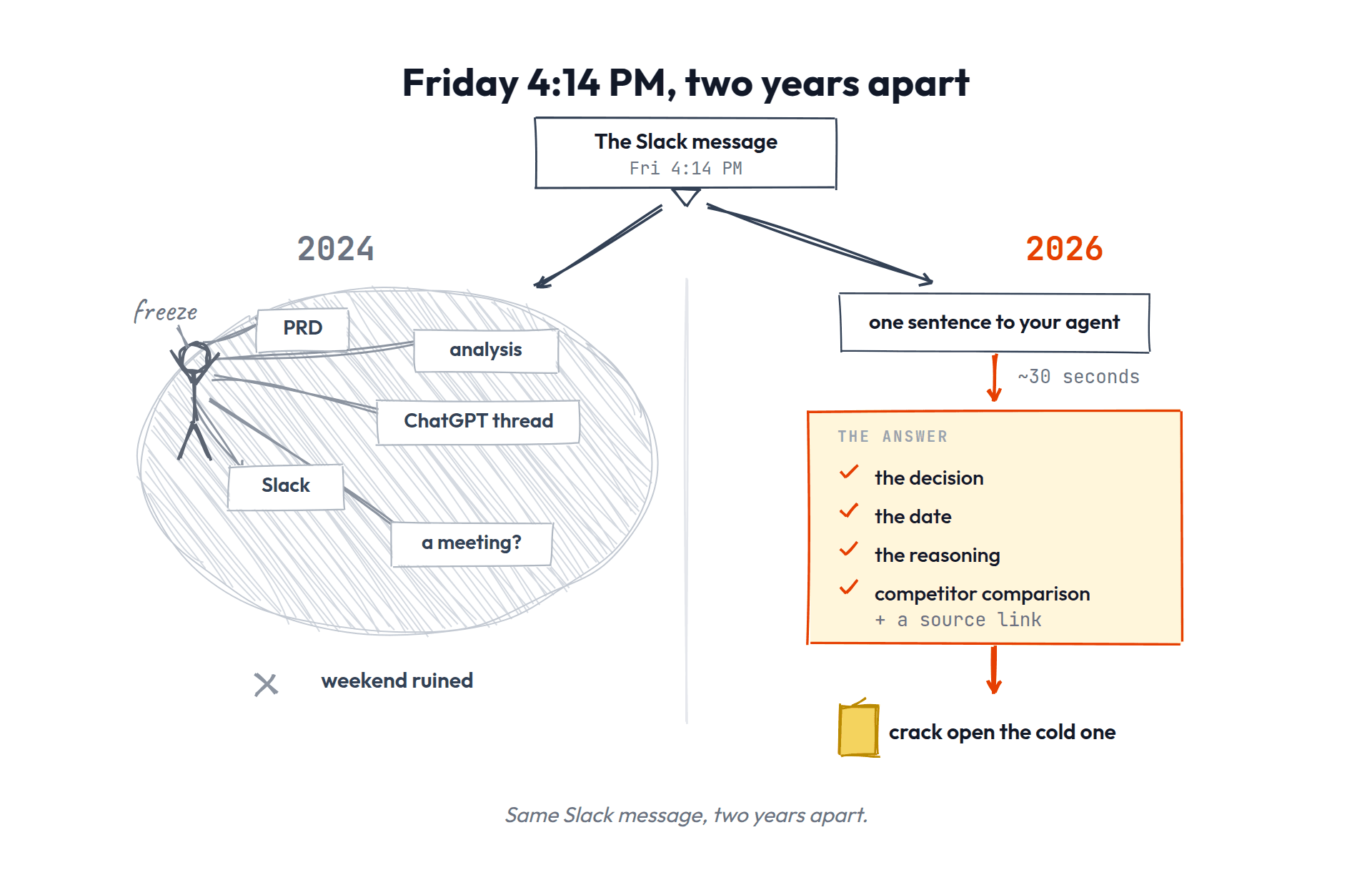
Other systems answer these questions differently: auto-memory shifts who controls what gets written and filtered; a graph database changes how things are stored and retrieved. Same questions, different answers. That's what the next pieces are about.
GETTING STARTED
The cold start problem. Every new system starts empty, and an empty system is the easiest thing in the world to abandon. So don't start with the system; start with today's work and let the system grow out of it.
Don't backfill. Do not spend a weekend feeding 200 old documents through ingest. You'll burn out, the wiki fills with context-free summaries, and you'll conclude the system doesn't work. Migrate today's state; old material surfaces through current work, and when it does you'll actually have the context that makes ingesting it worth anything.
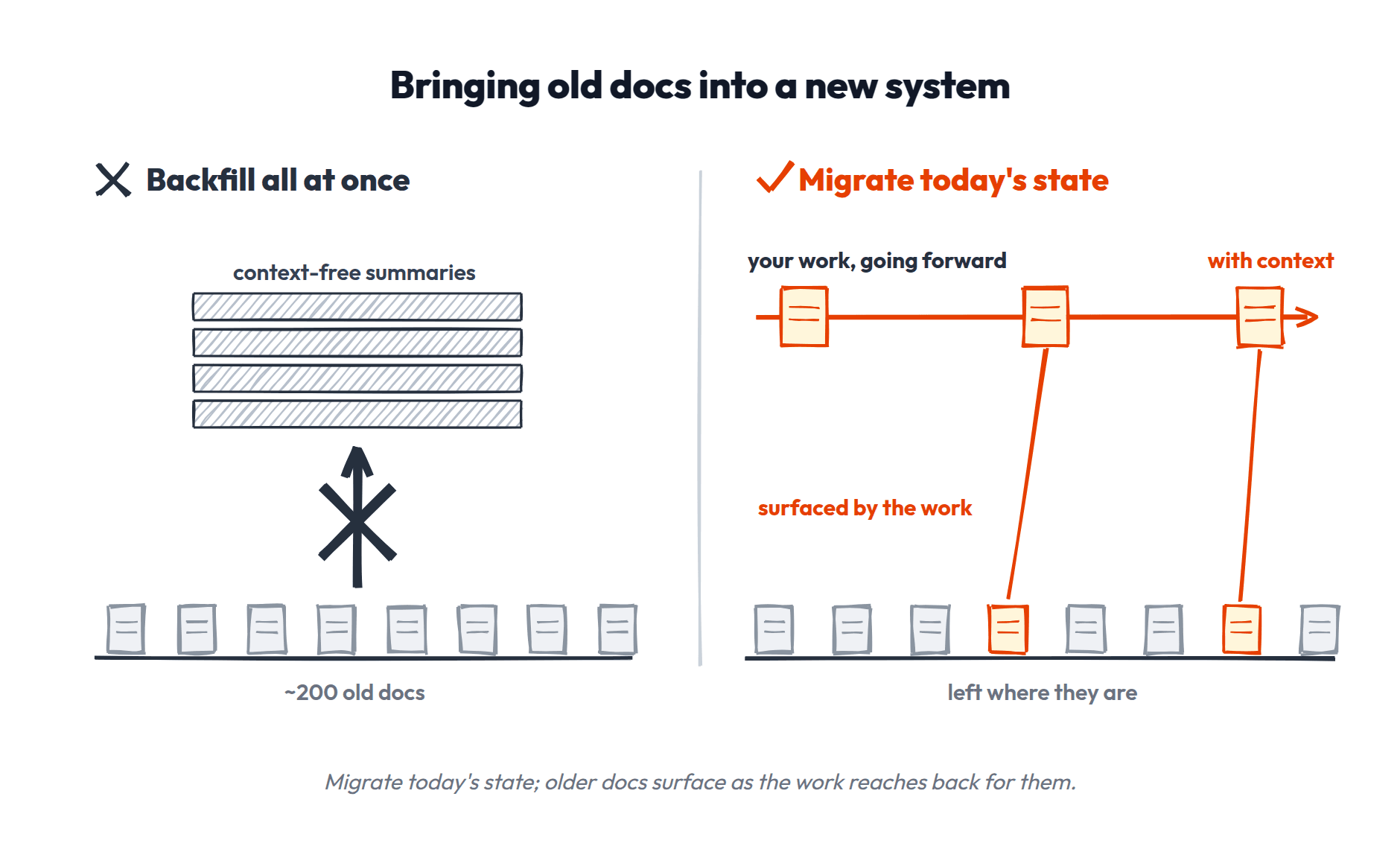
The fastest way in: install it. Everything this piece taught is packaged as free skills. Paste this to your agent — works in Claude Code, Codex, and Cursor:
Install the fullstackpm CLI via npm and use it to add wiki-skills and docs-audit to this workspace, check fullstackpm.com/cli for details if needed
Then, in order:
- Organize your space. Run
/docs-audit. It checks whether your context file is an index or a filing cabinet, then reorganizes your workspace into project and workflow folders with you. - Stand up the wiki. Run
/wiki-setup. Folders, index, the five starting fields, and the map line in your context file. - Use it.
/wiki-capturein the moment ("capture this"),/wiki-harvestto sweep a finished session,/wiki-ingestfor articles and transcripts,/wiki-reviewonce a week.
Want the guided version?
Full Stack AI Mastery includes the interactive version of this article: three lessons that run inside your own agent, where you build and drive this exact system hands-on, and a snazzy certificate when you finish.
After you join, paste this in your agent: fspm add agent-memory — then run start-memory-1.
$200/year until Tuesday, August 11, then $300 → fullstackpm.com/mastery
The memory system is free to install. The guided practice and certificate is Mastery.
FREQUENTLY ASKED QUESTIONS
How do I get version history, or undo a bad write?
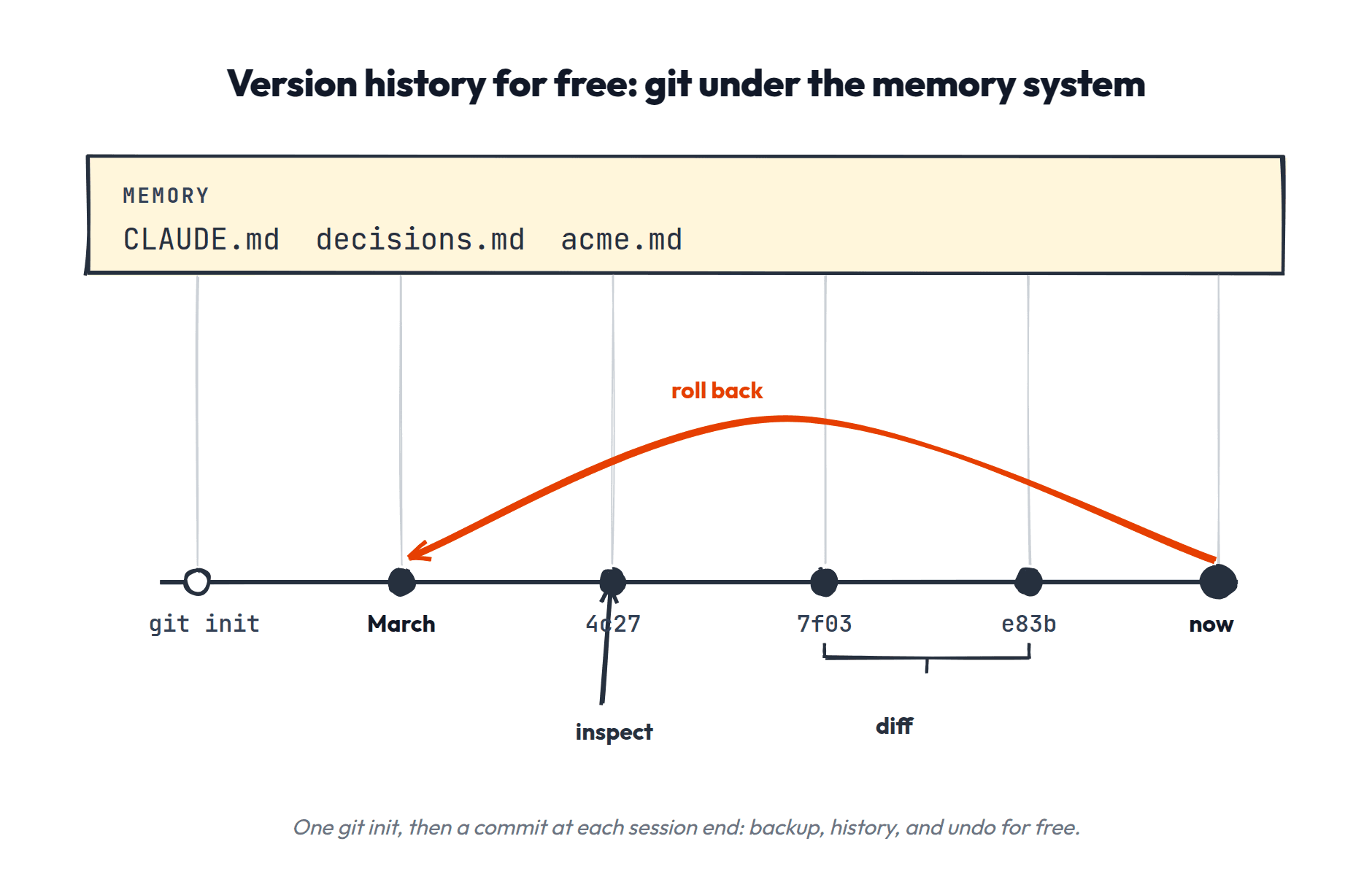
Git gives you backup, history, and undo for free. Every change to memory is a saved version you can inspect, compare, or roll back. It's also how you read a doc's past ("what did this look like in March") without keeping a manual changelog.
Never used git? You don't need to learn it. Tell your agent to set it up once and to save a version at the end of each session (or add a rule so it happens automatically). The agent handles all the commands; you just get the time machine.
How do I work across multiple repos?
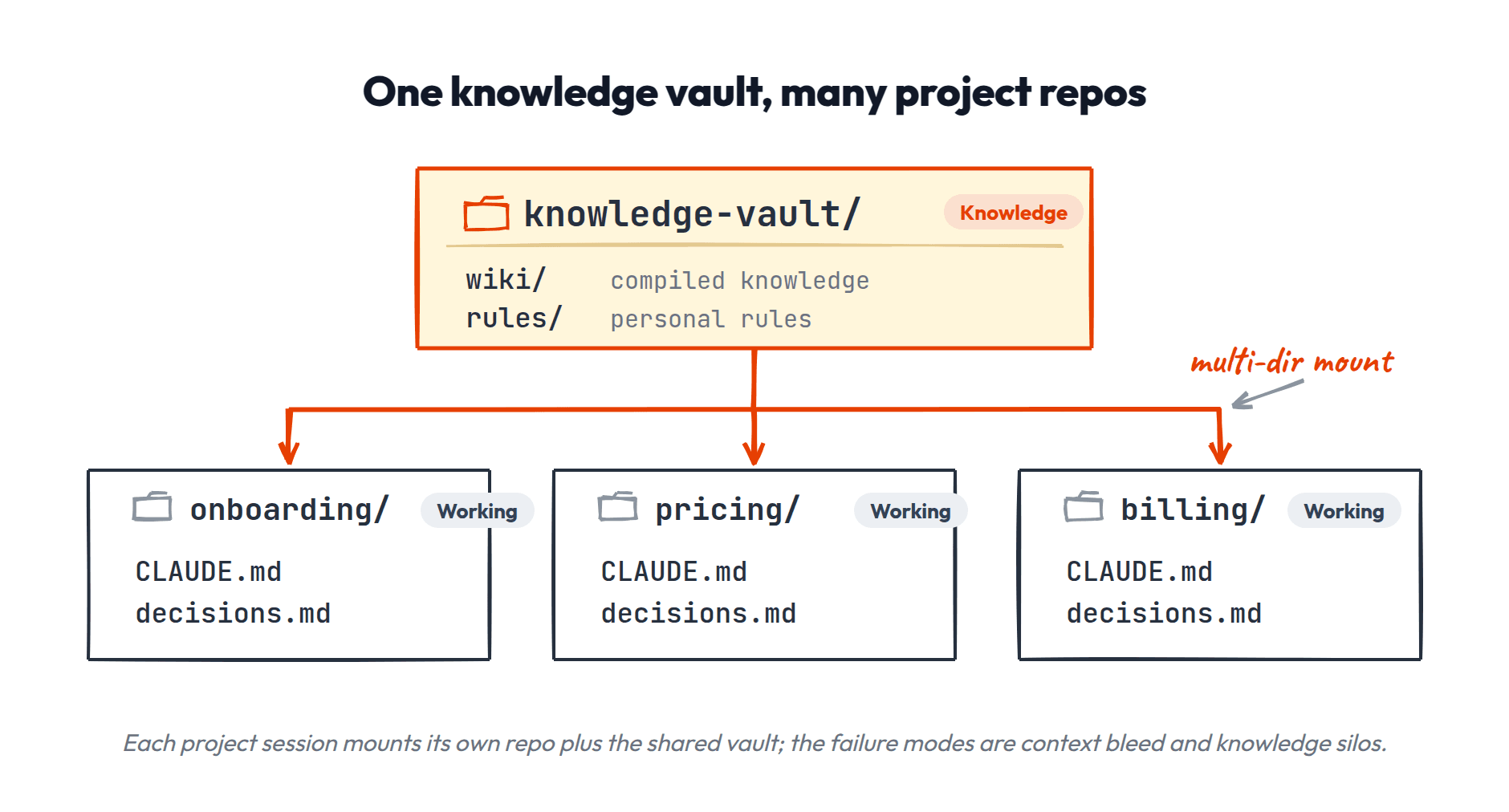
The problem: a central set of Knowledge docs plus per-project Working docs. How does the agent see both?
Hub-and-spoke: one central vault (your Knowledge docs and personal rules) plus per-project repos (each with their own Working docs and CLAUDE.md). Wire it with your tool's multi-directory feature (--add-dir in Claude Code, or point the agent at both paths), or with symlinked rules pointing at a shared source.
What goes where: project decisions stay in the project, durable learnings go to the Knowledge docs, personal preferences go in your global config. The two failure modes to avoid: context bleed and knowledge silos.
What happens as it grows, and when do I outgrow it?
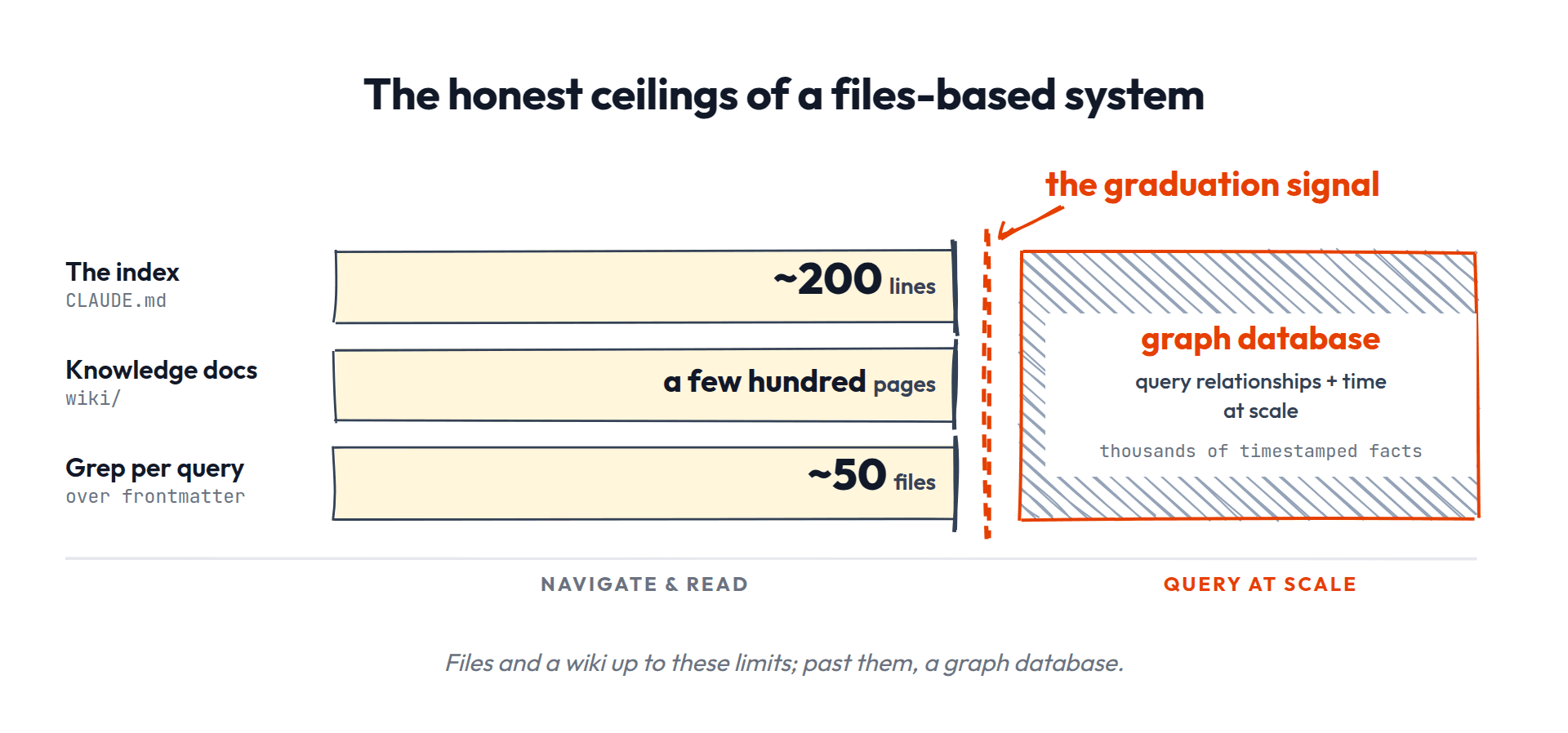
The real ceiling isn't file length, it's branching factor: no single scan should present the agent with more than ~15 choices. Keep roughly one line per page, ~10-15 lines per section, ~10-12 sections, and you land at the familiar ~200-line index almost by arithmetic — which also means an index that size holds about 200 pages, one line each.
Why small matters more than you'd think: it's about accuracy, not token cost. A 2025 EMNLP study found model performance drops 13.9-85% as input grows even when retrieval is perfect — even padding with whitespace hurts. Your always-loaded index is a permanent tax on every session's actual work, not a cheap table of contents.
When it grows, there's a ladder, and most people should stop at step three:
- Compress — one line per entry, merge near-duplicates, drop stale lines.
- Filter — archived pages leave the index (but not the repo).
- Partition — section headings, like we built above.
- Shard — a separate cluster index in its own folder, root keeps one line pointing at it. Only when a section still has 15-20+ entries after compressing, clusters naturally, AND whole sessions live inside that cluster. Two levels deep, maximum.
And remember grep is the safety net under all of it: a missing index entry costs a slower search, not a lost page. The index is an accelerator, not the system of record. (Honest flag: nobody has published flat-vs-nested measurements for LLM agents specifically — this ladder is converged practitioner consensus, including Anthropic's own agent-memory design, which is exactly this shape: an index file, topic files, a hard cap, and compress-before-shard.)
The graduation signal is navigate-vs-query. Your wiki is a graph you navigate by following links. What you don't have is a graph database, a graph you query with an engine, with time built in. When navigating and reading stops being enough and you genuinely need to query relationships and time at scale (thousands of timestamped facts), that's when a graph database earns its complexity. That heavier system is a future piece.
How do I handle non-text content? (images, charts, data tables from PDFs)
For academic papers and reports with figures: run the PDF through a converter like Marker (best for papers with math, needs GPU) or Docling (best for tables and layouts, runs on CPU). The converter produces markdown with tables inline and extracted images as separate PNG files.
File both in raw/ alongside the source. During ingest, the LLM reads the markdown first (gets text and tables), then views the extracted images separately. Modern multimodal LLMs can read the PNGs and describe what they show.
In the compiled wiki page you get: text findings as prose, tables preserved as markdown tables, and figures either referenced as images or described in text.
The honest limitation: charts get extracted as images, not raw data. The LLM can describe what a chart shows ("Figure 3 shows a linear increase from 2020-2024"), but can't reconstruct the underlying dataset. If you need actual data points, extract them manually or use Docling's chart-to-table feature for simple charts.
WHAT'S NEXT
- •Agent automemory: the same questions, but the agent controls what gets written and filtered. The production architectures and their failure modes.
- •Team memory: the same questions, across people. Shared patterns, merge conflicts, the single-writer problem.
- •Building products with memory: the same questions, applied to features you ship.