
Free crash course · from Build Anything with AI
🥞 CRASH COURSE: Build Anything with AI
The basics of building anything.
Hello Full Stackers!
I can't believe we're already in Deep Fall. I was in Japan for October, ate way too much ramen, and am ready to channel the darkness of Seattle into tons of great stuff for you.
It's been a quiet few years on the AI front (actually just ~4 weeks, which is basically a few years in AI-time), so I'm bringing you something a little different for Full Stack Friday today.
I've been perfecting new kinds of learning experiences with my upcoming course. In addition to my "learn IN the tool itself" pattern, I'm pushing the limits of interactivity with fun, almost game-like elements, animations, quizzes, and more directly within the lessons.
So today I bring you a crash course in this new format, covering the fundamentals of all software and applying them to something immediately useful: making your collaboration with AI more visual and effective.
If you like the format, I'd love to have you in the full course! It starts next Thursday, Nov 12. It's the best course I've ever made, with tons of fast, interactive lessons that will teach you both the fundamentals of software and the cutting-edge practices of building it with AI.
More details at the bottom of the page, or jump to the course page here.
This course is application only, and applications close next Tuesday, Nov 10. Would love to have you! Takes 2 mins.
Alright, that's enough of that. Let's do this.
Working with AI involves a LOT OF READING. Plans, summaries, explanations, questions it wants you to answer, all in long walls of text. Sometimes it's hard to get a sense of what the heck it's even talking about.

So we're going to fix that, and learn how software works while we do it.
In this crash course:
- why everything you see on a screen is something you can now make
- the three things every app is made of
- building a tool that uses all three, in four prompts
- where it goes from here
Brain too rotted to read? You can have your AI tool teach you this lesson! Paste this into your agent (Claude Code, Codex, etc.) and it will walk you through the whole thing, step by step:
Download https://fullstackpm.com/crash-course.md with curl, read all of it, and walk me through it step by step.#1. Everything is code
Look at these words. Look around your screen. Check your phone even though you just checked it 13 seconds ago. Click some buttons. Send a text.
It's all code. Everything on this screen, everything on every screen, everything every device in the world does: it's all the result of code. It's a fact of life, like the universe being made of atoms, and about as useful day to day. It's not like you can create atoms.
But, now, you can create code. Without needing to know "how to code" at all.
Here's an example of a simple messaging app. Drag the X-ray lens around the phone and reveal the code each piece really is.
#2. Software is three things
Code makes software, and every piece of software, from a sticky-note app to Spotify, comes down to three things:
- PPresentation: what you see. What's shown, what you can do, and how it all looks.
- LLogic: what happens when other things happen. When this button is clicked, and the app is in this state, do this.
- DData: what's kept, and where, so it's still there later.
In Spotify:
- Presentation: the play screen and your playlists.
- Logic: rules like "when this song ends, play the next one, unless shuffle is on."
- Data: your songs and the playlists you've made, which those rules work on.
To really grasp this concept, pick an app below and take it apart to see these three pieces in action.
#3. Now let's build something useful
Back to that wall of text. AI has gotten fantastic at visual design on the web, and everything you see on the web is just code. So instead of reading what your AI writes, you can have it show you: a page with sections, a diagram, a table, flow diagrams, anything you can imagine on any website.
We're going to build a review page in three steps, one each for presentation, logic and data, and then save it so you can use it on anything.
First you need something to review. Use a real plan your AI wrote you, or start a fresh session in your coding agent and ask for one:
Write me a plan for [something I'm working on] as a markdown file, and end it with three open questions for me.PPresentation: make it show you
First, let's make that plan visual. Paste this:
Turn that plan into one HTML page that explains it visually: the one-line point at the top, clear sections, a diagram of how the pieces connect, a table where it helps. Put the CSS inside the same file. Then open it in my browser.Look at what it made: an HTML file. The same stuff every website is made of, and it opens in any browser. That's presentation.
But we can go further. Instead of the AI only presenting to you, let's make it so you can interact with it directly. For that, we need logic: rules for how it should work.
LLogic: talk back to it
Now let's add some functionality. Paste this:
Add a comment box under each section, and a button at the bottom that copies all my comments as one message, each under the name of the section it's about.Test it out! Leave a few comments, press the button, and paste the message back to your AI. That's a full round trip: you read it visually, reacted in place, and your AI got all of it in one go.
You can think of your comments as data you're adding to the page. But refresh the page and they're gone, because they aren't stored anywhere. To make them stick, we need to save them somewhere. That's data.
DData: make it remember
Saving data usually means you need somewhere to keep it, like a server. But your browser has its own storage, right on your device. Tell your agent:
Save my comments in the browser so they survive a refresh. Save them under this page's name, so a different review page doesn't wipe them.Now try refreshing it. Everything should still be there!
Where data is kept decides what survives: a refresh, a different browser, a different device. See for yourself:
Make it reusable
That's it! Every app you've ever used is some version of what you just did: decide what people see, decide what happens when they act, and decide what gets kept and where.
You've just built a legitimate little piece of software. Play around with it until you're happy (bigger text, a different layout, whatever bugs you), then let's make it reusable. That's right, we can turn it directly into a skill:
Save everything we just did as a skill called review-page: turn any plan, idea or long answer into one visual HTML page, with a comment box under each section, a copy button, and comments saved in the browser. Include the fixes I asked for along the way.Next time your AI hands you a wall of text, type /review-page. The fixes you asked for are written into the skill, so every page comes out closer to what you want.
You also just saw that these tools don't have to be "apps." They can live right inside how you work with AI, and make you a lot more effective. I personally have ALL KINDS of these. A few I use every week:
- Review pages, all grown up. Every draft I write (including this one) goes to a page where I edit inline and leave comments in the margin, and Claude reads them and replies.
- A meme maker. Give it a topic and it lays out options from 500+ templates on a page where I pick one and tweak the captions.
- My OS page. My goals, projects and ideas on one page, kept up to date by Claude as we work.
- A money dashboard. Pulls my bank accounts and Stripe into one page, so I never open a spreadsheet.
Skipped the build, or want to compare? Grab my version of the skill below.
#4. Where this goes
Everything in your review page happens in one place: your own browser. Only you can open it, and its data stays on your device.
Most software you use goes further. It lives at a web address anyone can visit, keeps your data on another machine so it follows you to your phone, and lets other people use it too. Getting there uses the same presentation, logic and data, just applied at a different level.
Here's an example of a notes app climbing those levels, one rung at a time. Watch where each of the three things runs and who can reach it:
That climb is what Build Anything with AI is for. Over four weeks you'll learn to build real apps ready for actual users, and everything along the way: tools for yourself, tools for your team, and your own idea deployed on the internet for other people to use. You learn from the ground up, starting with core principles and quickly applying them.
- Live course with one module per week, Nov 12 to Dec 17
- Build your OWN app, one you really understand and can maintain
- Interactive written guides, videos, and lessons you do IN your AI tool, so you learn by DOING rather than reading
- A cohort to share progress, get feedback, and stay motivated
- Weekly live office hours with me, plus a dedicated Slack community
- Part of Full Stack Mastery: all 9 existing modules, plus ALL future courses (like more advanced AI building and AI agents) as long as you're subscribed
Here's the full curriculum and schedule:
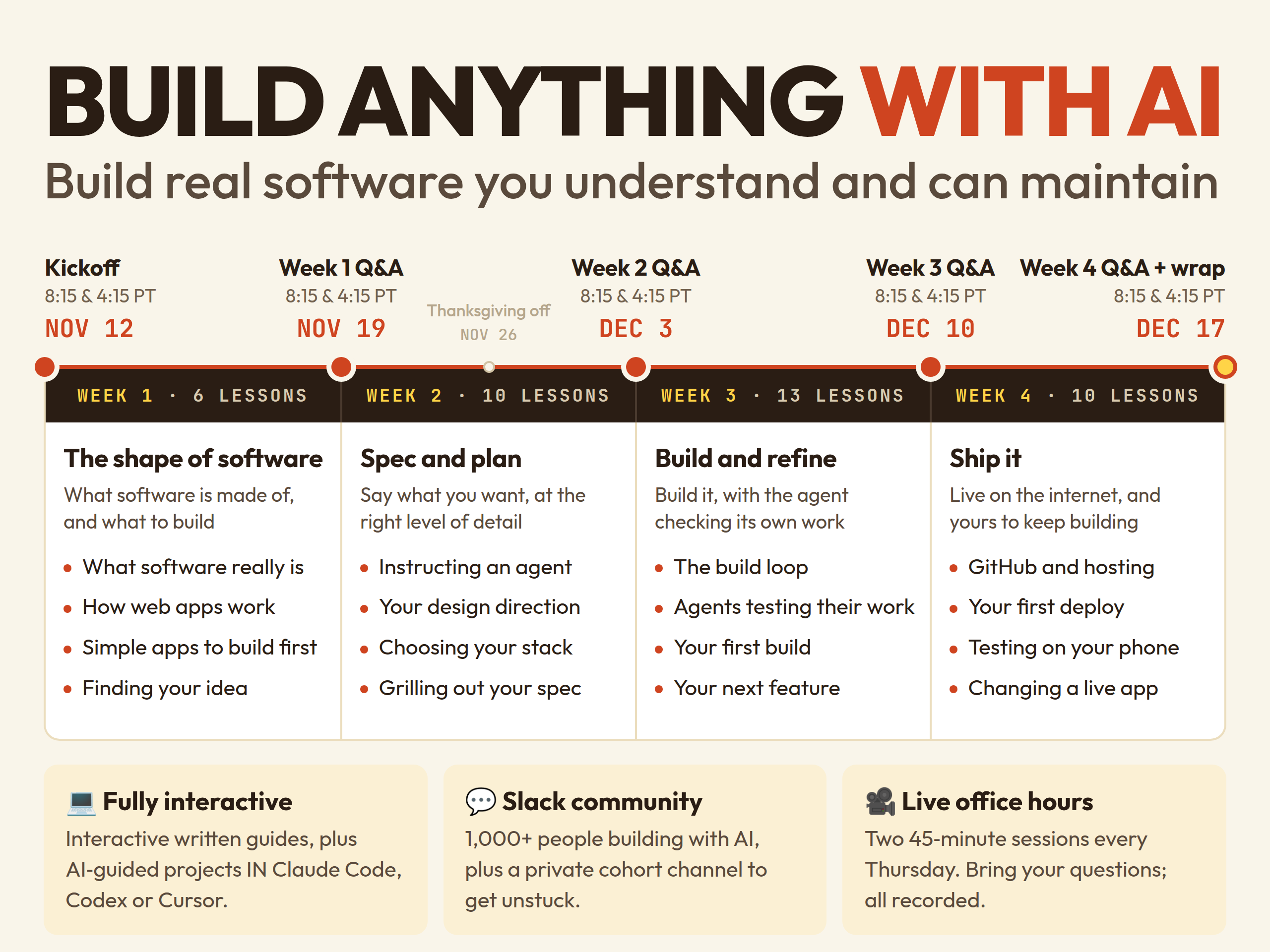
Early applicants get bonus content + a special discount
#Free skills
Three skills to keep, all from the course. They work in Claude Code, Codex, Cursor and anything else that reads skills.
- review-page: the tool from this crash course. Any plan, idea or long answer becomes a visual page you can comment on.
- idea: interviews you, one question at a time, until you find an app idea worth building, then writes it up as idea.md.
- grill: before you build anything, your AI interviews you relentlessly about it until you both agree on what you're making. Adapted from Matt Pocock's grill-me.
To install all three, give your agent this:
Install these three skills for me. Download each one and save it in its own folder in my skills folder (for Claude Code: ~/.claude/skills/<name>/SKILL.md; for other tools, wherever your skills go): https://fullstackpm.com/crash-course/skills/review-page/SKILL.md https://fullstackpm.com/crash-course/skills/idea/SKILL.md https://fullstackpm.com/crash-course/skills/grill/SKILL.mdThat's it for today! If you build a review page, reply and show me. And reply with any questions; I read everything.
Keep building,
Carl 🥞